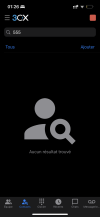
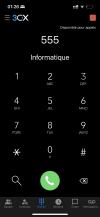
System extensions aren't shown

Status
Not open for further replies.

AdnanR

Bronze Partner
Basic Certified
Joined
Jan 11, 2023
Messages
9
Reaction score
0
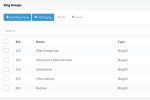
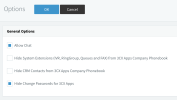
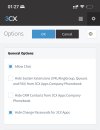
I'm trying to show some of the system extensions (or all if "some" isn't possible), I made sure "Hide system extensions isn't checked" and I can't find where they are shown in the UI (webclient, iOS, macOS apps).

Did I miss something ?
 

Attachments

  • Capture d’écran 2023-02-01 à 02.18.33.png
    Capture d’écran 2023-02-01 à 02.18.33.png
    4 KB · Views: 42
  • Capture d’écran 2023-02-01 à 02.18.37.png
    Capture d’écran 2023-02-01 à 02.18.37.png
    81.2 KB · Views: 42
  • Capture d’écran 2023-02-01 à 02.18.50.png
    Capture d’écran 2023-02-01 à 02.18.50.png
    79.1 KB · Views: 43
On the Dashboard, in the PBX Status box, click System Extensions.
 
Thanks for your reply @SteveITS, but I meant to see them in the contact list. The setting says: "Hide System Extensions (IVR, RingGroup, Queues and FAX) from 3CX Apps Company Phonebook", so I suppose I should see them in the contacts menu in the webclient or desktop app, isn't it ?
 
No, they don't show there. The contacts list is external people/customers, not the "company phone book" which is internal.

You can open the desktop app dialer window and type a partial ring group or IVR name like "ring" and that window will show search results including those extensions.

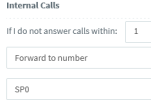
If you really want one shown in the Team page, you can create a dummy extension number, and forward calls to that extension. That works with Shared Parking for example to have somewhere to easily call from a 3CX mobile app:
1675224155924.png
 
I understand. Then can you please explain me what is the "3CX Apps Company Phonebook" ? Because again, sorry to insist, hiding system extensions from apps company phonebook doesn't prevent users to call them or use them to configure call transfers (when away, etc…)

I mean, from what I saw and from what you tell me, I don't see the difference anywhere between showing and hiding system extensions :confused:
 
If hidden, the IVR, etc. are not downloaded to phones.

The phone book is contacts plus extensions.
 
If hidden, the IVR, etc. are not downloaded to phones.

The phone book is contacts plus extensions.

I think we are finally getting somewhere. In my case, hidden or not, system extensions aren’t show even in the phone book in 3CX

The system extensions are currently shown, the phone book doesn’t show a group “555” for IT, but dialing it will show it.
 

Attachments

  • 45DF5E43-B783-4A5E-B1EF-4F3AA0918F22.jpeg
    45DF5E43-B783-4A5E-B1EF-4F3AA0918F22.jpeg
    332.4 KB · Views: 24
  • 69B30D50-5F25-44FE-9D97-4C0F7F13F7F1.png
    69B30D50-5F25-44FE-9D97-4C0F7F13F7F1.png
    185.6 KB · Views: 23
  • 4F2B8BCC-C4BC-4DC9-9EA3-2E4EF95AB7B5.png
    4F2B8BCC-C4BC-4DC9-9EA3-2E4EF95AB7B5.png
    215.7 KB · Views: 22
I'm pretty sure (but can be wrong) the option above only affects IP phones and not the 3CX apps.
 
  • Wow
Reactions: AdnanR
The “phone book” is users in 3CX, and the contacts are external people. I think the closest you’re going to get is to create an extension and forward it’s calls to the desired system extension.
 
@SweetAction This could be the case. I'm receiving few IP phones, I'll see.

@SteveITS I understand the workaround, but since the beginning of this thread, the conclusion seems to be that this setting (Hide System Extensions (IVR, RingGroup, Queues and FAX) from 3CX Apps Company Phonebook) is useless and doesn't change anything anywhere. It's hard to believe that there is a useless setting, I'm trying to understand what it's used for. If @SweetAction is right, then I would get it. Otherwise don't tell me it doesn't bother you
 
Status
Not open for further replies.

Forum statistics

Threads
111,973
Messages
590,078
Members
164,896
Latest member
sameage