T54W YeaLink STUN setup

Status
Not open for further replies.

jrodcpwk

Bronze Partner
Basic Certified
Joined
Dec 2, 2019
Messages
41
Reaction score
4
Just dropped in a brand new T54W Yealink phone and trying to provision via STUN. My dashboard successfully sees and deploys the configuration but my phone only loads the Redirector and when I pop in my info it just says "Updating Config" then says "Update Skipped!"

Ive factory reset it, made sure it had the latest firmware provided by 3CX, and saw that it was able to connect Site 2 Site via LAN but for STUN it never seems to update. Is there something I need to provision on the side where the phone is? Such as forwarding any ports internally? Im looking for more articles on this but all the instructions lead to is me manually or factory resetting the phone. Tried this for a couple hours now and all signs seem to point green but for some reason my phone is failing to update with the provision. The latest update is it stuck on Network Checking as I finished creating this post.

 

Attachments

  • firefox_2019-12-13_17-00-17.png
    firefox_2019-12-13_17-00-17.png
    3.6 KB · Views: 35
Although this issue should be fixed on Yealink models with later firmware, a similar issue occurred for me recently and the fix was to go into the phone interface >> Security >> Enable trusted certificates >> Disable.

Then try a reprovision.

If all else fails confirm under auto provisioning that the correct provisioning link has been downloaded on the phone (under auto-provision) and try with FQDN changed to public IP address of the PBX.
 
Hey eddv123,

Yeah I've attempted that now and no dice. Replaced the FQDN with the external IP instead and its still having trouble loading the config. Just lists No Service as before. Going to try and do some more digging if possible.
 
No server = no registration. What you need to do is look at the account information - has it actually downloaded the configuration from 3CX.

Basically is the issue registration or config download.
 
I think its the config download because every time I issue it to download the config it won't update. I'll try manually entering everything to see if changes.
 
Nothing. The dashboard for activity states that it sent the configuration successfully. Just the Phone itself wont change to indicate its connected. Tried external IP, turned off the "Trust Certificate", the firmware is as stated on the 3CX site and YeaLink software page. If I turn my location into Site-to-Site it works just fine but for some reason STUN is just dont giving the phone any information. Going to test a VVX411 out of curiosity if it is my own network. Forgot that the VVX411 doesnt support STUN lol. Welp that possibility is out of the test.
 
I'm guessing blacklist.
 
Hey everyone, I use the Lets Encrypt through 3CX and I also double checked my black list. The concern I have is that I have a T46G which takes the provisioning but I cant connect a call out. A dial tone is generated but it wont connect a call out. With the T54W still not getting an provisioning. I'll check that digicert link though just to see if I am missing anything. Just to note if I didn't already, when I use LAN because I can create a direct Site-to-Site and tested it all connects fine and works. Im wondering if I have to do anything for the remote site in which the phone is trying to connect out. My firewall in the remote location has open outbound ports. Do I need to port forward anything inside?
 
from a PC on the same lan as the phone, can you hit the provisioning url and download the provisioning file?
 
Interesting, SweetAction. I tried that link both on my LAN and on a Site C. Site C is bringing a page cannot be found and on my LAN it just loads a blank page.
 
Got it resolved. I had to start a fresh extension and when doing a factory reset on the phone everything picked up. Thank you everyone for your input!
 
Got it resolved. I had to start a fresh extension and when doing a factory reset on the phone everything picked up. Thank you everyone for your input!

Interesting. I have resorted to this myself in the past to overcome issues, where it is good to try and find the root cause of something often that takes time so a new extension solves and saves time.
 
Hello,

Ensure that the extension Options don't have "Disallow use of extension outside the LAN (Remote extensions using Direct SIP or STUN will be blocked) "

Ensure that your HTTPS port (5001 usually) is open and forwarded correctly on the PBX side

The factory reset phone should be redirected by Yealink towards your PBX and it will ask you for a username and password to download the config (does this step happen?). If this is successful then the phone managed to reach the PBX on the HTTPS port and is awaiting for credentials to proceed and download its configuration.

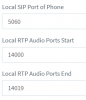
Once this is done, the phone will register but the firewall at the phone site will need to have the ports in the phone provisioning page forwarded to the IP of the phone (because provisioning may work, but registration and calls may fail)
13593


Watch the whole webinar of our remote STUN configuration here, it has everything you need to be aware of: https://www.3cx.com/3cxacademy/videos/intermediate/configuring-remote-extensions/
 
Status
Not open for further replies.

Forum statistics

Threads
111,935
Messages
589,823
Members
164,815
Latest member
natedog