T58W Comes with Firmware 150.86.188.2 when will 3CX update the supported firmware

Status
Not open for further replies.

Myprovider

Silver Partner
Basic Certified
Joined
Jun 6, 2019
Messages
5
Reaction score
0
When installing PnP Yealink T58W phones everything works fine, only 3CX warns that the phones firmware are unsupported.
3CX has version 150.86.0.5.
I cannot downgrade the firmware from 3CX (at least not by selected upgrade firmware)

When does 3CX upgrade the supported firmware or is there a way to downgrade to phones to the supported firmware version from the 3CX management console?

This is causing confusion at the moment.
 
Last edited:
I'm not sure why it's causing confusion as you seem to understand the process and the potential path for resolution. 3CX isn't going approve new firmware just because you ask. 3CX has to go through a testing process, and chances are they are testing this, or a 3CX specific version and will update once testing is complete. If everything is working, then there is no cause for concern or confusion. Otherwise, if you want to not see the phones in red, you can manually downgrade them (if you are able to). Technically the guide for the T5 series states as much. While the wording says 'Upgrade' to the required firmware, in your cause the correct path would have been to downgrade to the required firmware before deploying in 3CX.
 
  • Like
Reactions: JohnS_3CX
I'm not sure why it's causing confusion as you seem to understand the process and the potential path for resolution. 3CX isn't going approve new firmware just because you ask. 3CX has to go through a testing process, and chances are they are testing this, or a 3CX specific version and will update once testing is complete. If everything is working, then there is no cause for concern or confusion. Otherwise, if you want to not see the phones in red, you can manually downgrade them (if you are able to). Technically the guide for the T5 series states as much. While the wording says 'Upgrade' to the required firmware, in your cause the correct path would have been to downgrade to the required firmware before deploying in 3CX.
Thank you for your reply, downgrading the devices manually would mean we would have to unpack and connect all of them before shipping to the offices. The confusion comes from seeing ERROR (e.g. red phones) So not a big issue indeed, but also not the best experience :-). If 3CX is behind on a Vendor (Which seems perfectly logical at some point) it would be nice if the push firmware to phones mechanic would be able (allowed?) to push the specific (3CX tested) firmware, no matter if this mean up or down from the installed version. And/or a planned release date/interval would at least be nice to know.
 
There are many ways to make sure the correct firmware is on devices. Many authorized distributors such as 888VoIP will charge a nominal fee to pre-provision phones, make sure they are on the correct firmware and include anything you want in the box (such as e911 notices, marketing materials, etc). Many vendors (Yealink included) have device management capabilities that will let you control the phones so you can deploy firmware, either by direct push or using RPS to point to a configuration/firmware source of your choice. But yes, otherwise you have to update them yourself, manually or once they are in the field.

Understand that 3CX does not make the phones or the firmware. If Yealink just suddenly pops out a firmware without any notice to 3CX, they can't do anything about it. If there is a compatibility issue preventing downgrade via the management console they can't do anything about it. All they can do is test the firmware THOROUGHLY and then approve it. They might find an issue which they then have to go back to Yealink to have them fix which might result in a new firmware which again has to be tested again. So while it certainly would be nice to know all those things, much of it is not under 3CX control.

Ultimately, if you look at the supported phone list you will see this:

1643218447515.png

1643218463283.png

Yealink is a 'Supported' brand and not a 'Preferred' brand. Not to say that this should happen often with any brand, but 3CX would appear to have better communication with Fanvil to help prevent such issues.

But ultimately, you are probably ok just leaving it as is, ignore the red for now, and then once that or a a new firmware is approved by 3CX upgrading and you should be all set.
 
Login to your 3CX, select "Phones > Options" and enable "Allow alternative firmware (i.e. localized/3rd party firmware other default 3CX supported firmware)".
Wait a day or so to allow the PBX to download the supported firmware, and then you can upgrade (or downgrade) the phone firmware to the supported one.
 
  • Like
Reactions: JohnS_3CX
Thanks @complex1, good to know that will pull older firmware and allow downgrades.

@Myprovider, if everything is working fine you could also just wait until 3CX catches up. We also had one phone at a client that was "too new" and didn't downgrade through 3CX but since everything seems to be fine, we opted to wait and have had no reported issues.
 
Hello @Myprovider

Specifically, firmware containing a 188 like 150.86.188.2 is Lydis firmware.
You need to enable this option for the system to download Lydis firmware because this is a 3rd party localization:
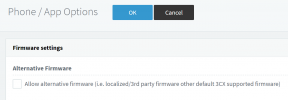
1643269676644.png

Please Note: We do not test Lydis versions like we do with the main branch firmware, it is handled entirely by Lydis. We will just publish it whenever they send it to us but in case you have any issues it's best to contact them directly.

For the moment we do not have a Lydis version for the T58W at all, so the system defaults to checking for the main branch of T58 that being 150.86.0.5 and may show you that the version is not supported.


Thank you for your reply, downgrading the devices manually would mean we would have to unpack and connect all of them before shipping to the offices.
This cannot be avoided regardless - as per our guides, you need to factory reset and install the latest supported firmware BEFORE the first provisioning. Otherwise, you might face failures. This is a phone manufacturer restriction, and we just follow best practices according to their recommendations. We assume that you will install the most recent firmware as per our guide before provisioning the phone. When we release the next update, we expect that your phone was already running on the previous stable (this is the sequence in which we test new releases).

If 3CX is behind on a Vendor (Which seems perfectly logical at some point) it would be nice if the push firmware to phones mechanic would be able (allowed?) to push the specific (3CX tested) firmware, no matter if this mean up or down from the installed version.
This is allowed, but it will not work with main branch software being pushed to a Lydis phone. The phone will simply reject the upgrade. Regardless, even if it was possible, we would recommend to manually install the correct firmware before you provision the phone. It's good practice to factory reset and make sure the phone does not have any leftover settings from a different version (before initial provisioning).

And/or a planned release date/interval would at least be nice to know.
This is not up to us, it is entirely up to the phone manufacturers so if you want planned release dates you would have to contact them directly. What we do is test the firmware whenever they send it to us (after they have already tested it), and if we do not notice any issues that compromise basic functionality in our tests we then release it publicly. It then appears in your management console to download it. After a while, the system will download it automatically in the background and you will be notified when you see the phones in red. It will stay that way until you decide when to deploy it.

I hope this has covered most of your questions!
 
Status
Not open for further replies.

Forum statistics

Threads
111,832
Messages
589,284
Members
164,662
Latest member
DejanMDS

