


- Joined
- Oct 6, 2020
- Messages
- 8
- Reaction score
- 0
Hello,
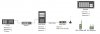
I want to setup SIP-Trunk for a product which is not supported (Teldio RBX). This software based "RBX" solution will be used for communication between pmr devices (like Motorola Mototrbo radios) and phone subscribers. The communication between both systems needs to be established via SIP-TRUNK. Therefore I have setup latest V16.06.655 OnPremise. So RBX app and 3CX OnPremise are installed within same LAN. In same LAN I have 2 windows 3CX softphones which are already up and running. The RBX app has an internal IVR which is reachable via extension 8000.I need to know how to setup SIP-Trunk to this system to be able to use one of my sip softphones to connect to this RBX system (I should here a prompt after connection to ID 8000 is establised). The pmr radio subscribers will use ID's 1201 and 1202. My Softphones ID's are: 1212 and 1212.
This is a test environment. There is no need to connect to an external provider via SIP. We just need to communicate locally.
Solution Overview
Question(s):
- anyone knowing this Teldio RBX system and familar with SIP setup ? On the RBX system I can only define the following parameters: Name (SIP Trunk). IP, Username, Password, Maximum numbers of simultaneous calls, Should Register (Yes/No).
- any ideas regarding correct setup within 3CX to get this done ?
From manfucaturer point of view, 3CX pabx should be work with Teldio RBX app from interop point of view.
Best Regards
Andreas
I want to setup SIP-Trunk for a product which is not supported (Teldio RBX). This software based "RBX" solution will be used for communication between pmr devices (like Motorola Mototrbo radios) and phone subscribers. The communication between both systems needs to be established via SIP-TRUNK. Therefore I have setup latest V16.06.655 OnPremise. So RBX app and 3CX OnPremise are installed within same LAN. In same LAN I have 2 windows 3CX softphones which are already up and running. The RBX app has an internal IVR which is reachable via extension 8000.I need to know how to setup SIP-Trunk to this system to be able to use one of my sip softphones to connect to this RBX system (I should here a prompt after connection to ID 8000 is establised). The pmr radio subscribers will use ID's 1201 and 1202. My Softphones ID's are: 1212 and 1212.
This is a test environment. There is no need to connect to an external provider via SIP. We just need to communicate locally.
Solution Overview
Question(s):
- anyone knowing this Teldio RBX system and familar with SIP setup ? On the RBX system I can only define the following parameters: Name (SIP Trunk). IP, Username, Password, Maximum numbers of simultaneous calls, Should Register (Yes/No).
- any ideas regarding correct setup within 3CX to get this done ?
From manfucaturer point of view, 3CX pabx should be work with Teldio RBX app from interop point of view.
Best Regards
Andreas
Attachments
Last edited:


