- Joined
- Aug 19, 2020
- Messages
- 5
- Reaction score
- 1
Following Situation:
3CX Enterprise 24SC Hosted by 3CX
Customer has a Telekom Sip-Trunk, which is connected to their Internet line (so i cant register it in The cloud)
Telekom Siptrunk is registriert on a Lancom VOIP Router, which is registert as a master Bridge on the 3CX
Calls are getting routed from the Lancom to the PBX and ring the right extension, but on the display it shows the Localhost IP.
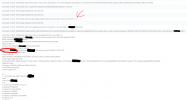
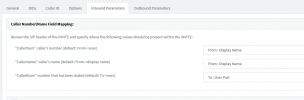
As you see in the screenshot,the caller Number is in the "from field", but its not display behind the Line; it only shows a + (also in the "making route from Line")
Does somebody know how we can fix this?
If you need to information just say it, im willing to share more to get this done^^
With best regards E. John
*the customer cant port their numbers to a different provider, so we want to use a workaround to let them keep their numbers.
3CX Enterprise 24SC Hosted by 3CX
Customer has a Telekom Sip-Trunk, which is connected to their Internet line (so i cant register it in The cloud)
Telekom Siptrunk is registriert on a Lancom VOIP Router, which is registert as a master Bridge on the 3CX
Calls are getting routed from the Lancom to the PBX and ring the right extension, but on the display it shows the Localhost IP.
As you see in the screenshot,the caller Number is in the "from field", but its not display behind the Line; it only shows a + (also in the "making route from Line")
Does somebody know how we can fix this?
If you need to information just say it, im willing to share more to get this done^^
With best regards E. John
*the customer cant port their numbers to a different provider, so we want to use a workaround to let them keep their numbers.