Template generator - Use an output from a previous step

Status
Not open for further replies.

sam.phillips

Platinum Partner
Advanced Certified
Joined
Mar 11, 2019
Messages
185
Reaction score
135
Wondering if someone who is much more clever than I could point me in the right direction here.

Got a api endpoint that needs the contact ID inserted in it like this:
[baseUrl]/api/v1.0/companies/[companyId]/customers/[ContactId]/notes/

The 'Matching Scenario' scenario that does the look up is setting the needed ID in the 'ContactID' variable. But am I right in thinking that variable is only around for that one api call? Do I just need to add it as a parameter so it becomes persistent?

I see the output section has a 'next' option where i can pick another scenario. But you wouldn't want it to try and make the journal entry right after its done the contact lookup.
 
In the lookup scenario, you set your Outputs, including EntityId and EntityType. Those two, along with Name and Number are available during the call reporting scenario. That's how you can know where to log the call.

Docs: https://www.3cx.com/docs/crm-template-xml-description/

Also, I recommend looking at 3CX built-in templates for example of what is possible.
 
The variables that you define while executing a scenario, will be available during chained scenarios. So for example, you can run a contact lookup that returns some data, and maybe you need a second scenario to get additional information, like the company name. Then you can do this, any variable defined in the first scenario will be available in the second.

However, once this execution chain ends, variables are not stored, except by those generated as outputs that @ConceptsWeb has mentioned.
 
Thanks guys. That is super helpful. Could you help me understand the Entity ID thing a bit more please?

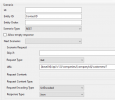
If i have my basic contact lookup scenario like this:
1726724892088.png
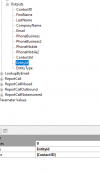
And this is the output varibales:
1726724943732.png

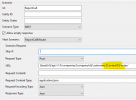
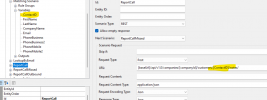
Is that all I need to do to use [ContactID] in my ReportCall scenarios? Here is the report call scenario:
1726725166434.png

But when i look in the logs its just getting parsed to an empty value...
/api/v1.0/companies/8/customers//notes/
 
Also, I recommend looking at 3CX built-in templates for example of what is possible.
Thanks guys. That is super helpful. Could you help me understand the Entity ID thing a bit more please?

If i have my basic contact lookup scenario like this:
View attachment 43923
And this is the output varibales:
View attachment 43924

Is that all I need to do to use [ContactID] in my ReportCall scenarios? Here is the report call scenario:
View attachment 43925

But when i look in the logs its just getting parsed to an empty value...
/api/v1.0/companies/8/customers//notes/
 
I hear what you're saying, and genuinely appreciate the assistance. Just trying to figure it out. This is what confuses me....

I look at the prebuilt Pipedrive template and one similar example I can see is this:
1726736736578.png
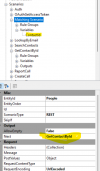
My read of that is the Matching Scenario finds the id and then defines [ContactId]. Then later on GetContactById can use [ContactId].

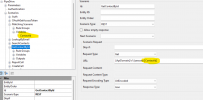
So when I look on this template I'm trying to make:
1726737130046.png
I feel like I have the same thing?? And yet the variable clearly isn't coming through in the ReportCall scenario, so I'm doing something wrong.
 
ohhhhhhhhhhh god dam... I see it now.....
1726737279901.png

So i just simply put the ID lookup call in the 'default' ReportCall scenario, and then create a new scenario that does the actual journal entry api call. Then just set that new scenario as 'next' in the ReportCall.

That makes alot of sense. Thanks so much for the direction, I've been looking at these for days and just going around in circles.
 
  • Like
Reactions: Evolute IT
In your ReportCall scenario, yuou're using the variable ContactID, but that's not passed on from the contact lookup scenario. You need to use the EntityId variable there. The case is important, don't use EntityID for exaple.
 
Status
Not open for further replies.