Temporarily Forwarding all phones to voicemail

michael.kennett

Gold Partner
Basic Certified
Joined
Sep 8, 2025
Messages
1
Reaction score
0
A customer of mine has semi-regular all-staff meetings. During these meetings, nobody is manning the phones (reception or individual users).

In V18, they had the option to use a dial code, which would update the status of all extensions, forwarding all inbound calls to voicemail (either individual VM box or a shared VM box). After the meeting, another dial code was used and could switch the phones back to normal operation.

I've not found a way to allow this same behaviour in V20. Is this something anyone else has come across and do you have any fixes or workarounds to suggest?
 
Hello,

There are call scripts in the Store that can be assigned a dial code and have them trigger whole Department in/out of office hours. Perhaps these can be a starting point if not a complete solution for your client's use case.
 
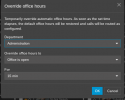
You can use the webclient to set the office to closed / holiday for a period of time

1767602833639.png
 
In V18, they had the option to use a dial code, which would update the status of all extensions, forwarding all inbound calls to voicemail (either individual VM box or a shared VM box). After the meeting, another dial code was used and could switch the phones back to normal operation.
you mean *640 / *641 and *642 if these dial codes were activated

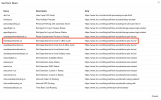
3CX v20: Admin / Integrations / Call Scripts / Add from Store / Set Departments to force ... and Reset Department Routes to Default is a solition for that.
 
  • Like
Reactions: KyriacosS_3CX
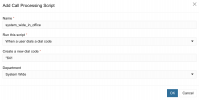
If you absolutely MUST replicate the previous behaviour, you could try the following:

1767617577343.png

...followed by:

1767617589777.png

(YMMV)
 
  • Like
Reactions: N_G and fxbastler
@michael.kennett
One more note regarding these call scripts:
In all call scripts that forces the status for all departments (in, break, out, holiday) this status lasts only until midnight of the respective day. This is also stated as a comment in one line of each script. The status does not remain permanently, but you can easily change the timespan yourself.
 
  • Like
Reactions: KyriacosS_3CX
Well...

@michael.kennett
One more note regarding these call scripts:
In all call scripts that forces the status for all departments (in, break, out, holiday) this status lasts only until midnight of the respective day. This is also stated as a comment in one line of each script. The status does not remain permanently, but you can easily change the timespan yourself.

...I suppose you could simply change the "1" in "FromDays(1)" to some value large enough to suit your intent.
 
  • Like
Reactions: fxbastler

Latest Posts

Forum statistics

Threads
111,953
Messages
589,916
Members
164,851
Latest member
DrunkeMeister