• We do not provide troubleshooting help for unsupported phones. Please try with a supported phone.
  • V20 Update 10 Alpha 2 Learn more

Testing 3CX, cant seem to find these "features" that all Asterisks systems have

Status
Not open for further replies.

GRIFFCOMM Inc

New User
Joined
Dec 16, 2021
Messages
3
Reaction score
1
Hi

We are reviewing 3CX as we sell Asterisk based systems, clients use features we cant seem to find in 3CX, i would be surprised if they are not in the system so thought i would post. We appear to be running the free version, so if any features are in the Pro or Enterprise, please explain how to change the version to see and test them.

  • Cant find "BLF - Monitor Voicemail", this would be *98[ext]" in the BLF field, a 3CX "expert?" on Reddit says your system supports this

  • Cant seem to find any location to create phone provision templates, companies have more than a single location and departments, so BLF buttons, phone backgrounds and other phone dedicated features have provision specifications to that office / department, with systems like Grandstreasm many templates can be created for each phone model allowing easy deployment of 10 phones in a single department with all the BLF and other specific details required, as the phone is provisioned the modal is chosen then the template for that modal that's specific to that office location / department, which carries details of items like the BLF assignments, background image and firmware update settings. The 24/7 call center would not want firmware at 0600 when they are still open, where as sales are fine with this, also the BLF assignments between departs would be radically different, Support do not want to see the Call Parking slots for Sales, all of these would be setup in the phone provisioning template. Generally each department has the same make and model of phone, so the templates generally are model specific.

  • Cant seem to find any location to store the phone display backgrounds to upload to 3CX (related to the above provisioning question)

  • BLF - Monitor Call park, to allow monitoring of parking calls slots, unless this is "Shared Parking"?, in Asterisk all parking slots are set as "extension" so really the system treats them as extensions allowing for easy transfer in, out and monitoring.

  • We currently have many Grandstream phones in use (GXP21xx), but are willing to look at Fanvil, depending on the above testing.

  • Surprised we cant seem to find an image of the phone when setting up the provisioning, Cisco and Netsapien both have this, Grandstreasm have started to look at this.
Many Thanks
 
Last edited:
If you are running the free version of 3CX then you'll need to purchase a licence upgrade to Pro or Enterprise. As for the rest:
  • "BLF - Monitor Voicemail" - I'm not sure what this option does for you but the 3CX app, web interface and provisioned phones all have indicators to show that there are new voicemails (unless you disable it). If you want to use the *98[ext] code then you could try using a custom speed dial.
  • You can create custom templates in the 3CX Management Console by going to Settings -> Templates. 3CX do not provide technical support for custom templates so, if you run in to an issue, you will either need to replicate it on a phone that doesn't use the custom template or get support from the forums.
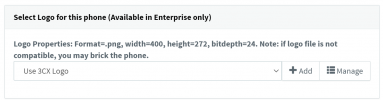
  • Phone backgrounds (called Logo in 3CX) is set on the phone provisioning page for the extension but requires 3CX Enterprise edition and phones that can handle a background image. (can also be included in certain templates if you know how).
  • "BLF - Monitor Call Park" - This should be equivalent to 3CX Shared Parking where you choose which shared parking extension a BLF will show (System defaults to 10 shared parking slots but you can change this in Settings -> Call Parking).
  • You can use quite a range of phones with 3CX but make sure to check the supported phone list too see which ones are officially supported by 3CX.
  • I have never seen 3CX provide an image of the phone when setting up provisioning in the management console so I don't think you'll find this (If I'm wrong, please tell me).
I hope this helps.
 
  • Like
Reactions: Evolute IT
Hello and welcome to 3CX!

I will try to answer your questions as best as I can, but note that the two systems are not directly comparable.

Cant find "BLF - Monitor Voicemail", this would be *98[ext]" in the BLF field, a 3CX "expert?" on Reddit says your system supports this
I don't know what this refers to, but I can tell you that voicemail is monitored via the indicator that the phones have built in (uses SIP SUBSCRIBE). Each manufacturer displays it differently: some are a VM icon, some are a flashing light, some are an on-screen notification.

Cant seem to find any location to create phone provision templates
3CX uses a different approach: we are extension-centric so the template does not include the BLFs. You add the BLFs on your extensions, and then when you add a phone to that extension, it will inherit them. This is because we are not entirely focused on deskphones: we provide mobile, desktop and web 3CX clients so that your experience as an extension persists regardless of what endpoint you use.

We also have the extension copy feature: you can create a blank extension for "Accounting" and then use it as a "template" to generate the extensions of the accounting personnel. They will all end up with the same BLFs/Forwardings/Rights but each one can be customized if needed.

Cant seem to find any location to store the phone display backgrounds to upload to 3CX
This is a Enterprise feature, configurable per extension, and then per device:
1639989551737.png

BLF - Monitor Call park
We have "SP" or Shared Parking which makes the BLF on the device flash red when someone is parked in. You either press it to retrieve the call, or you press it to park your active call.

We currently have many Grandstream phones in use (GXP21xx), but are willing to look at Fanvil, depending on the above testing.
We support everything you see here when using our provided firmware versions. You can make unsupported models also work, but that's entirely on you - we don't provide any assistance. Basically, if you have the knowledge you can make almost any SIP endpoint work, but for most people we recommend using stuff that has already been vetted by 3CX to be compatible (most folks won't have the time or expertise to experiment and we understand that).


Surprised we cant seem to find an image of the phone when setting up the provisioning, Cisco and Netsapien both have this, Grandstreasm have started to look at this.
When you throw a new phone on your network, 3CX detects it via multicast. You "blindly" select it from the list of new phones, and 3CX automatically knows what model it is so it can send it the correct provisioning file then moment you choose to assign it to any extension. I know it sounds cool to have a picture of the device, but this is not necessary and not planned to be added.

We have the 3CX Academy which is available to anyone for free, and teaches you how to use 3CX without assuming you have a background in SIP. I would highly recommend it!

If you look to the right column of this forum, you will also see free webinars we have scheduled where our 3CX Trainer will be happy to teach you as well as answer any relevant questions. This is also offered free.

Take your time to look at the material and guides, many questions will be answered there, and for the rest we will be happy to answer them here on our dedicated forum.

I know it's tempting to compare 3CX to what you already know from Asterisk, but I would recommend to look at it from a fresh perspective, let it show you what it can do and if it works for you, it won't take you too long to find out.

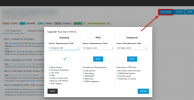
By the way, if you want to test the Enterprise version, you can. Log into your customer portal (via our website) and change your product:
1639991634659.png

During the first year of 3CX you can choose a free upgrade to any of the options in the portal.
We also host the machine for you on our cloud for free during that period, if you don't want to host it yourself.
 
  • Like
Reactions: Evolute IT
3CX uses a different approach: we are extension-centric so the template does not include the BLFs. You add the BLFs on your extensions, and then when you add a phone to that extension, it will inherit them. This is because we are not entirely focused on deskphones: we provide mobile, desktop and web 3CX clients so that your experience as an extension persists regardless of what endpoint you use.

We also have the extension copy feature: you can create a blank extension for "Accounting" and then use it as a "template" to generate the extensions of the accounting personnel. They will all end up with the same BLFs/Forwardings/Rights but each one can be customized if needed.
Hi

This alone would stop us selling 3CX, to confirm your action method above:
- If a single BLF was changed on the "default" account, this would not inherit to any "copied" extensions as they would have been "copied" before that change? requiring the required change to then be replicated on ALL extensions that were created from that original "master" account?

There's no way we could sell / maintained this for clients, it means tracking every single extension when a single BLF for a 50+ phone call center was changed, then having to change that single BLF on 50 extensions, this makes no sense, i would ask "are you sure this is correct" as it sounds Ludacris why you would not have templates, but you appear to be a 3CX "insider" so why are you not using templates?

I assume i have confirmed your explanation, with that in mind we are moving on to testing more PBX systems. Thanks for the answers above.
 
Last edited:
  • Like
Reactions: Evolute IT
3CX does not have a default account (The closest approximation is the receptionist extension) but, yes, you are right in saying that changes made to a particular extension's BLF settings aren't inherited by other extensions.

The easist way to achieve BLF inheritance is to use custom templates (found in Settings -> Templates) and define the BLFs in there. This can be a lot of work (I know from experience) and means that, if you have problems with your system, you will need to replicate the issue with a standard template before 3CX will provide official support (They often provide unofficial support in these forums, though).
 
3CX does not have a default account (The closest approximation is the receptionist extension) but, yes, you are right in saying that changes made to a particular extension's BLF settings aren't inherited by other extensions.

The easist way to achieve BLF inheritance is to use custom templates (found in Settings -> Templates) and define the BLFs in there. This can be a lot of work (I know from experience) and means that, if you have problems with your system, you will need to replicate the issue with a standard template before 3CX will provide official support (They often provide unofficial support in these forums, though).
Hi

I did see this area, however i couldn't find how to select which template to use, so really isnt a "template" as such. We have many deployments using many templates:
  • Sales
  • Customer service
  • Canada
  • Barbados
Yes, i have companies with offices in different countries, there is no way a single template can be used, it has to have different time zones, buttons, screen background and on these phones weather settings so it pulls the correct weather for its locations, so we have about 6 templates, when a phone is deployed the template is selected that will push the correct BLF and other settings for the phones. I am [very] confused as to how any PBX could work without a selectable template system, with any number of phones but especially when there are 2 or more phones in company areas or offices locations
 
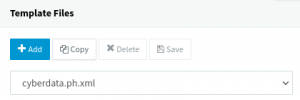
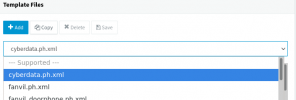
I don't think that 3CX templates are going to be very useful for what you want to do but, if you want to try them, you change the template by clicking on the down arrow and choosing the template to work on.
3CX-Template1.png
3CX-Template2.png

I suggest making a copy of the template and then making changes to the copy. Also, take a look at this page for instructions on creating custom templates.
 
  • Like
Reactions: Evolute IT
You can multi-select extensions, and edit their BLFs simultaneously. So this should not really stop you. If anything it makes things easier I would imagine..

As mentioned earlier, you have to resist the temptation to compare this product with the one you are familiar with - precisely because they do not follow the same philosophy.

At this point I would really recommend you go through all the 3CX Academy modules, it will answer many of your questions and give you the foundations you need to understand if the product is right for you. We do things differently and some things you might find more convenient and others less convenient, but ultimately I think that you need to use the product and put it to the test to really get to grips with it (as with any software really).
 
For what it's worth, for the last 17 years or so, we've been an Asterisk shop. I've even presented at Astricon in the US a couple of times. I came to 3CX with an Asterisk perspective* - and I shared your annoyance that features X, Y and Z simply weren't available**.

It may sound a bit "Well, duh", but I'll hold my hands up and admit that, once I took a step back, I realised that 3CX is a different product serving a different market and requiring different methods of working. If you've been selling Asterisk for any length of time, then I will say with 100% confidence, that you have customers for whom 3CX most certainly isn't the best solution. I would also say that you have customers for whom 3CX is very likely to be a much better solution.

Start looking at 3CX as another tool in your box rather than a replacement for your other tools.

But, more importantly, play with it, do the certifications, read the forum, ask questions.

Nicholas.


* Our Asterisk product is custom built for the end-user with whatever integrations/features they need. If they want something, Asterisk can provide it. This suits a lot of our customer base, but we have a significant number of customers that just want a system that does take/make/transfer - before they started home working, this also wasn't a problem, but the lack of a reliable SIP/IAX2 Android/iOS softphone meant we were spending more and more time supporting customers. Whatever you think of anything else, in our experience, the 3CX phone app is about the best softphone (in terms of features, reliability and cost) and 3CX therefore becomes a natural sell for the customers wanting a more simple solution.

** I'm currently really missing the ability to choose which message to play before voicemail is taken, for example - I want to have the choice of "Sorry, we're closed, please leave a message", "Due to high call volumes we're unable to take your call, please leave a message" and "Sorry for the wait, but it would probably be easier if you left a message, please speak after the tone" style messages. I've done it, but had to create CFD apps which seems a little silly to me as I know this is a pretty common feature in many different PBXs, but it is what it is.
 
Last edited:
  • Like
Reactions: cobaltit
Status
Not open for further replies.

Forum statistics

Threads
112,149
Messages
590,965
Members
165,171
Latest member
Mahlon