Solved The backup version 18.0.9.23 is newer than the PBX version 18.0.9.20

Status
Not open for further replies.

frankietseu

Free User
Joined
Dec 16, 2023
Messages
8
Reaction score
3
Product details tab: 18.0 (Build 23)

I wanted to migrate my PBX from a self-hosted to Amazon Lightsail. However, I faced an issue while restoring the backup. The error message said 'The backup version 18.0.9.23 is newer than the PBX version 18.0.9.20'.
The installer available for download from the 3CX Customer Portal is 18.0.9.20.

Do we need to wait for 3CX to release an updated installer on their portal? Or can someone from their support team assist in resolving this?
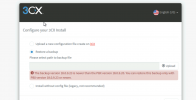
Screenshot 2024-01-24 at 01.21.08.png

Please assist.

- FT
 
Hello,

are you open to installing v20?
 
If your backup is newer than the installed version, you must first install the system as a fresh install without restoring the backup and then update it to the latest version. You can then upload the backup to a location reached by the system and restore the backup post-install.
 
Last edited:
  • Like
Reactions: bitn2
Hello,

are you open to installing v20?
We are interested in exploring new systems and the latest versions available. However, we learned that the V20 version does not support the Electron App, which may not be the best option for our team. We surveyed our team members. We found out that most of them prefer using a single application (Electron) for both call and chat instead of using the chat feature on the web browser and the call feature on the Windows Native App.

However, if our understanding regarding the support for electrons is wrong, and the V20 version does support it, we will definitely upgrade from V18 to V20.
 
We are interested in exploring new systems and the latest versions available. However, we learned that the V20 version does not support the Electron App, which may not be the best option for our team. We surveyed our team members. We found out that most of them prefer using a single application (Electron) for both call and chat instead of using the chat feature on the web browser and the call feature on the Windows Native App.

However, if our understanding regarding the support for electrons is wrong, and the V20 version does support it, we will definitely upgrade from V18 to V20.
If you have the electron app already installed, it works with the current v20 out there. But it's officially not supported and may (will likely) break in the near future.

Also v20 is officially not a stable release version - it's a release candidate that shouldn't be used in production.
 
  • Like
Reactions: frankietseu
If your backup is newer than the installed version, you must first install the system as a fresh install without restoring the backup and then update it to the latest version. You can then upload the backup to a location reached by the system and restore the backup post-install.
Hi Charles,

Thank you for the information. I will try and see if it works.

- FT
 
Could really do with an updated ISO, wanting to migrate from 18.0.9.23 (Windows) to a Linux VM. Is there no way to update the package via SSH for a fresh install?
 
Any further thoughts about getting an updated ISO?
 
Any further thoughts about getting an updated ISO?
No further updates yet from 3CX. Has been constantly checking the forum for updates.
 
If your backup is newer than the installed version, you must first install the system as a fresh install without restoring the backup and then update it to the latest version. You can then upload the backup to a location reached by the system and restore the backup post-install.
This is the answer... takes maybe 5-10 Minutes longer than having an ISO with the newest update.
 
This is the answer... takes maybe 5-10 Minutes longer than having an ISO with the newest update.
So just set it up with our existing licence, install updates from the console and then restore the backup?
 
  • Like
Reactions: bitn2
So just set it up with our existing licence, install updates from the console and then restore the backup?
correct
 
Hi All

I have the same problem, moved from Windows where the system was at 18.0.9.23 as I have also loaded the hotfix for SQL.
Now on Debian I loaded a system but it is stuck in 18.0.9.20. I have loaded a clean system just using the customer license. But the hotfix does not become available in the updates page.
Any help on getting that done?

Regards
Johan
 
@JohanFer Are you able to activate?
Did you installed with the ISO?
 
Can you restart the services one more time and check again?
 
Can you restart the services one more time and check again?
Hi Theodoros
I have restarted. No update for the hotfix available. I have started this system last night already and hoped that the update will be available this morning but it is not.
 
I would suggest that you create a support ticket so we can check this further.
 
  • Like
Reactions: JohanFer
Hai,

I think during the initial setup you can select last option, "Install without config file(Legacy, Not Recommended)"

then after that update the 3cx from 18.0.9.20 to 18.0.9.23 after that in backup, upload the back up and restore it? will it work?

bcz the ISO file come with 18.0.9.20. luckily we take backup yesterday before upgrade 18.0.9.20 to 18.0.9.23.

So we use yesterday backup to restore it.

Thank You
Regards
Elil
 
Hai,

we installed the ISO "debian-amd64-netinst-3cx.iso" which is 18.0.9.20. but our backup was taken from 18.0.9.23.
So initial setup i chose "Install without config file(Legacy, Not Recommended)" then use the same license key. and setup.
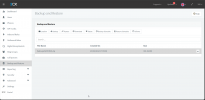
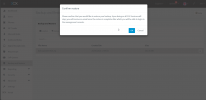
then I uploaded the backup file (using same way as backup ftp) then restored . its 300MB file took around 50min.

Now all working fine.
 

Attachments

  • Restore1.png
    Restore1.png
    65.7 KB · Views: 15
  • Restore2.png
    Restore2.png
    78.6 KB · Views: 13
Status
Not open for further replies.

Forum statistics

Threads
111,974
Messages
590,081
Members
164,899
Latest member
mazet