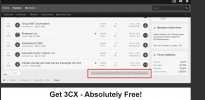
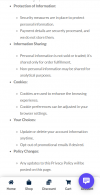
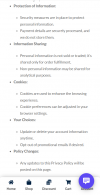
The Live Chat icon overlays the bottom sidebar of the site.

Status
Not open for further replies.

AnkaS

New User
Joined
Jun 4, 2023
Messages
4
Reaction score
0
Hello!
I was unable to change the location of the Live Chat icon.
The icon overrides the menu button on the site.

Editing the code does not lead to the desired result.


Please help move the chat slider a little higher.

Changing the code (right: 20px; bottom: 20px;") does not solve the problem. The chat icon does not respond to this code change(
What needs to be changed in the code and how to move the chat icon a little higher?

photo_2023-06-02_01-24-37.jpg

<!--<call-us
phonesystem-url="https://1342.3cx.cloud"
style="position:fixed;font-size:16px;line-height:17px;z-index: 99999;--call-us-main-accent-color:#1c61e7;--call-us-main-background-color:#FFFFFF;--call-us-plate-background-color:#373737;--call-us-plate-font-color:#E6E6E6;--call-us-main-font-color:#292929;--call-us-agent-bubble-color:#29292910;right: 20px; bottom: 20px;"
id="wp-live-chat-by-3CX"
minimized="true"
animation-style="noanimation"
party="*****"
minimized-style="bubbleright"
allow-call="true"
allow-video="false"
allow-soundnotifications="true"
enable-mute="true"
enable-onmobile="true"
offline-enabled="true"
enable="true"
ignore-queueownership="false"
authentication="both"
operator-name="****"
show-operator-actual-name="true"
aknowledge-received="true"
gdpr-enabled="false"
message-userinfo-format="both"
message-dateformat="both"
lang="ru"
button-icon-type="default"
greeting-visibility="none"
greeting-offline-visibility="none"
chat-delay="2000"
enable-direct-call="true"
enable-ga="false"
></call-us>-->
<script defer src="https://downloads-global.3cx.com/downloads/livechatandtalk/v1/callus.js" id="tcx-callus-js" charset="utf-8"></script>
 
remove the extra characters at the beginning and end of the code <!-- -->
 
  • Like
Reactions: johnkirk
Thank you very much! I received two email replies from 3CX experts.
But your answer turned out to be the most correct and understandable.
You are clearly the best! Thank you!

I have another question about test periods and purchase. What is the trial period of the live chat that I currently have?
In the settings, I chose free customization options.
 
Thank you very much! I received two email replies from 3CX experts.
But your answer turned out to be the most correct and understandable.
You are clearly the best! Thank you!

I have another question about test periods and purchase. What is the trial period of the live chat that I currently have?
In the settings, I chose free customization options.
Live chat is always provided for free, as long as you have a subscription to 3CX
 
Thank you very much for the information.
I want to clarify with you - will tools be added to the live chat for self-editing the size of the live chat window?
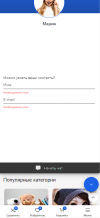
Since when changing the position of the chat icon, the adaptation of the open live chat window is very poor and goes beyond the screen on mobile devices.
Too much empty space in the open live chat window.
Tools for similar editing of dimensions for those who do not understand the code would be useful.2023-06-14_03-34-00.png
 
Thank you very much for the information.
I want to clarify with you - will tools be added to the live chat for self-editing the size of the live chat window?
Since when changing the position of the chat icon, the adaptation of the open live chat window is very poor and goes beyond the screen on mobile devices.
Too much empty space in the open live chat window.
Tools for similar editing of dimensions for those who do not understand the code would be useful.View attachment 35943

I agree. A lot more customization would be amazing.
Go here and vote for the things you like - https://www.3cx.com/community/forums/live-chat-sms-facebook/
Plenty to improve, but I'm sure 3CX is working hard at it.
 

Attachments

  • 2023-06-20_03-29-51.png
    2023-06-20_03-29-51.png
    366.3 KB · Views: 18
Hello!
I was unable to change the location of the Live Chat icon.
The icon overrides the menu button on the site.

Editing the code does not lead to the desired result.


Please help move the chat slider a little higher.

Changing the code (right: 20px; bottom: 20px;") does not solve the problem. The chat icon does not respond to this code change(
What needs to be changed in the code and how to move the chat icon a little higher?

View attachment 35765

<!--<call-us
phonesystem-url="https://1342.3cx.cloud"
style="position:fixed;font-size:16px;line-height:17px;z-index: 99999;--call-us-main-accent-color:#1c61e7;--call-us-main-background-color:#FFFFFF;--call-us-plate-background-color:#373737;--call-us-plate-font-color:#E6E6E6;--call-us-main-font-color:#292929;--call-us-agent-bubble-color:#29292910;right: 20px; bottom: 20px;"
id="wp-live-chat-by-3CX"
minimized="true"
animation-style="noanimation"
party="*****"
minimized-style="bubbleright"
allow-call="true"
allow-video="false"
allow-soundnotifications="true"
enable-mute="true"
enable-onmobile="true"
offline-enabled="true"
enable="true"
ignore-queueownership="false"
authentication="both"
operator-name="****"
show-operator-actual-name="true"
aknowledge-received="true"
gdpr-enabled="false"
message-userinfo-format="both"
message-dateformat="both"
lang="ru"
button-icon-type="default"
greeting-visibility="none"
greeting-offline-visibility="none"
chat-delay="2000"
enable-direct-call="true"
enable-ga="false"
></call-us>-->
<script defer src="https://downloads-global.3cx.com/downloads/livechatandtalk/v1/callus.js" id="tcx-callus-js" charset="utf-8"></script>
Hey :)

Could someone explain where to put this code, please? I need to also move the icon on my site as it is unusable due to the return to the top of page button in WordPress.

Any help is appreciated!


Icon Location.png
 
Same problem
 

Attachments

  • Screenshot 2024-01-28 020256.png
    Screenshot 2024-01-28 020256.png
    59.4 KB · Views: 8
Thank you very much! I received two email replies from 3CX experts.
But your answer turned out to be the most correct and understandable.
You are clearly the best! Thank you!

I have another question about test periods and purchase. What is the trial period of the live chat that I currently have?
In the settings, I chose free customization options.
Hello, could you please teach me how to raise the live chat icon a bit? I'm experiencing a similar issue on my WordPress website. Thank you
 

Attachments

  • Screenshot 2024-01-28 020256.png
    Screenshot 2024-01-28 020256.png
    59.4 KB · Views: 8
To adjust the 3CX button position on your website and prevent it from overlapping with your menu, you should modify the `bottom` CSS property in the widget's style tag. This property controls the distance of the widget from the bottom of the page.

In your provided code, the widget is currently set to `bottom: 20px;`, meaning it's 20 pixels from the bottom. To move it up, increase this value. For example, changing `bottom: 20px;` to `bottom: 50px;` will raise the widget 50 pixels above the bottom, reducing or eliminating the overlap with your menu.

Here’s how to adjust it:


Code:
<!--<call-us
...
style="...; bottom: 50px;"
...
></call-us>-->


Make sure to test the new positioning on different devices and screen sizes for a consistent user experience.
 
This does not work, as the style is over written in the callus.js file

The another approach is to add your custom CSS after the link to the callus.js file, within a <style> tag in your HTML. This would look something like:


HTML:
<script defer src="https://downloads-global.3cx.com/downloads/livechatandtalk/v1/callus.js" id="tcx-callus-js" charset="utf-8"></script>
<style>
    #wp-live-chat-by-3CX {
        bottom: 50px !important;
    }
</style>

By placing this after the script tag, it ensures your custom CSS loads last and has a higher specificity.

I haven't tested it yet, but as a last resort, I would use JavaScript. However, I am convinced that this will work. Have you tested it?
 
To adjust the 3CX button position on your website and prevent it from overlapping with your menu, you should modify the `bottom` CSS property in the widget's style tag. This property controls the distance of the widget from the bottom of the page.

In your provided code, the widget is currently set to `bottom: 20px;`, meaning it's 20 pixels from the bottom. To move it up, increase this value. For example, changing `bottom: 20px;` to `bottom: 50px;` will raise the widget 50 pixels above the bottom, reducing or eliminating the overlap with your menu.

Here’s how to adjust it:


Code:
<!--<call-us
...
style="...; bottom: 50px;"
...
></call-us>-->


Make sure to test the new positioning on different devices and screen sizes for a consistent user experience.
Hi, Thank you for the comment! Where can I find the widget's style tag? I'm sorry, I'm not very familiar with WordPress.
 
remove the extra characters at the beginning and end of the code <!-- -->
For those of us who don't know html: could you specify what exactly needs to be output in that code? or better yet, what should be left?
 
As I stated before, 3cx has embedded in the callus.js the style = value:"position: fixed; right: 20px; bottom: 20px; This overrides any css on the page, thus you can't move the callus-container, maybe inn Wordpress bey not on a normal website
 
  • Like
Reactions: johnkirk
As I stated before, 3cx has embedded in the callus.js the style = value:"position: fixed; right: 20px; bottom: 20px; This overrides any css on the page, thus you can't move the callus-container, maybe inn Wordpress bey not on a normal website
So it can only be fixed with a 3cx update
 
Only if 3CX removes the code from the callus.js
 
  • Like
Reactions: johnkirk
Status
Not open for further replies.

Forum statistics

Threads
112,147
Messages
590,961
Members
165,167
Latest member
Finatra.us