Threat alerts from SentinelOne for desktop update initiated from desktop client

Status
Not open for further replies.

Brendan D

Silver Partner
Advanced Certified
Joined
Mar 22, 2023
Messages
15
Reaction score
12
Is anyone else seeing this issue with other A/V vendors?

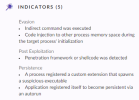
Post Exploitation
  • Penetration framework or shellcode was detected
Evasion
  • Indirect command was executed
  • Code injection to other process memory space during the target process' initialization
\Device\HarddiskVolume4\Users\**USERNAME**\AppData\Local\Programs\3CXDesktopApp\3CXDesktopApp.exe
SHA1 e272715737b51c01dc2bed0f0aee2bf6feef25f1

I'm also getting the same trigger when attempting to redownload the app from the web client ( 3CXDesktopApp-18.12.416.msi ).
 
The 3CX server is running 18.0 Update 7 (Build 312)
 
Same problem here. On some Workstations it still runs - on mine it was wiped away...
Still awaiting answer from SentinelOne - but definitely looks as false positive.
And btw: Yes, same Edition: 18.0 Update 7 (Build 312)
 
Last edited:
I was given the advice to put an exclusion to the paths, 3CX installer uses...
The problem is - I have to first investigate it on another PC to know which paths to put there...

Tried different exclusions - all without success... would be nice if either SentinelOne or 3CX could/would help!
 
Last edited:
After a few hours and a restart, it seems to work again. I'm not sure if it was my exclusions or if it was a change on SentinelOne side. Have you changed anything in the exclusions? - If not, does it work now on your side too?
If not - I'll provide you with my exclusion entries :-)
 
Skuers,

I added an exception for the MD5 hash, for both the update file pushed by the app, as well as the installer pushed from the web client. Once I did that everything worked as expected for updates and fresh installs.

Thanks,
Brendan
 
Hi Brendan,
OK, I added the exception for the signer id "3CX LTD" and the paths to
  • c:\ProgramData\3CXPhone for Windows
  • *\AppData\Local\Programs\3CXDesktopApp\3CXDesktopApp.exe
That worked too.
Thank you too :-) Stefan
 
I ran into this issue this morning. 3CX Desktop app was recently updated and SentinelOne caught it.
 
Skuers,

I added an exception for the MD5 hash, for both the update file pushed by the app, as well as the installer pushed from the web client. Once I did that everything worked as expected for updates and fresh installs.

Thanks,
Brendan
I added the MD5 Hash and Signer Identity exclusions.
*\AppData\Local\Programs\3CXDesktopApp\3CXDesktopApp.exe
I added those filepath exclusions as well as

  • *\AppData\Roaming\3CXDesktopApp\
  • *\Downloads\3CXDesktopApp-18.12.416.msi
We're still getting the installation attempts detected as malicious and being mitigated.
 
  • Like
Reactions: Evolute IT
Confirming that we are seeing this as well. The SentinelOne dashboard is reporting the following behaviours:

1679902718591.png
Adding the SHA1 hash d99a21bca8354e95999de9d51c6252bdaba82522 to the exclusion list is a workaround as others have noted.
 
  • Like
Reactions: Evolute IT
Still no official word from 3CX regarding whether this is a false positive?
 
Same detection here with Cortex xdr Paloalto
 
Confirming we are also seeing this issue on 3CX 18.0 Update 7 (Build 312) as a result of 3CX being set to auto update.

Sentinel Detections:
Original 3CXDesktopApp.exe (On update execution).
3CXDesktopApp-18.12.416.msi Installer
Updated 3CXDesktopApp.exe.

All of these need HASH based exclusions from the Incident.
I have found that if there was an incident you need to unquarantine, run the 3CXDesktopApp-18.12.416.msi Installer on the affected device either manually or via your RMM. If you run it manually you may get a warning that the install has a problem with the desktop icon but that can be ignored.


Anyone else heard back from Sentinel Support or 3CX Support?
 
I added the MD5 Hash and Signer Identity exclusions.

I added those filepath exclusions as well as

  • *\AppData\Roaming\3CXDesktopApp\
  • *\Downloads\3CXDesktopApp-18.12.416.msi
We're still getting the installation attempts detected as malicious and being mitigated.
I think, as VaughnMusil wrote, you need to unquarantine the installation file to have it work again.
 
Throwing a reply in here as well so I get alerted and don't forget.

We have implemented the same "fixes" as described here, but a response from 3CX and/or SentinelOne would be really helpful as I do not like defaulting to trust in the current security landscape of supply chain attacks.

- Mike
 
If you use SentinelOne and have this issue, it's best to contact them directly to provide you with feedback on why they remove the app.
 
  • Sad
Reactions: wits2020
If you use SentinelOne and have this issue, it's best to contact them directly to provide you with feedback on why they remove the app.
Hmmm... the more people using both 3CX and SentinelOne get the same problem. Wouldn't it be nice if you from 3CX would contact SentinelOne and figure out if this is false positive or not? - From provider to provider - so at the end, you and the community would know if it is still save and sound?
 
Hi skuers,

While that would sound ideal, there's hundreds if not thousands of AV solutions out there and we can't always reach out to them whenever an event occurs. We use the Electron framework for our app, perhaps they are blocking some if its functionality?

As you probably understand, we have no control over their software and the decisions it makes so it's not exactly our place to comment on it. I think in this case at least, it makes more sense if the SentinelOne customers contact their security software provider and see why this happens. Feel free to post your findings here if you get a reply.
 
  • Sad
Reactions: LTDP and wits2020
Hi skuers,

While that would sound ideal, there's hundreds if not thousands of AV solutions out there and we can't always reach out to them whenever an event occurs. We use the Electron framework for our app, perhaps they are blocking some if its functionality?

As you probably understand, we have no control over their software and the decisions it makes so it's not exactly our place to comment on it. I think in this case at least, it makes more sense if the SentinelOne customers contact their security software provider and see why this happens. Feel free to post your findings here if you get a reply.
Hi John,
OK, I'll try to investigate - but will not find the time this week, as it is full already.
If someone else wants to investigate it further with SentinelOne, please feel free and inform here.
 
Hi skuers,

While that would sound ideal, there's hundreds if not thousands of AV solutions out there and we can't always reach out to them whenever an event occurs. We use the Electron framework for our app, perhaps they are blocking some if its functionality?

As you probably understand, we have no control over their software and the decisions it makes so it's not exactly our place to comment on it. I think in this case at least, it makes more sense if the SentinelOne customers contact their security software provider and see why this happens. Feel free to post your findings here if you get a reply.
Just checked again:

The detailed errors found are as following:

Post Exploitation
  • Penetration framework or shellcode was detected
  • MITRE : Execution
  • MITRE : Defense Evasion [T1027][T1480.001]
Exploitation
  • Detected suspicious shellcode API call
  • MITRE : Execution [T1106][T1059]
Evasion
  • Indirect command was executed
  • MITRE : Defense Evasion [T1218][T1202]
  • Code injection to other process memory space during the target process' initialization
  • MITRE : Defense Evasion [T1055.012]
  • MITRE : Privilege Escalation [T1055.012]
---
and the MSI causes these reactions:

Evasion
  • Indirect command was executed
  • MITRE : Defense Evasion [T1218][T1202]
  • Code injection to other process memory space during the target process' initialization
  • MITRE : Defense Evasion [T1055.012]
  • MITRE : Privilege Escalation [T1055.012]
Post Exploitation
  • Penetration framework or shellcode was detected
  • MITRE : Execution
  • MITRE : Defense Evasion [T1027][T1480.001]
Persistence
  • A process registered a custom extension that spawns a suspicious executable
  • MITRE : Persistence [T1546.001][T1547.001]
  • MITRE : Privilege Escalation [T1547.001][T1546.001]
  • Application registered itself to become persistent via an autorun
  • MITRE : Persistence [T1547.001]
  • MITRE : Privilege Escalation [T1547.001]
General
  • User logged on
  • MITRE : Persistence [T1078]
  • MITRE : Defense Evasion [T1078]
  • MITRE : Privilege Escalation [T1078]
  • MITRE : Initial Access [T1078]
 
Last edited:
Status
Not open for further replies.