Thank you for your reply.
1) You are right. User didn't have their friendly name set.
Still points to an issue though. The error displayed doesn't help. "Video conferencing disabled" doesn't make the user think "ah I haven't set my friendly name". Also it would be way better if it could (also) be set centrally in admin panel or get a default!
You're right, it should show something more correct. In previous PBX versions, a friendlyname was automatically added to all extensions and if it was missing during extension creation, you'd be prompted to fill the field. In the latest releases the field validation for this was removed which now allows for extensions to not have a friendlyname.
Extensions having a friendlyname is a requirement for Video Conferencing to work. We'll have to adjust our error messages to the new workflow. Hopefully we'll have something in the next release or the one after it that addresses this.
2) I am talking about the organizer of the meeting, even me that I am admin. You are right though, I used the normal link everybody else used (although system could be smarter, knowning which user actually created the meeting). Where do I find the organizer link? Clicking "Join" button on top right of the scheduled meeting SHOULD take me in as organizer. No?
It actually tells me "meeting has not started yet", when I am the organizer AND is already 1 minute past start,
It DOES work if I click the link sent in my mail though (and did show sharing options this time...).
Doesn't look like normal behavior though. I am sure we will get around the intricacies of the system, but they are still weird.
Where do I find the organizer link?
The organizer is the person who's created the meeting. The organizer link is in the WebClient > Meet page of the user who created that meeting.
I used the normal link everybody else used (although system could be smarter, knowing which user actually created the meeting).
The system knows who created the meeting. If the organizer logs in on his device using his own personal organizer link located in the WebClient > Meet > "My Meeting X", then the organizer is logged in as an organizer.
Users logging into a meeting with anything that's not the organizer's personal URL located in the WebClient are simply logged in as regular users.
Clicking "Join" button on top right of the scheduled meeting SHOULD take me in as organizer. No?
No. To enter a meeting as an organizer, you have to click the following URL in your WebClient. This link being in your WebClient is proof you are the owner and consequently the organizer of the meeting. The same link may be in your e-mail.
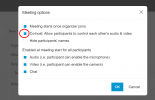
If you want to allow everyone to join the meeting and have all permissions to screen share, kick users, disable other user's video or audio, you'll need to tick this option in the settings during meeting creation. This button makes everyone an organizer and by default it's disabled.
It actually tells me "meeting has not started yet", when I am the organizer AND is already 1 minute past start,
It DOES work if I click the link sent in my mail though (and did show sharing options this time...).
By default, no one is allowed into a meeting if the organizer isn't in the meeting first. You can create a new meeting and remove this restriction by clicking on the appropriate setting during meeting creation as shown below.
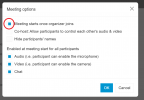
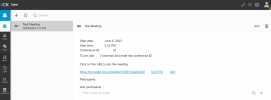
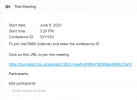
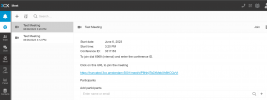
The fact that you were unable to enter your own meeting means that you used one of the other meeting link/url's that are meant to be shared to intended meeting participants. In your mail you'd see both your organizer link & shareable link like this.
One link is meant for you and if you use it, you'll just seamlessly join a meeting as an organizer. The other is meant to be shared and will allow users to join a meeting as participants (As long as you, the organizer has started the meeting by joining first or you set the appropriate setting for the meeting as shown previously above).
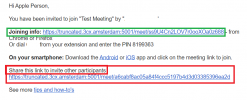
All you have to do is use the appropriate URL and you'll be in your meeting as the organizer.
Doesn't look like normal behavior though. I am sure we will get around the intricacies of the system, but they are still weird.
I understand, but some of these intricacies are there to protect you from unauthorised use. Another example of this which is where some of this confusion may be coming from is the following.
1) Your Organizer Link looks like this:
https://truncated.3cx.amsterdam:5001/meet/ss9U4Cn2LOV7r0ooXOa0z688
2) Your shareable link would look like this:
https://truncated.3cx.amsterdam:5001/meet/a6cabf8ac05a84f4ccc5197b4d3d03385396ea2d
If you click the organizer link, you'll join the meeting as an organizer, but your URL bar will actually show the shareable link. This is intentional as we've found that people who join meetings sometimes want to share their meeting with others and tend to copy the link in the URL bar of their browser...
People were in fact copying their own organizer's link over to other people to join with inadvertently giving them their own personal link which is a security breach. To counter this, if you use your organizer link to login to the meeting, we let you in as the organizer and we just change the URL bar to have the shareable link so that you can invite regular participants to the meeting and to prevent this sharing of sensitive data like your organizer's link to others.
It is conceivable that you may have used the shareable URL instead of the organizer URL to join the meeting and this is simply where all this confusion is coming from.
(Please note that the above URL is for demonstrations only and that you should use on of your own. The above links are invalid.)
3) Thanks. You are talking about conferencing apps. Does this involve the web client that kickstarts from the meeting link people receive? (on PC) Note that the issue is happening only on one participant, the others work normally.
My apologies, i'm referring to the Web Application used for Desktop/Laptops, not the Mobile applications. A new version is being released today with some minor improvements in the area you mentioned that may mend away some of these black camera issues.
If it does not, let us know and we can take it from there.