Transcription changes in v20

Status
Not open for further replies.

Callinectes

Silver Partner
Advanced Certified
Joined
Nov 19, 2020
Messages
196
Reaction score
53
From what I can tell, with v20 it is now required to use Google storage for recording and voicemail archives in order to use transcription. Am I correct? If so what happens to systems that have been storing recordings in a different type of storage for archive? Will they no longer be able to use transcription? This could also prove to be much more expensive than alternative storage locations.
 
From what I can tell, with v20 it is now required to use Google storage for recording and voicemail archives in order to use transcription. Am I correct? If so what happens to systems that have been storing recordings in a different type of storage for archive? Will they no longer be able to use transcription? This could also prove to be much more expensive than alternative storage locations.
Does anyone have any additional information on this?
 
  • Like
Reactions: Evolute IT
Charles, yes I have seen that guide. It does not address 2 major concerns: One, there is no migration path so what are we supposed to do with many years worth of old call recordings. As I understand it all old recordings would be inaccessible once the change is made. And two, in order to use the transcription feature both recordings and voicemail archives must use Google storage.
 
I asked similar question back on the 12th:
Was wondering why speech to text was not working after upgrading to V20 from the link below this it suggests that we have to use Google Storage, but we use SharePoint?
https://www.3cx.com/docs/manual/google-speech-api-v2/
This worked in V18 just fine with transcription on Google and storage in SharePoint is this a planned development for final release?
 
Can we get some clarity on this, if we use SharePoint for Backup and Recording Archive which was released in V18, in V20 will we still be able to use SharePoint as this document seems to be silent on the matter, we do not want to use Google which is why we switched it over to SharePoint in the first point?
https://www.3cx.com/docs/manual/google-speech-api-v2/
  1. To configure 3CX to use transcription for voicemails and/or recordings, navigate to the Admin Console > “Recordings” > “Settings”.
  2. Select the option to “Enable Remote Archiving” and select “Google Storage” in Location Type (Required).
  3. Upload the json file downloaded in the previous step, in the Private Key (JSON type) field and select a Folder/Path within your Google Storage Bucket.
  4. Select the option “Enable Transcription to automatically transcribe a Voicemail or a Recordings to text.”
  5. Use the “Speech Language” dropdown to set the transcription language.
  6. Select what to transcrib
 
Well Google Transcription requires Google Storage these days.
But we are planning to support OpenAI transcription in Q1 of 2024 which does not have this requirement.
 
  • Love
Reactions: accentlogic
@Nick Galea thanks for the clarification with V20, a bit disappointed that transcription will be temporarily unavailable in V20 until Q1 unless we migrate back to Google Storage from SharePoint storage.

Will transcription continue to work with V18 as before, we like using SharePoint for storage as it fits nicely with O365.

In V18 we had just one account for the storage buckets all rest of client interaction was MSFT no google.

Any chance at looking at MSFT CoPilot instead of OpenAI or possibly both don't know how complicated the apis are?
 
I'm using v20 but a bit confused regarding VM transciption. Is it currently working if we are using Google Storage? I have set it up and it does not appear to be working on my end, at least in this version of v20.
 
@biggreyphone Google changed to a new Api so you will have to follow this, our upgrade to V20 disabled VM transcription even though it was working in V18 with having Google do transcription and SharePoint for storage, so there must be some reconfiguration with the new storage choice of Google Storage tied to recordings in V20: https://www.3cx.com/docs/manual/google-speech-api-v2/

@Nick Galea been thinking about your response above hoping we can put back in, until Q1 release with new transcription, the same split configuration as we did in v18 with SharePoint for storage and Google for speech.

I have found no way to accomplish this in V20 short of totally swapping out SharePoint for Google storage in recordings eliminating use of SharePoint for storage which we have rolled out and working very well for end-user access to long-term archiving of 3CX?

Like a lot of the new additions to V20 but without a few missing items from V18 we'll have to stay back.
 
I am not sure i fully understood your post.

But if i understand it right it seems you are implying that we are enforcing Google Storage for Google Transcription but this is a rule required by Google, not 3CX.

V18 supports Google V1 transcription and Google will retire this in January or February so you might have to go to v20 to keep transcription. Stay back as long as you want of course.
 
@Nick Galea thanks for the quick reply, that's why we said " Google changed to a new Api" we know 3CX did not require the change from earlier post.

The challenge is in V20 there is no way to update to the new Google api if you want to use SharePoint for storage for recordings.

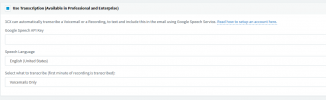
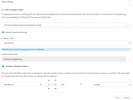
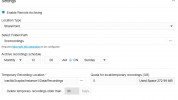
Can we go back to the separate configuration screen for transcription like in V18 where we setup VM transcription with Google (and if that now requires a Google Storage Bucket for just transcription, so be it) and still be able to select SharePoint for recordings not just backups?
V18:

1704292886048.png
1704293048052.png
V20:

1704292949139.png
 
@biggreyphone Google changed to a new Api so you will have to follow this, our upgrade to V20 disabled VM transcription even though it was working in V18 with having Google do transcription and SharePoint for storage, so there must be some reconfiguration with the new storage choice of Google Storage tied to recordings in V20: https://www.3cx.com/docs/manual/google-speech-api-v2/

@Nick Galea been thinking about your response above hoping we can put back in, until Q1 release with new transcription, the same split configuration as we did in v18 with SharePoint for storage and Google for speech.

I have found no way to accomplish this in V20 short of totally swapping out SharePoint for Google storage in recordings eliminating use of SharePoint for storage which we have rolled out and working very well for end-user access to long-term archiving of 3CX?

Like a lot of the new additions to V20 but without a few missing items from V18 we'll have to stay back.
Thanks for the reply. I was using transcription in v18 with Google. I updated to v20 with the updated instructions for transcription with Google but it isn't working. Is the v20 transcription feature working in this beta with the instructions? Not sure if I am doing something wrong or is this feature not functional yet.
 
  • Like
Reactions: Callinectes
@illcsales Microsoft Co Pilot - Yes makes sense of course, especially now with the Google Storage requirement. But right now is a bad time for new features so we will need some months.
 
@Nick Galea Great news on other options!
However, in the meantime can we at least go back to the separate storage for translation like it was in V18 so we do not have to stop using SharePoint just to reactivate translation in V20.
We have built a whole process around SharePoint since its inclusion in V18 but in the upgrade as you know we lost translation.
We have no problem having SharePoint for recording storage and google buckets api 2 for just the translation.
Hoping you can make that happen before final release or we'll have to stay back on V18 and miss all new goodness...
 
  • Like
Reactions: Callinectes
@Nick Galea Great news on other options!
However, in the meantime can we at least go back to the separate storage for translation like it was in V18 so we do not have to stop using SharePoint just to reactivate translation in V20.
We have built a whole process around SharePoint since its inclusion in V18 but in the upgrade as you know we lost translation.
We have no problem having SharePoint for recording storage and google buckets api 2 for just the translation.
Hoping you can make that happen before final release or we'll have to stay back on V18 and miss all new goodness...
Any update on offering the split methodology of google for transcription and storage of recordings in SharePoint like it was in V18. Really missing our transcription of vm in V20 and do not want to have to use Google for storage.
 
Just checking back in on this as new RC rolls out, we have no problem using the new Google framework for the transcription piece but do not want to have to abandon a working SharePoint storage that we implemented under V18 and which is working very well just to get transcription back.

Seems that if it worked in V18 it should still work in V20 only change should have been the config change for new Google API which we can do but the new gui does not provide that previously available split.

We will have to hold back clients that use SharePoint from all the goodness of V20 until it gets sorted out as they have built business process around the access of recordings and voicemails in SharePoint.

Hoping that fix is coming sooner than later because we miss it on our test system as we used a lot...;)
 
@illcsales Microsoft Co Pilot - Yes makes sense of course, especially now with the Google Storage requirement. But right now is a bad time for new features so we will need some months.
+1 for Co-Pilot if new transcription options are going to be AI integrated. Most of our clients are implementing updated acceptable use policies directly targeted at acceptable AI use in their organizations, and there is a strong preference for Co-Pilot since its security model includes tenant isolation & training boundaries.

Transcription has been a major roadblock preventing our clients from upgrading to v20, so we're anxiously hoping for an update on this so we can get everyone upgraded before v18 starts being impacted at the end of the year.
 
  • Like
Reactions: Callinectes
Status
Not open for further replies.

Latest Posts

Forum statistics

Threads
111,953
Messages
589,916
Members
164,851
Latest member
DrunkeMeister