Transfers to extension doesn't works

Status
Not open for further replies.

Moustic

New User
Joined
Dec 20, 2021
Messages
3
Reaction score
0
Hello,
I have a particular problem with the webclient. I can't make transfers (blind or att.) to internal extensions.

Webclient --------------- Transfer to ---------> Extension (webclient or 3CX Android app) KO
3CX Android App ----- Transfer to ---------> Extension (webclient) OK
Webclient --------------- Transfer to ---------> External number OK

I have a particular setup, although I don't think it comes from there.
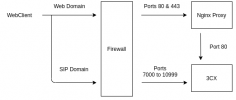
The 3CX is installed on a Debian 10 VM, the web interface is behind a nginx proxy, and everything have a static IPv4 and IPv6. There are two domains configured, one for the web interface and the other for the SIP, and the WebRTC communicates directly with the IP of the 3CX and not the proxy, as intended.
The installation was done last week, so it is up to date. I switched to the Beta version of the Webclient to see if it could solve my problem, in vain.

I tried to search in logs, but I don't see any particular error message.

any of you had this problem before?
 
Hi @Moustic,

Is this particular setup for this specific network only? As in, do you have another network without this particular setup that you can test on? If yes, can you do that from Web Client to Web Client?

Have you by chance, changed any of the default 3CX Settings, particularly the "Local SIP Domain".

Can you clarify exactly what you mean when you mentioned that you have set up a new nginx that sits in front of the 3CX proxying the traffic, and that is where you have configured the 2 domains?
 
Last edited:
> Is this particular setup for this specific network only? As in, do you have another network without this particular setup that you can test on? If yes, can you do that from Web Client to Web Client?

the 3CX is on our platform hosted in a datacenter. The intended use is centered around the web client. So it's impossible not to use the proxy.

> Have you by chance, changed any of the default 3CX Settings, particularly the "Local SIP Domain".

I have indeed replaced the "Local SIP domain" configuration by the domain used for SIP communications. Basically, the DNS entry of this domain in IPv6 is the 3CX one and not the proxy one.

> Can you clarify exactly what you mean when you mentioned that you have set up a new nginx that sits in front of the 3CX proxying the traffic, and that is where you have configured the 2 domains?
3cx proxy scheme.png
having two domains is really useful for IPv6, otherwise for IPv4 the firewall will redirect the ports to the right machines

I may have a clue to help you better target the problem. I am trying to make deductions from the traffic capture on the 3CX.
To simplify the explanation, let's say that extension 10 is on a call with extension 20, and extension 10 wants to transfer the call to extension 30.
So when extension 10 starts the transfer to the extension, there is a SIP request "INVITE" sent several times without answer, with for " from" the extension 30 to the extension 20, with for source port 5060 to the port 5063, all on the IP 127.0.0.1. I think that the 3CX process should respond to these packets but it does not.
and Obviously, there is the "3CXManagementCo" process that listens on this port
 
Hi @Moustic,

If you were to remove the in-between proxy you've added, and thereby use the system as it is intended, does it work then?
 
  • Like
Reactions: Evolute IT
This habit of using a Nginx proxy in front of 3CX has to stop. The system is not designed to work this way. Everytime someone tries, they fail to make it work.
 
> If you were to remove the in-between proxy you've added, and thereby use the system as it is intended, does it work then?

VasilisV_3CX I just tried, I bypassed the proxy by generating a let's encrypt certificate and communicating directly with the 3CX machine, I still have the same problem. The problem does not come from the proxy.

> This habit of using a Nginx proxy in front of 3CX has to stop. The system is not designed to work this way. Everytime someone tries, they fail to make it work.

If many want to do it, it is because there is a real demand and a need. That's not the subject tho
 
Hi @Moustic,

I believe that this will not work and rather suggest:

1. Take a full 3CX backup
2. Uninstall 3CX completely
3. Remove proxy completely (not in-between anythings)
4. Re-install 3CX and restore backup

This is the supported / tested way.

Note that you can get 3CX support via a 3CX Partner, but most likely that would result in the same first action suggestion.
 
  • Like
Reactions: Evolute IT
Status
Not open for further replies.

Forum statistics

Threads
112,349
Messages
592,027
Members
165,514
Latest member
megalmazan