Trunk sip not found

Status
Not open for further replies.

Alle CTEC

Silver Partner
Advanced Certified
Joined
Sep 11, 2023
Messages
368
Reaction score
47
3cx on premise professional license I am creating a sip trunk voip operator achanto. IP address authentication without password. port 5070 I created exit rule and port forwarding rule. I create the trunk and I don't see any outgoing or incoming logs. I connect to 3cx debian. I perform a telnet on the voip IP 5070 and the traffic appears. It seems like you don't even try to establish the trunk?
 
Hi,
3CX PBX respects the “Re-Register TimeOut” Time SIP Trunk configurations under options TAB. If you press refresh, it will have no effect if the time has not expired.

Using a supported sip trunk would be a much better idea..
 
  • Like
Reactions: N_G
@Alle CTEC The SIP trunks page shows the last attempt. The activity log shows any errors.
 
Nothing appears in the 3cx logs and in the firewall logs and it is as if 3cx did not even try to establish the trunk. I have the same provider on another 3cx same cfg working perfectly
 
Nothing appears in the 3cx logs and in the firewall logs and it is as if 3cx did not even try to establish the trunk. I have the same provider on another 3cx same cfg working perfectly
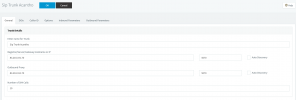
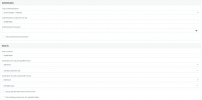
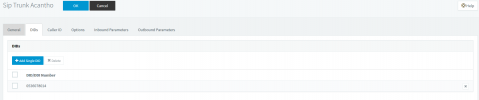
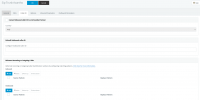
Send screen captures for your SIP Trunk config.
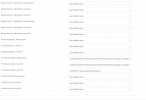
We want to see all the SIP Trunk configuration tabs.
 
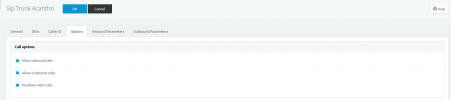
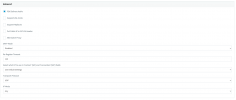
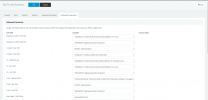
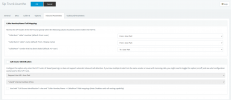
Here are the screens and in the meantime, thanks
 

Attachments

  • 01.PNG
    01.PNG
    20.3 KB · Views: 10
  • 02.PNG
    02.PNG
    22.7 KB · Views: 9
  • 03.PNG
    03.PNG
    14.2 KB · Views: 8
  • 04.PNG
    04.PNG
    33.3 KB · Views: 5
  • 05.PNG
    05.PNG
    13.6 KB · Views: 5
  • 06.PNG
    06.PNG
    16.3 KB · Views: 5
  • 09.PNG
    09.PNG
    47.8 KB · Views: 5
  • 08.PNG
    08.PNG
    44.3 KB · Views: 6
  • 07.PNG
    07.PNG
    7.6 KB · Views: 7
  • 10.PNG
    10.PNG
    38.3 KB · Views: 9
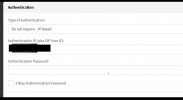
On Capture 2,
Type of Authentification ;
”Don’t require registration… IP-Based”

The PBX does what you asked it to do... it doesn't try to register... it's normal that you don't see a registration attempt, that's not what is configured

IMG_3113.jpeg


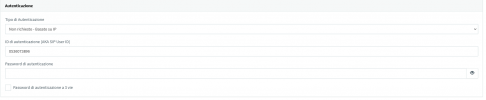
( Please remove the phone number in ScreenCapture , To avoid unwanted calls )
 
  • Like
Reactions: N_G
Removed it but nothing changed. I attach the screen of a 3cx same operator populated field works correctly
 

Attachments

  • 11.PNG
    11.PNG
    9.4 KB · Views: 4
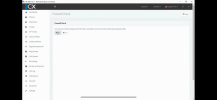
Have you done a Firewall checker? If not, do it.

Depending on the configuration you send me, it does not have authentication.. therefore, you are identified by your Public IP. Does your Sip Trunk provider have your public IP?
 
  • Like
Reactions: N_G
But should I still see logs in which the control panel tries to record the trunk?
 
So there are no logs?

However, on the firewall I should see some traffic or at least the attempt. Currently I only see logs if I try to open a telnet connection to the provider on the 5070.

Thanks for the replies
 
So there are no logs?

However, on the firewall I should see some traffic or at least the attempt. Currently I only see logs if I try to open a telnet connection to the provider on the 5070.

Thanks for the replies

You will see attempted outbound calls.. no authentication..
 
I created an exit rule for an extension that only calls using that line but on the firewall I don't see any access attempts???
 
Do you have try call ?
 
Call or Registration to 3*********@(Ln.10000@Sip Trunk Acantho) has failed. 0.0.0.0 replied: 408 Request Timeout; internal
 
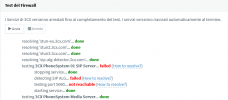
You haven't answered me, have you run the Firewall Checker test?
IMG_3116.png

if all is green (Success) ;
Take a Wireshark capture via the web interface. Select “All Interface“
https://www.3cx.com/docs/capture-network-traffic/

Save and send to your Sip Trunk provider.
At this point, it's up to them to support you or switch to a supported provider.
Specify the Public IP address of your 3CX server


if red (failed) ;
Check your network configuration.
 
  • Like
Reactions: N_G
New developments I can currently use the outgoing trunk and it works perfectly. It doesn't work for me on input. Question 3cx uses port 5060 by default. But did I set 5070 in the sip tunk configuration?
 
New developments I can currently use the outgoing trunk and it works perfectly. It doesn't work for me on input. Question 3cx uses port 5060 by default. But did I set 5070 in the sip tunk configuration?

The port you set on the SIP Trunk is the port where you will send the Invite...ect..
it's not the listening port..

The "listening port" is configured when you first install 3CX.. and cannot be changed unless you reinstall it.

Normally, the respectable providers should not force you to change your listening port...
I'm asking the question for the 3rd time, please answer my question if you want help..
the minimum is to answer the questions.. I'm sharing my time for free to help you, please help me help you ;-)

>> You haven't answered me, have you run the Firewall Checker test?


New questions:
What is the result (Firewall Checker test) ?

Have you done a Wireshark capture to see if it sends you the Invites?

If no, please done a Wireshark capture ..


thx
 
Last edited:
Sorry, you're absolutely right

I have 2 full nat input rules one for the 5070 and the other for the 5060

The check fails I attach the screen also the sip alg is disabled.

The firewall is an Endian firewall, I have the same configuration working in other locations

I also performed the wireshark acquisition, can I attach it to the post?

Thank you very much for the support you are giving me
 

Attachments

  • Fw-Checker.PNG
    Fw-Checker.PNG
    17.9 KB · Views: 6
Status
Not open for further replies.

Latest Posts

Forum statistics

Threads
112,324
Messages
591,897
Members
165,475
Latest member
lastshadow