Trying to make call parking more descriptive

Status
Not open for further replies.

nrbeeee

New User
Joined
Apr 20, 2022
Messages
4
Reaction score
3
Hello, I am trying to make unparked calls more descriptive since we make heavy use of call parking. At the moment I am having difficulty getting the shared parking extension to show up in CFD. I was going to set up a condition to check for the parking extensions (SP1, SP2, etc.) then transfer them to queues with descriptive names like "Park 1 is recalling..." and "Park 2 is recalling..." which should look really good on our phones and help my team out. This seems like it should be super easy with CFD.

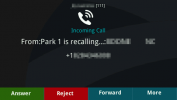
So I am hoping instead of this:
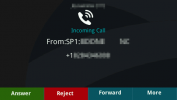
1650572365406.png

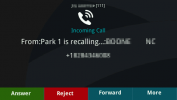
I can work out a way to get this:
1650572230806.png

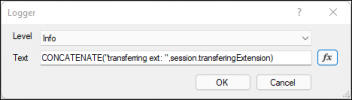
My problem is that the shared parking extension isn't showing up on the variable session.transferingExtension. I set up a logger to check like this:
1650571142596.png

which results in a log entry like this:
2022/04/21 16:05:12.762|8407|0009|Trc|CallPair._850_22.Main.375.[C:96.6]-From script: parking - CallID 000001804DBA27F2_96 - Callflow - Start executing component 'Logger1'
2022/04/21 16:05:12.763|8407|0009|Inf|CallPair._850_22.Main.375.[C:96.6]-From script: parking - CallID 000001804DBA27F2_96 - CallFlow.CFD.LoggerComponent 'Logger1' - transferring ext:
2022/04/21 16:05:12.763|8407|0009|Trc|CallPair._850_22.Main.375.[C:96.6]-From script: parking - CallID 000001804DBA27F2_96 - Callflow - Start executing component 'Transfer1'

If I transfer from my extension rather than automated unparking the log entry has the extension filled out:
2022/04/21 16:08:12.333|8407|0004|Trc|CallPair._850_22.Main.383.[C:98.5]-From script: parking - CallID 000001804DBD04EB_98 - Callflow - Start executing component 'Logger1'
2022/04/21 16:08:12.333|8407|0004|Inf|CallPair._850_22.Main.383.[C:98.5]-From script: parking - CallID 000001804DBD04EB_98 - CallFlow.CFD.LoggerComponent 'Logger1' - transferring ext: 111
2022/04/21 16:08:12.333|8407|0004|Trc|CallPair._850_22.Main.383.[C:98.5]-From script: parking - CallID 000001804DBD04EB_98 - Callflow - Start executing component 'Transfer1'

Is this possible?
 
The variable session.transferingExtension only works with regular extensions, not with a shared parking. Anyway, you can't change what's shown in the phone with a CFD app. What you need is not possible unfortunately.
 
  • Like
Reactions: Evolute IT
I can change it by directing calls to different queues though which is what I want to use CFD to do. I just want to be able to direct calls to different queues based on what shared parking they came from. So SP1 would be directed to a queue named "Park 1 is recalling..." and SP2 would go to a queue named "Park 2 is recalling..." and so on. This seems like it should be so easy. Also, it doesn't only work with regular extensions, if I transfer with a ring group or queue the extension shows up properly. The only thing not showing up properly are the SP1, SP2, etc. extensions.
 
You can't determine from which SP the call comes from, no variable will tell you that.

How are you transferring the call to a shared parking? Is this a CFD app? Or you do it from a regular extension? If you do this from a CFD app, then you might solve the issue by attaching data to the call, which you can read later from another CFD app. Otherwise I see no solution.
 
Got this working without CFD by using the new DN properties, very cool.

From there I was able to set a custom destination for each shared parking extension so I set up queues with distinctive names and forwarded each park to its corresponding queue.
 
  • Like
Reactions: edossantos
In the end, I did use a CFA. Changing the DN properties through the Admin Web UI is cumbersome but with CFD/CFA I automated it.

I'm quite excited to get this working so I will detail my solution here in case anyone comes across this looking for something similar.

Create more descriptive call park recalls (requires a pro or better license):
  1. Configure the # of parks you need. I needed 16 since I have 2 sites that regularly use 6 parks and 1 site that uses 4.
  2. Check the 'Automatically unpark forgotten calls' box and fill in a number of seconds before calls are unparked.
  3. Create queues for each park and name them descriptively as these names are what will show first when the call unparks. For example, I named each of mine "Park 1 is recalling..." and "Park 2 is recalling..." and so on.
  4. In Contacts > Options select "Append Name under "Add Group, Queue or DID/DDI Names to Caller ID"
  5. In Settings > Parameters search for DEVELOPMENT_DNTABLE_EXPOSE and set it to 1 to enable the DN Properties tab.
  6. Reload the page to see the tab and click on it.
  7. Search for SP and select a park extension from the list.
  8. Take note of the possible DN properties you can change with CFD/CFA.
  9. Instead of changing the properties here, I want to do it with CFD so I can re-program them in the future if needed quickly.
  10. In CFD create a project and use the 3CX Internal Properties > Set DN Property to set the properties to the values you want.
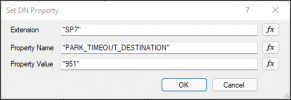
  11. In my case, I set each park to a corresponding recalling queue so each of my Set DN Property blocks looks something like this:1650658849703.png
  12. The 951 extension looks like this:1650658911881.png
  13. Which results in a recalling screen on our phones that looks like this:1650659093328.png
  14. I have my CFA bound to ext 850 so if I ever need to change my park time (which resets all the park destinations) then I can just dial 850 to get them all set back up again.
 
Status
Not open for further replies.

Forum statistics

Threads
111,973
Messages
590,078
Members
164,896
Latest member
sameage