Turn off Assistant taskbar messages

Status
Not open for further replies.

Montclairguy

Joined
Feb 23, 2010
Messages
68
Reaction score
0
We installed the 3CX assistant on Friday to test it out, and came in today with everyone having to click through repeated notifications on the windows taskbar from the assistant about missed calls. This took us a good five minutes to click through all of them. This makes the tool too annoying to use in a call queue environment. Reps who don't take a call are constantly notified that they missed it. I cannot locate any mechanism to shut off all of these intrusive messages. Is there a way?

When we want to use the application, we'll use it. We don't want to be bugged all day about calls coming in that somebody else has taken, however.
 
Pleae advise the PBX build number you are using and the assistand build number you are using
 
The latest of both.

Assistant
Installed Version: 8.0.11114.0
Executable: 8.0.0.1111.0

PBX 8.0.10708.0

Also, I've noticed GDI corruption when the application isn't in the foreground, and the PBX's status changes (a call comes in or goes out.) Unless the main window is "x"'d out, and only the taskbar icon is running, I get a ghosting effect of the assistant window, on top of whatever application is in the foreground. Hard to explain, but essentially there is display corruption on apps with the focus, when the assistant is open, and running in the background.
 
Any update to this issue?
 
Ive tested this out but the window dissapears after 5 seconds. Your PBX is slightly out of date and might cause conflicts with the most recent version of the Assistant please upgrade 3CX and advise.
 
Yes, the box disappears after 5 seconds. I'm not sure why it notified us of every missed call over the last weekend, and wouldn't go away until we clicked through all of them.

Regardless, and before I go and upgrade a slightly out of date version, can you clarify the following?

1) Is it possible to turn off these taskbar messages completely? We don't want any taskbar messages at all. They're annoying and distracting.

2) Do you experience display corruption when you make the assistant window as narrow as possible, do not minimize it, and give other applications focus (i.e. the assistant window is behind other application windows)?

Thanks!
 
1. On the Assistant go to to file > preferences > Notify on my incoming calls.

2. No I have not seen this, tried to put IE, Firefox, MSN and others in front but no display corruption. Kindly post a screenshot.
 
1. On the Assistant go to to file > preferences > Notify on my incoming calls.

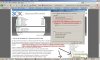
Yes -- I am aware of that. I did look at all of the options before posting to the group. That option has no effect on the taskbar messages. Further, for those of us who like the taskbar to auto-hide, the assistant makes it popup as well -- so it's even more annoying. Screenshot :


I wasn't able to get the video corruption to occur today -- yet. Once it happens, I'll take a screen shot and follow up.

So -- how do I turn off these taskbar notices?
 

Attachments

  • annoying.jpg
    annoying.jpg
    157 KB · Views: 1,625
Still waiting for an answer on turning off these annoying pop-ups...

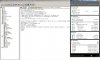
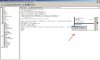
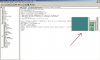
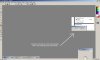
Here are the video corruption snapshots.

Assistant before placing it behind other applications.


Screen corruption while call active and assistant behind other apps:
 

Attachments

  • corruption1.jpg
    corruption1.jpg
    105.8 KB · Views: 1,612
  • corruption2.jpg
    corruption2.jpg
    69.4 KB · Views: 1,611
  • corruption3.jpg
    corruption3.jpg
    66.8 KB · Views: 1,610
  • corruption4.jpg
    corruption4.jpg
    62.3 KB · Views: 1,611
Yes the option you selected were correct, but you are saying that they are still showing?

Have you upgraded the PBX? Ill allow testing and development to comment further on the screenshots.
 
Yes, I'm saying I have the notification boxes unchecked, and the assistant still does exactly what's pictured.

Are you saying I need to download the whole thing and reinstall it just to have the executable updated? ?

Any reason why a minor revision update doesn't show up in the PBX as an update?
 
Hi there,

The issue being discussed here is a known issue and will be addressed in Version 9.

There is currently no Option to Disable the missed calls notifications, though as said above, it will be added in a Version 9 Build of the Assistant.
 
Thanks. Does that include the video corruption issue, or am I the only one who has experienced and reported that?
 
You are the only one who reported this issue.

Could you give me some more info about what Operating System you are using?
Also i don't understand anything from the Screenshots you posted, did you intentionally mess up the screenshot in Paintshop? Or is that the "Video" error you are talking about?

Also how do you reproduce this error?
 
1) XP SP2.

2) No, I did not intentionally mess up the images. Those are screenshots of the video corruption I'm discussing.

3) Make the assistant window as narrow as possible, do not minimize it, and give other applications focus (i.e. the assistant window is behind other application windows.) When activity occurs on the PBX and the assistant is updating it's display, some of it bleeds through, or parts of other apps bleed through to whatever currently has the focus, but only in the section of the display where the assistant is running. It takes a while to occur on a fresh reboot, but once it starts happening, it's fairly consistent, which points in the direction of a memory leak from mismanaged brushes.
 
Hi

Could you tell me what specs your machine has?
Ram / Cpu / VGA etc...
 
RAM 4GB
CPU Dual Xeon 2.8Ghz
Video: Nvidia GeForce 9800 GTX+ based (BFG is mfg)

I just confirmed this behavior on a second machine. Go to Youtube, watch a video full screen, and watch for corruption while a call is active. Put the video back to normal size, and you'll see the corruption.

Second machine's specs are:
RAM 3GB
CPU Dual Xeon 2.8Ghz
Video: Nvidia Quadro FX 1400 based (mfg PNY)
 
Montclairguy said:
RAM 4GB
CPU Dual Xeon 2.8Ghz
Video: Nvidia GeForce 9800 GTX+ based (BFG is mfg)

I just confirmed this behavior on a second machine. Go to Youtube, watch a video full screen, and watch for corruption while a call is active. Put the video back to normal size, and you'll see the corruption.

Second machine's specs are:
RAM 3GB
CPU Dual Xeon 2.8Ghz
Video: Nvidia Quadro FX 1400 based (mfg PNY)

Do you mean that Windows API doesn't work correctly? ;)
 
Nothing is perfect, for sure, but this is something that should be fixable. It's not like every windows app on the planet exhibits this issue. ;)
 
I believe extensions may have to be in a management group for this bug to appear, if that makes any sense.
 
Status
Not open for further replies.

Latest Posts

Forum statistics

Threads
112,324
Messages
591,897
Members
165,475
Latest member
lastshadow