Solved Two Incoming Rules (one with office hours, one without)

Status
Not open for further replies.

dkornahrens

Bronze Partner
Basic Certified
Joined
Mar 30, 2021
Messages
30
Reaction score
5
Good morning community!

We have a first for us and looking for some assistance. We have a system where the customer wants the phones to ring externally to a service after hours (not matching the office hours of 3cx Settings for Office Hours). This has been done and works great. However, on the same SIP trunk we have another number that they want sort of as a 'back door' where their phones can still ring after hours.

How would I accomplish this since it seems the SIP trunk is set to "after hours" times and any incoming rule is overwritten by those hours. I have tried the incoming rules of use these hours. Perhaps I need to remove the global hours and utilize the incoming rules per DID?

Thanks in advance!
 
Guessing the number is an DDI number associated with the main number

Create an DID inbound rule with the correct routing - if this does not work make sure you have the correct DDI number format (you can use prefix the number with * (See Inbound Rules for DIDs number 3) https://www.3cx.com/docs/manual/inbound-did-call-routing/

If the 3CX can not match the DDI number, it uses the default routing on the sip trunk

You can check the incoming number format in the activity log
 
  • Like
Reactions: YiannisH_3CX
Guessing the number is an DDI number associated with the main number

Create an DID inbound rule with the correct routing - if this does not work make sure you have the correct DDI number format (you can use prefix the number with * (See Inbound Rules for DIDs number 3) https://www.3cx.com/docs/manual/inbound-did-call-routing/

If the 3CX can not match the DDI number, it uses the default routing on the sip trunk

You can check the incoming number format in the activity log
Eh, maybe I wasn't so clear.

We have the incoming rules working fine.

Rule #1 = main DID trunk number incoming rule = Ring Group (works fine and during business hours that are applied to the trunk)

Rule #2 = secondary DID, same trunk = Ring Group (we do not want this to follow the hours that are applied to the trunk based on the open business hours)

Thanks,
David
 
The point is don't apply the hours to the trunk, apply the hours to the inbound rules individually.
 
The point is don't apply the hours to the trunk, apply the hours to the inbound rules individually.
I tried that, but the "default" incoming rule is from the DID that is the main trunk number. So when I apply the hours, it creates it as the hours for the trunk.
 
Can you post your ddi rules, masking out the telephone numbers for security
 
Can you post your ddi rules, masking out the telephone numbers for security
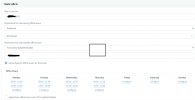
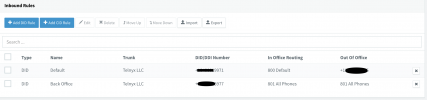
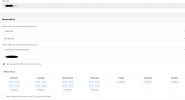
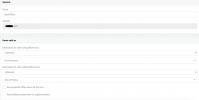
Okay. Hope this explains. 9971 is the default line for the trunk. Incoming rules should be applied to only ring Internal Ring Group during business hours. The external forwarding should be outside of normal hours.

The 3977 number is a "back office" number that should ring all phones anytime. Will be used for employees, family, etc.
 

Attachments

  • Screen Shot 2021-11-03 at 8.50.27 PM.png
    Screen Shot 2021-11-03 at 8.50.27 PM.png
    168.9 KB · Views: 13
  • Screen Shot 2021-11-03 at 8.51.48 PM.png
    Screen Shot 2021-11-03 at 8.51.48 PM.png
    94.9 KB · Views: 13
  • Screen Shot 2021-11-03 at 8.52.33 PM.png
    Screen Shot 2021-11-03 at 8.52.33 PM.png
    178.4 KB · Views: 9
  • Screen Shot 2021-11-03 at 8.53.00 PM.png
    Screen Shot 2021-11-03 at 8.53.00 PM.png
    132 KB · Views: 12
The way you have things set up should work since both your in office hours and out of office hours for the second DID point to the Ring Group. So even if the wrong office hours were applied the destination should still be the same.

Perform the following test and let us know of the results. For the 3977 change the destination for both in office and out of office to a single extension (your own preferably) and then call the number. Does your extension ring or if the call still going to the Ring Group?

If the call is still going to the Ring Group then inbound calls do not match your Inbound rules and all calls are routed to the main trunk number destination, hence the issue.

Let us know of the results.
 
The way you have things set up should work since both your in office hours and out of office hours for the second DID point to the Ring Group. So even if the wrong office hours were applied the destination should still be the same.

Perform the following test and let us know of the results. For the 3977 change the destination for both in office and out of office to a single extension (your own preferably) and then call the number. Does your extension ring or if the call still going to the Ring Group?

If the call is still going to the Ring Group then inbound calls do not match your Inbound rules and all calls are routed to the main trunk number destination, hence the issue.

Let us know of the results.
@YiannisH_3CX when you say the inbound calls do not match the inbound rules.... I don't follow really.

I have tried this, this morning. The default trunk number = 9971. When that is the default trunk number, it automatically updates the inbound rule for did = 9971 to match the same hours it's applied.

I have removed the main number from the default trunk DID (added another DID not being used). I then created an inbound rule for the 9971 number with the hours and it works. I also setup 3977 inbound rule for that line with it ringing to a ring group and this works fine.

So it seems the issue is that the default SIP trunk number binds itself to that inbound rule for the same DID. So when I create a time, it applies it to the entire trunk incoming rules.

Any other workaround?
 
The way you have things set up should work since both your in office hours and out of office hours for the second DID point to the Ring Group. So even if the wrong office hours were applied the destination should still be the same.

Perform the following test and let us know of the results. For the 3977 change the destination for both in office and out of office to a single extension (your own preferably) and then call the number. Does your extension ring or if the call still going to the Ring Group?

If the call is still going to the Ring Group then inbound calls do not match your Inbound rules and all calls are routed to the main trunk number destination, hence the issue.

Let us know of the results.
@YiannisH_3CX That is exactly what is happening.
 
@YiannisH_3CX That is exactly what is happening.
Without changing anything else go in your trunk settings and then in your DIDs tab. Your 2 DIDs should be listed there. Edit both of them and add a "*" in front of the numbers after deleting the +1.

So if your number was +1234567890 it should become *234567890. Do the same for both numbers.
So now when a call comes in the PBX will only try to match the called number to any digit after the "*".
So even if the called number comes in as +1234567890 or 1234567890 or 234567890 the PBX will be able to match the called number to the correct inbound rule.

Try it and let us know
 
@YiannisH_3CX Thanks for the information. I actually found what it was shortly after writing my last message to you.

Even though the provider (Telnyx) stated it was in the correct format, it did not like the + before the 11 digit number. Thank you for your help.
 
Glad to see the issue has been resolved. You can actually change the format of the incoming numbers in the Telnyx portal. I think by default it should be E164 without the "+" which looks like your issue.
 
Status
Not open for further replies.

Latest Posts

Forum statistics

Threads
112,324
Messages
591,897
Members
165,476
Latest member
awan05