Two Way Audio Elastix Hosted on AWS

Status
Not open for further replies.

agrondemiraj

New User
Joined
Dec 31, 2021
Messages
7
Reaction score
0
Hi Team,

Recently joined 3CX and started trying the solution. I gave 3CX access to my AWS Account and 3CX automated process installed the PBX on a server and configured end to end. However, after I configured 2 Extensions for testing, the communication is going one way only, I can hear the other part, but they can not hear me. 3CX Clients for Android and iOS used for testing.

I read many threads here, but it is usually when solution is self hosted on owned data centers, And for my scenario, I see that Automated configuration already allowed the necessary ports on the Security Group assigned to the server.

Hosting Server: Debian as required
3CX Version: Latest
 
Does each extension have 2 way audio when using Audio tester? Dial *777

Does the firewall checker pass?

Is PBX delivers audio on?
 
I can not hear anything when calling *777.

Firewall check shows all fields Done in green.

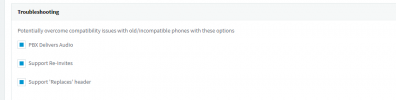
How do i check PBX Delivers Audio ?
 
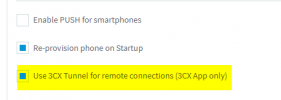
For the two extensions, make sure 'Use 3CX Tunnel' is checked under Phone Provisioning for the 3CX App:

1640966936090.png
 
I used default settings and all are enabled for both extensions.
 

Attachments

  • Screenshot_2.png
    Screenshot_2.png
    19.6 KB · Views: 5
I can not hear anything when calling *777.

Firewall check shows all fields Done in green.

How do i check PBX Delivers Audio ?
Extension -> Options Tab -> Troubleshooting Section

1640968210219.png

Sounds like a network issue of sorts if echo test isn't working. That's just between you and the PBX. Tunnel (as mentioned above) should handle it.

Try wifi/4g and see if it's different. Also is the mic/speaker on the test device working with a regular phone call?
 
*777 not working on WiFi or 4G.
PBX Delivers Audio was not enabled, but even after enabling it, It still does not work, Echo or Call Extension to Extension.

It is weird because video works, I hear the other extension but they do not hear me. And both connected to same PBX.

Just for more information, I am using Android, and the other Extension is using iOS.
 
*777 not working on WiFi or 4G.
PBX Delivers Audio was not enabled, but even after enabling it, It still does not work, Echo or Call Extension to Extension.

It is weird because video works, I hear the other extension but they do not hear me. And both connected to same PBX.

Just for more information, I am using Android, and the other Extension is using iOS.
Lets rule out the PBX.

Can you and the other extension load the webclient (domain.example.com:5001/webclient) and verify audio works correctly? If so, try 1 side with webclient and 1 side with a phone. Find out which is the problem phone, then post information about it.
 
Have you tried calls originating from each of the two devices?
 
I have tested the scenario using WebClient as well, with both sides Webclient, then one web, other mobile but the issue still remains the same. I can hear the other party, but they can not hear me.
I have switched the call origin on multiple devices and web, but no difference.
 
So...it's always the device initiating the call, that cannot be heard? And this happens when using multiple devices? Have you looked over the 3CX Activity Log to see if there is an error, of any sort..port, Codec?
Do you have any sort of firewall deployed?
 
I have tested the scenario using WebClient as well, with both sides Webclient, then one web, other mobile but the issue still remains the same. I can hear the other party, but they can not hear me.
I have switched the call origin on multiple devices and web, but no difference.
If both parties are using the webclient and 1 party is having 1 way audio, you have a very unusual case. In your shoes I would do a brand new PBX install and restore (~20 minutes of work) and if issues persist I would start with a packet capture to see what's really going on.

I know it's a new PBX install and all, but the last time I had a weird case like this, that's what fixed it for least amount of effort.
 
Maybe this is one in a million cases issue, but I still have the same outcome even after reinstalling the PBX from scratch. Reconfigured client on Mobile App and as presented from App, I called the Echo Service *777 but I cannot hear anything, Call seconds go on normally.
Tried from WebClient calling the Echo Service Again on *777 and the same happens, No Sound.

I am making no configuration change on any layer, Just using the out of the box automatic installation on a Debian server as required from 3CX.

What I noticed, is that there is no HTTP to HTTPS redirection set up, I do not know if this is of any use on my scenario.

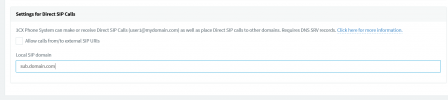
I checked the Activity Log, and I am getting some hints on what the issue might be, but still have no clue how to fix it. I think that Extension to Extension is trying to use private domain to intercommunicate between extensions and somehow not able to resolve the DNS Query. I also found a document here https://www.3cx.com/docs/direct-sip/ treating this issue, but I am not managing any DNS Zone for this solution.
 

Attachments

  • sub-sip.png
    sub-sip.png
    16.4 KB · Views: 4
Last edited:
I think I would need a capture to troubleshoot further based on everything you have shared. Maybe someone else has something else to add.

Re your edit - I don't think that setting can cause this issue (an extension with no audio while calling echo test from the webclient). You could set it to your FQDN and turn it on, but it should not be related to this. The DNS records would be for external users to the PBX trying to do DirectSIP with you, not internal calls.
 
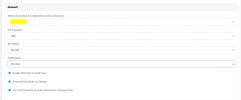
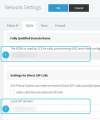
To first make sure the configuration under "Network >> FQDN" is correct. Make absolutely sure that the PBX's FQDN is entered correctly in the "Local SIP Domain" field. Just confirm that fields 1 and 2 below BOTH have the same exact value:

1641211949473.png

Disable "Allow Calls from/to external SIP URIs" and click on OK on the top. Come back to these settings and make sure the "Local SIP domain" still has the correct FQDN in the field. Does the issue persist?
 
To add to what my colleague said, I'd also like to take a step back. You said you are using the Android App on one phone and a IOS App on the other.

When you make a call Android ---> IOS, or IOS ---> Android, is it always the Android that has one-way Audio? And the IOS user has two-way audio?

If this is what is happening, what happens when you dial *777 from the IOS? Do you then have also two-way audio when you talk into the mic?
 
  • Like
Reactions: Evolute IT
To first make sure the configuration under "Network >> FQDN" is correct. Make absolutely sure that the PBX's FQDN is entered correctly in the "Local SIP Domain" field. Just confirm that fields 1 and 2 below BOTH have the same exact value:

View attachment 26824

Disable "Allow Calls from/to external SIP URIs" and click on OK on the top. Come back to these settings and make sure the "Local SIP domain" still has the correct FQDN in the field. Does the issue persist?
Hey Chris, Yes issue persists. Actually these are the default values, but I thought it should be different to work properly.


I think I would need a capture to troubleshoot further based on everything you have shared. Maybe someone else has something else to add.

Re your edit - I don't think that setting can cause this issue (an extension with no audio while calling echo test from the webclient). You could set it to your FQDN and turn it on, but it should not be related to this. The DNS records would be for external users to the PBX trying to do DirectSIP with you, not internal calls.
Attached a dump file for your reference.

To add to what my colleague said, I'd also like to take a step back. You said you are using the Android App on one phone and a IOS App on the other.

When you make a call Android ---> IOS, or IOS ---> Android, is it always the Android that has one-way Audio? And the IOS user has two-way audio?

If this is what is happening, what happens when you dial *777 from the IOS? Do you then have also two-way audio when you talk into the mic?
So, Added more tests, and it is getting weirder and weirder every time. Using another laptop ( chromebook ) Webclient works perfectly fine using my default extension calling *777. I called another extension as well and everything works fine.

Called *777 from the second extension I created and configured on iOS and that also works fine.

Is this Windows 10 issue, Android issue or something else, I do not know.

EDITED - *File removed*
 
Last edited by a moderator:
I've had a quick look at the packet capture and can't see any WebRTC traffic but can see traffic on UDP port 5090 (3CX Tunnel Port) so I'll assume you performed a 3CX mobile app call during this test. I see traffic both ways so I can't really say there's an issue, nonetheless, you did say that these calls worked fine so the provided packet capture might not be of much help.

I'll PM you for a bit more information on this.
 
Status
Not open for further replies.

Forum statistics

Threads
111,974
Messages
590,083
Members
164,901
Latest member
Silent_Guru