Solved Unable to access 3CX Management Console - Switch and phones are operating normally

Status
Not open for further replies.

Bob Denny

SOHO User
Joined
Feb 21, 2009
Messages
195
Reaction score
17
I am unable to access the management console, no response at all on the FQDN or the IP address (as shown on Google Cloud Instance). The phones are working just fine, and I got a scheduled backup from it a couple of days ago. All lines here are working (softphones and Linksys SPA 112 ATAs) including internal, inbound, and outbound calling. I can log in via SSH to the Google Cloud instance. I stopped and started the Google Cloud Instance. No change. No access to the 3CX management console. Just a dead end (no response from web server).

I know nearly nothing about Linux. I did the Cloud Express on Google. Is there something I can look at via SSH? I don't even know where the 3CX files are located. Definitely not visible on SSH login to /home/xxxx/ The Cloud installation is very simplified. Oh and I checked the Google Cloud Instance firewall rules for HTTP and HTTPS and they are open. Of course the rules for the pbx ports are working, our phones are working fine.

What can I do? Where can I look?
 
I'm having this same issue on a self-hosted 3CX Linux VM.
Has anyone responded?
 
Not yet. Did this "just start happening"? I can't recall logging into the 3CX console since early November when I added a Linksys SPA 112 ATA box for a new POTS phone extension. No problems with that, all our phones are working fine.

I just bought a $75 ticket for upgrading Debian (which spit out zillions of inscrutable errors when I tried it a couple of months ago. I know nothing about Linux :) ). Maybe they can help me get into the console too, though they may force me to buy another ticket for that!
 
Just started happening.
 
Yeah same here then. Weird. You might try logging in from some other IP address... What I'm worried about is that someone tried to break in with a password attack and got me locked out. Now what???
 
Hi Bob,

have you tried reaching the management console via public IP?

Check your machine's public IP on the Google Cloud dashboard, then type it into your browser as https://xxx.xxx.xxx.xxx

If you are certain the ports are open, and this still doesn't load then you might have an issue on the installation itself. If that is the case, and you are not familiar with Linux, then the solution @cobaltit suggested is the quickest way to get it back. (take a fresh backup, restore it on a new deployment).

Sometimes the services may be shutting down in case the machine is too "small" and there is a lack of resources, Debian may kill the services that provide access to the management console.
 
@JohnS_3CX Thanks. Yes, actually my browser bookmark (which I have been using since Nov 2017 when I installed the PBX Express) is https for the public IP not the FQDN. I only had to change it once (it is "ephemeral" on Google). I can't recall why I wasn't using the FQDN ??? Anyway, I have a scheduled backup, and I can do another via SSH. I think you guys are saying that I should start from scratch and "Take the PBX Express" again, creating a brand new V16/Debian 10/etc, then figure out how to restore the backup to the new one? Or is there some other process for making the "new deployment"? My worry is the FQDN which has given me problems in the past. Should I pick a new one? Will the PBX Express assign a new one? Or will it use the existing one for the new instance? If the latter I am worried that while I wrestle around in Linux-land we won't have any phone service. I'm not a tech-idiot I am however only barely literate in Linux shell-ese.

I just got a response from my $75 ticket, and the guy didn't read it. He said they removed the Debian upgrade option from the PBX and that they cannot do Debian upgrades either. Ugh. Then he sent me this link https://www.3cx.com/blog/docs/cloud-pbx-backup-restore/ which, of course, requires me to log into my 3CX Management Console. Right up front I said it was unreachable. SIgh... so much for my $75.

@cobaltit I'll run the command line backup just in case, and make sure to include the FQDN and License Key (which I am 99% certain did when I set up the scheduled backup in the management console). So do I stop the existing Google Cloud Instance, run "Take the PBX Express" to create a new instance, then restore my backup? The 3CX guy said "restore it with PBX Express". Your link shows how to restore to the same VM? So I grab the backup from the running one, then create a new one, log into taht one and run the 3CX restore there? I'm so sorry to be so confused but there are a lot of moving parts and I just don't want to scorch a running phone system to which I have no management access!
 
Hey Bob. If your scheduled backup is still running and putting the file somewhere accessible (like Google Drive) then probably no need to do the command line backup as that will have it's own hassles as far as getting the file off the VM.

But yes if you have the backup file you can nuke the VM and then use PBXpress to restore as outlined here (same link they sent you):

https://www.3cx.com/blog/docs/cloud-pbx-backup-restore/

Your IP will likely change which means it will take ~6 hours for the FQDN to update. Keep that in mind as far as the timing.
 
Thanks everyone, especially @cobaltit. I have added you as my partner :-) If I run into trouble I may be giving you a call.
 
@cobaltit thanks again. I will be calling to introduce myself and formalize the reseller arrangement.

At the moment, though, I am back in business. It went quite smoothly. Getting the command line backup to my local system was a snap with FileZilla/SFTP (I had already put the public key on the VM instance for SSH terminal access). The PBX Express went so smoothly, including it assigned the same public IP address as was on the old shut down VM!!! That VM is gone. The phones just came up while the PBX Express was reporting firewall checks. It never stopped. "PBX is Delayed". I tested it all and it is OK.

So I ran the firewall checker and it is reporting a zillion Full Cone errors. It's the Google Cloud firewall.... I am certain I have all of the ports set 5060, 5090, 9000-10999 for UDP. Are those Full Cone errors normal with the Google Cloud firewall? Anyway the phones are working fine.

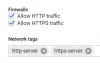
ORIGINAL TOPIC: Now for my confession: I couldn't get to the management console on the new one either. While reviewing the VM instance settings (deletion protection and adding the SSH public key) I noticed two little checkboxes to enable HTTP and HTTPS. They were OFF. I have no idea how. I had firewall rules on the VPC network for ports 80 and 443, but they were not applied to the VM instance with those special checkboxes ?!?!?!?! Anyway I enabled HTTPS (only, not HTTP) for the new VM instance and now I have the 3CX console.

Final item: Double checking the scheduled backup... I saw a deprecation warning for Google Drive. Dang. So I rigged it up to FTP the backups to a system here on premises, and it's going into a folder that's within my Dropbox ha ha. So I got cloud backup after all :)

Now I enriched 3CX for a support ticket ha ha. C'Est la Vie. Hopefully it will sit out there for me to use in the future.
 
  • Like
Reactions: AWS2P and cobaltit
Thanks for adding me and glad I could help. I'm guessing you clicked on one of those helpful 'suggestions' at one point that say it's bad juju to have http/https open to the world and you should close it and that's what happened. Anyways, for knowing nearly nothing about linux you accomplished quite a bit so kudos to you!
 
  • Like
Reactions: AWS2P
Hi Bob,

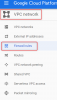
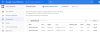
I'm Glad all was sorted in the end. If you click on the 3 dots next to your google cloud machine in the Google compute engine dashboard, and then select "view network details" I expect you should find the firewall rules that PBX Express creates for you (which include our specific HTTP and HTTPS ports).

In that case I'm under the impression that disabling the 2 little checkboxes you mentioned should not cause that issue for you since the explicit rules created by PBX Express should already take care of this. I'm wondering whether you already have some other general rules in place that apply to all machines and may be conflicting/blocking the the rules put in place by PBX Express

13801
 
Thanks again all... It's possible that I turned off those HTTP/HTTPS checkboxes (who else??), and yes I had been in and out of the VPC Firewall Rules page many times, as I have some 'allow' rules for various IP blocks set so that our softphones will operate in the field (on mobile data and customer site WiFi). I just didn't know what to look for. It was an adventure with a good outcome!!
 
I believe those checkboxes are disabled by default when making a new machine.
They don't do anything special other than enable some built in rules Google has it seems by giving the machine the target tags http-server and https-server:
13809

13808

So in case you made any custom changes where the target tag changed to "Apply to all" for example, then I don't know why your rules were affected.

Glad to know we have at least isolated the issue to be down to the firewall settings.
 
Thanks again. Hopefully anyone else who hits this one will benefit from the info and my adventure. The settings changed sometime during December... I log all of my actions and the3 only thing I did was to add another IP block to the 'pbxports' rule to allow our softphones to connect at a new customer site via their WiFi. I guess I somehow disabled the HTTP/HTTPS at the same time. I never saw it until yesterday as they are in the Edit Instance area not the firewall rules area.
 
I'll mark this one as solved then :)
 
Actually since this one is now marked solved - I'll start a separate ticket.
 
  • Like
Reactions: JohnS_3CX
Status
Not open for further replies.

Forum statistics

Threads
111,935
Messages
589,823
Members
164,816
Latest member
natedog