Solved unable to access remote admin console via Adsl

Status
Not open for further replies.

Aphteon

Free User
Joined
Dec 2, 2020
Messages
16
Reaction score
1
Hello,

Very strange :
About a configuration "on-premise mode", I can access to the 3cx admin console via my phone in accesspoint mode (connection share) with my pc but not when I initiate the connection via adsl. With another adsl connection same problem.

I tried to remove all blacklist ip. No change. (for info => https://domain_name.my3cx.fr:5001/).

I use a draytec vigor 165 router.

Can you help me ?
 
Yes, I did it. I assume that the problems began after the firmware upgrade. (not sure). I try a factory reset next week.
 
Here the result of the draytec NAT Active Sessions Table after trying connection :
Private IP Port #Pseudo Port Peer IP Port Interface
10.0.0.253 5001 5001 83.196.245.xyz (My adsl IP) 43230 WAN1
10.0.0.253 5001 5001 92.184.124.abc (My 4G IP) 51320 WAN1

It seems to be ok (router respond at the demand and initiate the nat correctly) but the problem is the same. I note too that application 3cx on my android phone run only in 4G mode, not via the wifi (via adsl).

I added my adsl ip address in whitelist to bypass the draytec firewall. Same result.

I run a netstat on the 3cx console, from 4G connection :
tcp 0 0 3cx.domain_name.local:5001 pop.92-184-124-10:51803 ESTABLISHED
tcp 0 0 3cx.domain_name.local:5001 pop.92-184-124-10:51795 ESTABLISHED

You have to continue the investigation, this only shows the attempt coming from outside.

You also need to see if the device actually forwards the packets to the PBX LAN IP otherwise this test will have shown nothing

You can also run a capture on the PBX to see if the traffic arrives to it in case you dont trust the draytec capture
 
  • Like
Reactions: Aphteon
You have to continue the investigation, this only shows the attempt coming from outside.

You also need to see if the device actually forwards the packets to the PBX LAN IP otherwise this test will have shown nothing

You can also run a capture on the PBX to see if the traffic arrives to it in case you dont trust the draytec capture
Thanks for your reply. I plan to go on site this week. I will start by resetting the router. Anyway, with another router it worked. This will not give me the exact cause of the problem, but will allow (?) the customer to benefit from all the 3CX features.
 
Hello
So I made a factory reset on the router. Same issue. I enabled syslog server on it. Here the informations :

IPBX 3CX : 10.0.0.253
Adsl static ip client side : 217.128.98.xxx
Adsl dynamic ip my side : 86.216.122.yyy
4G IP : 92.184.124.yyy

I tried to downgrade the firmware : same issue.
 

Attachments

Hello
So I made a factory reset on the router. Same issue. I enabled syslog server on it. Here the informations :

IPBX 3CX : 10.0.0.253
Adsl static ip client side : 217.128.98.xxx
Adsl dynamic ip my side : 86.216.122.yyy
4G IP : 92.184.124.yyy

I tried to downgrade the firmware : same issue.
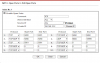
On the Draytek have you also added the ports into NAT --> Open Ports, not just into the firewall?
1607605579735.png
 
  • Like
Reactions: Aphteon
Are you using Port Redirection or Open Ports under NAT ?

Try using Open Ports - please post your settings.

Also have you configured any filters under Firewall ?

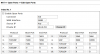
Here is a working open port setup

1607608751293.png
 
  • Like
Reactions: AWS2P
On the Draytek have you also added the ports into NAT --> Open Ports, not just into the firewall?
View attachment 19535
Thanks for your reply. I use only the NAT "open ports". No rules in firewall.(except the default rules). Remember, via 4G, no issues, just via adsl.
 
If you open up management of the router to the internet, can you manage it remotely - System Maintenance - Management,

This will see if your ISP is routing the traffic correctly.
 
If you open up management of the router to the internet, can you manage it remotely - System Maintenance - Management,

This will see if your ISP is routing the traffic correctly.
Yes I can manage the router via adsl. TCP 443.
 
At this point, I do a synthesis :

Communications, firewall checker are ok.

Via my phone in 4g mode, I can connect to the 3cx console admin, run the appli and view my state (available, busy, etc..)
Via adsl, wherever I am, unable to access to the 3cx console admin, view my state but strangely, I can initiate a communication.

Since I replaced the DLINK router (because it's not possible to deactivate the ALG) by the Vigor 165, I encountered this issues.
I discover a new issue : no ring when incoming call with Iphone and 3cx appli.

NAT and Firewall are not the cause since via accesspoint 4G all are correct.

1607623268032.png
 
Hello,

Just for your information, the solution of this issue was to change the mtu value to 1452 instead of the default value 1500. It's specific to the operator 'Orange'. Thanks for your helps.
 
  • Like
Reactions: AWS2P
Glad to hear this was resolved, thanks for updating the thread with your solution
 
Status
Not open for further replies.

Forum statistics

Threads
111,974
Messages
590,081
Members
164,899
Latest member
mazet