Unable to access the Settings part of the Live Chat Wordpress Plugin

Status
Not open for further replies.

ITSP

Premier Customer
Joined
May 4, 2022
Messages
69
Reaction score
10
Hello,

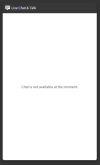
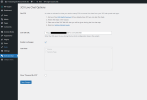
I've followed the guide and set up the Live Chat on 3CX v18 update 4 final. I installed the Wordpress plugin but I can't get to the Settings of it. When I try to access the URL of the Live Chat, I can access it but it displays a message saying "Chat is not available at the moment" even though I am logged in (as the agent and the chat is directed to come to me). This is the only thing 3CX related I can see ... what am I missing?
1660030461980.png
 
Last edited:
Unfortunately you are right, the advanced live chat configuration settings are in StartUP mode only. The management console has only basic live chat box configuration. We need update 6 to make it available for the dedicated installations from the webclient. Sorry but we need a bit more time to do this. I know it sucks a bit but please have some patience.

So I found the above reply from Nick. I guess that answers my question about not getting the Settings page. But then how do we get the Live Chat working?
 
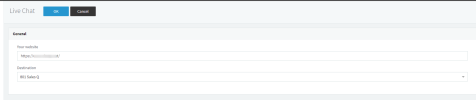
Have you configured the website address under the management console > messaging > live chat section?

1660058875307.png
 
Hi Charles,

Yes, I have. It's populated with the test website's address (hosted on wpengine.com if that makes a difference) and my own extension. I've tried putting the global office hours to so that it's open until late at night but I still get a chat not available message.

Would it matter that the Live Chat URL being given by 3CX is using the INTERNAL name (https://server.domain.local:5001/LiveChat123456)? I am using the EXTERNAL URL (https://server.publicdomain.org:5001/LiveChat123456) which I can access and they all point to the same server.

This is what I see when I access both the EXTERNAL and INTERNAL URLs using my browser so I wouldn't think it matters.

1660073987041.png
 
You will need to use the chat URL that is provided under the live chat settings within the management console and make sure you enter the website address as https://wpengine.com/
 
Hi Charles,

I did that but it still doesn't work which is logical because that domain is an internal one and can't be reached by WP Engine. The chat icon still shows up as not available at the moment.
 
Hello ITSP, can you send me please (probably in private message):
  • version of 3cx,
  • version of wordpress plugin,
  • livechat editor screenshot
 
Sent you the info. Thanks.
 
I've created a StartUP account and used it to test whether the problem lay with WPEngine but it works with StartUp so clearly the problem is on my end. Are there specific firewall ports for LiveChat other than 5001 that we need to open to make this work?
 
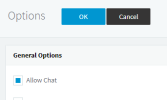
Found the solution. There is a setting under OPTIONS to allow chat. Tick this box and it works now.

1660189222481.png
 
Status
Not open for further replies.

Forum statistics

Threads
112,149
Messages
590,965
Members
165,170
Latest member
SupportRock