Unable to add IP phone

NoahFromRelyHost

Free User
Joined
Aug 6, 2024
Messages
6
Reaction score
0
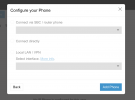
I'm using the 3CX Free tier and for some reason, I am not able to add additional IP phones any longer. After typing in the MAC address and selecting the phone model (or even clicking manual setup) all of the options are grayed out.

1736719450427.png

It used to say somewhere on the website there was a 3 IP phone limit (we currently only have 2 on the account - trying to add a 3rd) but I can't even find that any more. Are IP phones no longer supported on the free plan or is there some sort of issue I'm missing? The 2 we already have added are still working great.
 
You need an routerphone or sbc to connect to SMB
 
  • Like
Reactions: Alejandro_3CX
You need an routerphone or sbc to connect to SMB
The phone is the exact same model as the other two phones we have connected. Previously the option to “connect directly” was available for them, which would suggest they are router phones unless I’m missing something.
 
Which phone and firmware do you have?
 
You havent mentioned which phones you are using. Not all phones can be used as router phones. There are some models which might have a newer HARDWARE version which can be used as a router phone whereas the older HW version cannot.

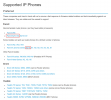
This is the full list of supported phones of 3CX https://www.3cx.com/sip-phones/

1736859894781.png

Here, I've highlighted one such example where the older X210 cannot be used as a router phone whereas the X210-V2 can.

You will also need to ensure that the phones are on the proper firmware provided by 3CX to ensure that the SBC capabilities are included in the firmware of these phones

https://www.3cx.com/docs/phone-firmwares/
 
  • Like
Reactions: bitn2
We’re using Yealink T23G phones. Keep in mind though this same behavior happens if I select to manually set up the phone for any model.
 
Have you upgraded the device to the latest 3cx firmware using the link Nicholas has provided?
 
We’re using Yealink T23G phones. Keep in mind though this same behavior happens if I select to manually set up the phone for any model.
Those are normal phones, in order to use them with the SMB installation you need to install first a 3CX SBC or provisioning a router phone, then you will be able to add those Yealink T23G as shown in this guide.

Please have a look here about what is the 3CX SBC or the router phones.
 
  • Like
Reactions: JohnS_3CX and bitn2
Sorry if maybe this is a silly question then but how was I able to directly connect the other phones of the same model? And yes the firmware is up to date but that wouldn’t make a difference as the option still isn’t available on the cloud UI.

Is a SBC a new requirement for 3CX SMB?
 
Sorry if maybe this is a silly question then but how was I able to directly connect the other phones of the same model? And yes the firmware is up to date but that wouldn’t make a difference as the option still isn’t available on the cloud UI.

Is a SBC a new requirement for 3CX SMB?
STUN is not supported nor recommended. If the phones will be remote then a 3CX SBC or router phone is needed.

Have a good day!
 
Do I need to buy a router phone or can I host something on proxmox or a VM? I don't have access to my router to open ports, not sure if this means that no matter what its not going to work?
 
SBC needs to be on same LAN your phones are, just use a simple Raspberry PI 3B+ or higher and you'll be good or if you have an old pc reinstall it with 3cx Debian iso SBC and you're done.
then in 3cx admin just change settings in each user with a desk phone to use SBC you just created.

same is possible if you buy a router phone , but you need to change one phone so may be first solution is no cost if you have an unused Pi or old PC to role as SBC
 
  • Like
Reactions: Alejandro_3CX
Hi, quick note to followup in this thread, in case it is helpful. The 3cx SBC can happily run as a VM on proxmox - I have a bunch of sites doing exactly this - Proxmox physical host inside the LAN office. SBC is installed as a (KVM Bare metal virtual machine - is most simple) - use the 3cx ISO installer in proxmox and choose the "SBC Install" config path. Once you do this, later in install it will demand info from you to proceed / to identify the public FQDN of your 3cx instance. There are also AUTH_TOKEN you must provide to validate the link from your 3cx to this SBC.

once you do this cleanly, your SBC will be alive, make sure it remains operational at all times lest you interrupt phone connectivity.

After that, the SBC is basically acting as a PROXY for all the VOIP traffic. This means both
(a) PNP Stuff related to phone auto-provision and discovery
(b) Voip phone call traffic / inbound outbound etc.

note for greatest simplicity, you will want to give an IP that does not change to your SBC inside your LAN at time of deployment. This could be a Static-assigned DHCP via MAC address mapping in your DHCP server, or a static IP like 192.168.0.222 or whatever it is for your environment which is free IP / works etc. But ideally don't change the SBC VM IP address. Makes life simpler so phones always know how to reach 3cx and vice-versa.

Then the SBC will proxy all the traffic phones<>3cx. Life is good. No drama with your office firewall and opening ports and NAT and .. firewall rules and on and on and on.

Towards your original question, 'how come it worked of for the first phone' - I believe the first time I deployed 3cx and didn't understand yet how SBC was important. I also deployed bare phone handset, and it worked. Then I added second, and third, and they kind-of-worked except - calls were weird, flakey, routing was confusing, I was having a bad day. It turns out that if your handset is not a modern type that does the SBC-integration-internally / self-traffic-tunnel for you -- then you really do want to have an SBC. Because firewall port rules and default behaviour otherwise make for a long day of 'arrgh why did this sort of work but now it does not?". VOIP traffic protocls with legacy hardware are ~complicated in terms of firewall traversal, port open/forward behaviour, traffic for data-voice vs session-init etc etc. All this to say. SBC is your friend. So much easier once it is lit up.

Happy testing!

Tim
 
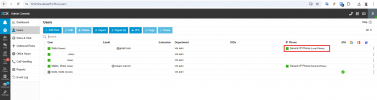
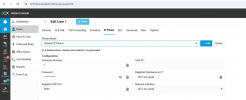
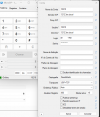
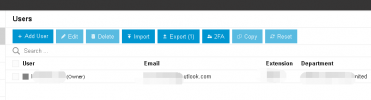
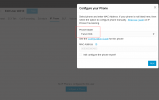
I believe that previously it was possible to add an IP phone directly because I was able to connect directly via MicroSIP and Intelbras ATA 200 and TIP125i, but currently on the 3CX Free SMB screen the option to connect directly is no longer avaliable (the option I used when I created the extension), I believe there has been some update in the last few months, remaning only the option to use SBC.Captura de tela 2025-04-11 232227.pngCaptura de tela 2025-04-11 232332.pngCaptura de tela 2025-04-11 232528.png
 
  • Like
Reactions: Evolute IT
I hv the same problem on the IP phone model, I can choose Generice IP Phone model, but it can not now.
If I didn't have IP phone, how to use 3CX system again?
 
If you don't have a physical phone you can use a web browser, or 3CX mobile app, or Windows Store 3CX app.
 
If you don't have a physical phone you can use a web browser, or 3CX mobile app, or Windows Store 3CX app.
Since I didnt have a physical phone, it can not setting up a Phone Model to the system. The user can not connected and the 3CX mobile app also didnt work.

1745346563673.png

1745346331182.png
 

Members Online Now

Forum statistics

Threads
111,832
Messages
589,278
Members
164,662
Latest member
DejanMDS