Unable to answer call in PWA - Chrome Version 129.0.6668.59 (Official Build) (64-bit)

double6jg

Bronze Partner
Basic Certified
Joined
Feb 4, 2021
Messages
73
Reaction score
9
Did a quick check on 129.0.6668.59 now and can confirm I get notifications.

It may take a few seconds after you launch the browser for the notifications to activate.
 
There must be some setting necessary as I can't use in either Chrome or Edge - have had PWA installed for testing for ages.

The issue came to light when installing onto a clients PC yesterday and attempting to show her how it worked to answer inbound calls when working from home. The flyin notification just does not show so no button to press to answer.

So I have 2 entirely separate machines showing the same behaviour.
 
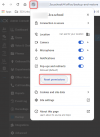
Can you try to reset your permissions in the browser, then reactivate the notifications? Ensure these notifications are enabled after completing this exercise.

1726750736327.png
 
  • Like
Reactions: JohnS_3CX
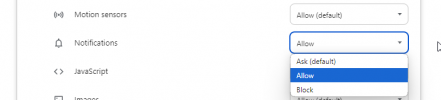
Ok I have it working but the default settings for Chrome do not allow it - they must have been changed in an upgrade as I haven't changed anything.

The missing setting is Notifications where the default is now Ask but it needs to be Allow

1726758906069.png
 
If they're not enabled the web client should show the bell icon in the upper left above the Team icon. I've seen the occasional post here where a browser got stuck somehow and needed notifications to be reset and set again, as implied above.

It's possible something changed recently though because the last couple I've tried to enable with people, the bell shows the image of the dialog as the instruction to the user but the browser prompt to allow it doesn't actually display. I think one was Firefox and I think the other was Chrome. Shift+reloading/F5 the web client seemed to fix it.
 
If they're not enabled the web client should show the bell icon in the upper left above the Team icon. I've seen the occasional post here where a browser got stuck somehow and needed notifications to be reset and set again, as implied above.

It's possible something changed recently though because the last couple I've tried to enable with people, the bell shows the image of the dialog as the instruction to the user but the browser prompt to allow it doesn't actually display. I think one was Firefox and I think the other was Chrome. Shift+reloading/F5 the web client seemed to fix it.
Yes. I did have to reset the browser and then maually alter the Notifications setting. I have this installed on 3 machines here and all needed resetting. I think it must be caused by a Chrome / Chromium (Edge) update.

And yes you are correct about the blue bell at top left which I hadn't noticed before.
 
Have done some more testing of other users installations and I am seeing the same - a Chromium update has reset the Notification settings in all cases I have looked at so far. FYI
 
FWIW I had an interesting situation just now, using the PWA. I noticed my PWA had a green square for my status (upper right) but on the Team tab I've apparently been Unregistered for a while. I was able to call *777 in that state, and chat, and see others' changes. A right click and shift+reload fixed it.
 
We have the same issue with newest chrome version 129.0.6668.71
Confusing is that as soon as we reactivate (disable and enable again) the notification setting in pwa -> app-info -> notifications
then it works. But as soon the pwa app is closed and start again we dont get notifications.
 
@bit101 Hmm, can't repro that in limited testing. Did you try the shift+reload? Are you on 20u2 or 20u3? (I'm on u2)
 
@bit101 Hmm, can't repro that in limited testing. Did you try the shift+reload? Are you on 20u2 or 20u3? (I'm on u2)
Hi SteveITS,

yes when i reload the pwa with strg + r then notifications works. But when i close the app and start it again it doesnt work.
We are on 20u2 build 715
 
Oh! I had closed PWA and reopened and it looked OK when I posted. I just changed my status and now the Team page changed to not registered, even though PWA shows the status change. Reloading fixed it as before. So not quite the same as you are seeing but I agree there's something wrong.
 
I skimmed through the notes twice and didn’t see it mentioned but I haven’t had a lot of coffee yet. :)

Didn’t notice this bug until this week, though if it only shows up when the PWA is closed, I leave it open, so ot might not trigger. We were going to hold off on upgrading for clients using phones due to the SP bug but apparently we shouldn’t upgrade those using the web client either. We log out client PCs by default each night. (Ones we manage)
 
Hi,

we figured out that this was a bug in Google Chrome browser that is fixed now. With the newest version of Chrome 129.0.6668.90 notifictions works immediately without needing to reload the pwa app.
 
Ah, thanks.

Which brings up something, it would be useful to have the PWA alert for a Chrome update, as some people don’t use Chrome.
 
Hello.
The same issue is occurring on "132.0.6834.84". Do you have any information?
When I press the answer button on the PWA, the notification disappears, but the conversation does not start.
 

Latest Posts

Forum statistics

Threads
111,962
Messages
589,993
Members
164,867
Latest member
swegner