Unable to Authorize Microsoft Dynamics 365

zeeb

Gold Partner
Joined
Mar 31, 2019
Messages
16
Reaction score
4
I'm trying to authorize Dynamics to connect it to 3CX. I already restarted the process because I thought I might be missing something, but I still can't get it to work.

I followed this guide: https://www.3cx.com/docs/dynamics-crm-integration/, prepared the app, set the API permissions, and waited 15 minutes. However, every time I hit "Authorize," I get a broken URL with a double slash, which leads to a 404 error. It seems that the tenant ID is missing in the URL.

https://login.microsoftonline.com//...2def155-4c47-4f5d-8ae3-99b7450a3e2a&resource=

When I manually add the tenant and client ID to the URL, it redirects me to an Office 365 login window, but after logging in, I get an error message from the 3cx API.

Any ideas?
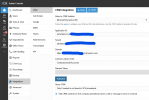
1738932442327.png
 
Hi @zeeb

From your screenshot I can see that the "Save" button is not greyed out which means that there are changes in the form that are not saved.
If you fill in all details and press "Save" before pressing "Authorize" do you still get the same issue?
 
Hi @zeeb

From your screenshot I can see that the "Save" button is not greyed out which means that there are changes in the form that are not saved.
If you fill in all details and press "Save" before pressing "Authorize" do you still get the same issue?
thank you so much! it was that simple!

1738935486207.png
 
I would check the application type that you created in Dynamics. Ensure that it's set to "Public client/native (mobile & desktop)".
 
I would check the application type that you created in Dynamics. Ensure that it's set to "Public client/native (mobile & desktop)".
It was the Save button! You need to fill in all the fields and, instead of clicking "Authorize" right away (which would be intuitive), you must first click Save at the top and then click Authorize.
 
It was the Save button! You need to fill in all the fields and, instead of clicking "Authorize" right away (which would be intuitive), you must first click Save at the top and then click Authorize.
Yes, I saw your response just after I sent mine! Good that you have it working!
 
Yes, I saw your response just after I sent mine! Good that you have it working!
Hi After you got connected did you manage to test ok, we have issue when we test a number ""System.Exception: Server returned a non successful status code - HTTPStatusCode=Forbidden - Reason=Forbidden - Content={"error":{"code":"0x80040225","message":"The specified user(Id = {0}) is disabled. Consider enabling this user. Additional Details: {1}"}}"""
The Integration user ( App ID for 3CX) has been configured with “System Administrator” security role within dynamics
 
Hi After you got connected did you manage to test ok, we have issue when we test a number ""System.Exception: Server returned a non successful status code - HTTPStatusCode=Forbidden - Reason=Forbidden - Content={"error":{"code":"0x80040225","message":"The specified user(Id = {0}) is disabled. Consider enabling this user. Additional Details: {1}"}}"""
The Integration user ( App ID for 3CX) has been configured with “System Administrator” security role within dynamics
Your issue is something else. It seems you're using a user account in Dynamics which is disabled.
 
  • Like
Reactions: Evolute IT