Unable to change prompts

noord

Bronze Partner
Basic Certified
Joined
Nov 25, 2015
Messages
244
Reaction score
168
It seems there might be an issue with prompt sets on v20U3RC (and possibly other versions, just noticing this now, don't change the prompts that often)

During installation, I selected the Dutch prompts as always.
Later, I needed to change the prompt for calldisabled_fwrule.wav / DISABLED_FWD because it says people need to contact the system administrator.
That's just really annoying because we got calls about it all day :-)

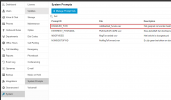
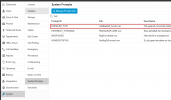
So, I went to system / prompts and copied the Dutch prompt set into a new one and changed the file.
I have set that new prompt set as the default.
I have set up that prompt set for every queue as well, although they were on 'use general prompt set (myNewSetsName)', just to make sure.
I even went into Advanced > Parameters and to the DN Properties-tab (which is hidden by default) and went to the specific user and updates the prompt set there as well.
But no matter what I do, 3CX always keeps playing back the .wav file from the Dutch folder.

So for now I have overwritten the file in the Dutch folder and that works.
It seems new prompt sets aren't being used by system extensions (like the busy prompt) after changing the prompt set.
I had the same issue with changing the default voice mail greeting for everyone. That didn't work either and I also had to manually update the wav file.

It's also impossible to set all prompts to English. I can change it and then it will also show up with the queue's settings, but the system will still speak Dutch.

I did stop and restart services after changing prompts and the files are uploaded correctly in the correct folder (of my copied prompt set).
 
Thanks, yes.
I have done everything correctly and the files are in the right format at the right location.
It's just that the system doesn't want to switch to the new prompts set, no matter what I try.
At least not for the system-level prompts like calldisabled_fwrule.wav . It keeps playing the one from the Dutch folder (1e6ed594-af95-4bb4-af56-b957ac87d6d7) while in my own folder ( 729913b0-e4d5-405e-ade6-d92c02c63b54) is the right file.

Ultimately I just copied the wav from 7299... to 1e6e... and that works fine - until 3CX updates the prompts of course and this is more of a hack than a best practice of course :)
 
This would also depend on which promptset the users have defined. Have you changed this to reflect on the users as well?
 
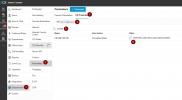
There is no official setting for changing the prompts for the user, so I even went here instead:
1727856434791.png

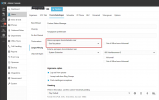
I have this user setup to 'give busy tone' when in this status:
1727856519159.png


But when I call him, the file from 1e6ed594-af95-4bb4-af56-b957ac87d6d7 (original Dutch folder) is played no matter what. It seems that once you set the language of the prompts during installation and set everything up as you want, there is no way to change the prompt set being used for this file / the general system prompts like the 'extension not reachable'

On a side note, I also would like to petition 3CX to change the prompt calldisabled_fwrule.wav . That file just plays when someone has their settings as above. However, the prompt also says 'please contact the system administrator' to anyone that calls that user, making it seem like there is a technical error.
 
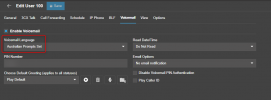
Dont complicate things for yourself by going into the parameters. Just go into their voicemail tab and select your new prompt set.

1727857118544.png

User 100 will have the Australian prompt set played back to them when they call any internal user. If I call extension 101 which has the dutch prompt set, it will play the australian prompt set for me, on extension 100, because that is the language I have set as my user.

When an external caller is calling to extension 100 they will hear the australian prompt set. When they call to extension 101 they will hear the dutch prompt set.

All you have to do is change the prompt set for all your users. It will NOT go and change the prompt set retrospectively. You have to do it manually.
 
Thanks for your help so far.
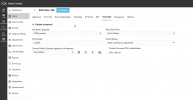
However, this specific user is already set-up correctly:
1727857639126.png

I was not aware that the prompt set set-up for the voicemail, would also impact calldisabled_fwrule.wav (or at least, it should). So I changed the ID in the parameters instead.

Can you replicate this:
1. Copy any existing prompt set (using the normal admin GUI)
2. Set the new set as default
3. Upload a new file for calldisabled_fwrule.wav using the GUI
1727857781991.png

4. Play back the file to a phone from that same screen. You will get the correct (new) file played back.
5. Restart service to make sure it'll pick up the new WAV
6. Call an extension that is configured to play the busy message. This is an already existing extension in my example. I did not test creating a new extension and seeing if that will use the new file.

No matter what you try and where you change things, it will always play the wav from the prompt set you had set up when you installed the system and created the user. In my experience :)
 

Attachments

  • 1727857860475.png
    1727857860475.png
    34.6 KB · Views: 8
Nicholas is right, the prompt set in this specific case (EndCall) is dictated by the caller. Enable verbose logging, repeat the call and check 3CXIVR.log for messages like this:

02/10/2024 15:09:44.799 [00005698] IVRHandlerTO = 102
02/10/2024 15:09:44.799 [00005698] IVRHandlerMENU = EndCall
02/10/2024 15:09:44.799 [00005698] IVRSubject = p=DISABLED_FWD
02/10/2024 15:09:44.799 [00005698] IVRHandlerFROM = 102
02/10/2024 15:09:44.799 [00005698] IVRHandlerIN = 1
02/10/2024 15:09:44.799 [00005698] IVRHandlerDID = -
02/10/2024 15:09:44.799 [00005698] IVRCRMContact =
02/10/2024 15:09:44.800 [00005698] 2 NEW NTF : 102 -> 102 (EndCall)
02/10/2024 15:09:44.800 [00005698] 2 ENQUEUE START 0
02/10/2024 15:09:44.800 [00005698] DR Added new session 2, total 1
02/10/2024 15:09:44.800 [00003e2c] 2 PROCESS START 0
02/10/2024 15:09:44.800 [00003e2c] 2 $_I = 2
02/10/2024 15:09:44.800 [00003e2c] 2 $_A = 102
02/10/2024 15:09:44.800 [00003e2c] 2 $_B = 102
02/10/2024 15:09:44.800 [00003e2c] 2 $_C =
02/10/2024 15:09:44.800 [00003e2c] 2 $_P = #DISABLED_FWD
02/10/2024 15:09:44.800 [00003e2c] 2 $_V = -
02/10/2024 15:09:44.800 [00003e2c] 2 $_S = 5060
02/10/2024 15:09:44.800 [00003e2c] 2 $_O = 100
02/10/2024 15:09:44.800 [00003e2c] Requesting DN property PROMPTSETID
02/10/2024 15:09:44.801 [00003e2c] 2 PromptSet 80f7eec5-e290-426f-8ab8-8d82780799c8 (en)
02/10/2024 15:09:44.801 [00003e2c] 2 Type=NTF To=102 From=102 Prompt by 102

02/10/2024 15:09:44.801 [00003e2c] IVR session has been started for call from 102
02/10/2024 15:09:44.801 [00003e2c] 2 Starting PromptAction
02/10/2024 15:09:44.801 [00003e2c] 2 PLAY id = 1 : $_P = C:/ProgramData/3CX/Instance1/Data/Ivr/Prompts/Sets/80f7eec5-e290-426f-8ab8-8d82780799c8/calldisabled_fwrule.wav

The line in bold above will tell you which ID and why has been used in the call.
As you correctly stated, IVR service needs restart after patching the prompts as they are cached.

Caching can be disabled by creating IVR_CACHE_DISABLE parameter with value equal to 1 and restarting the IVR service.
Then it will load the file from the disk every time it needs to be played back.
 
Thanks.
I misunderstood what Nicholas wrote.
I only understood it when I just now created the logfiles and took a look at the logfile you mentioned and noticed it was grabbing the file of the caller (and not the calléé) :) We understand logfiles better than forum posts.....

I understand know what you mean and how it works. It seems a little bit unlogical to me at first but I do understand how / why this has been set-up this way.
(With illogical, I mean 1) I didn't immediately create a link between someone's voicemail language and the language of the busy prompt being played back to them, 2) I would have expected the prompt being in the language of the callée not the caller).
But now I understand what it does and how it works.

Thanks!
 
  • Like
Reactions: NicholasP_3CX
It worked perfectly for me following the logic indicated.

Follow the steps in a simple manner

1 = Create a copy of the language file in SYSTEM PROMPT

2 = Choose this new language and then choose which audios to change and change it in the file and choose the audio (ideally, there would be a confirmation that you received the file but there isn't) and trust that the system received it.

3 = Restart the system services

4 = Change the language of the extensions' mailbox.

Then you can test that it is working.
 

Forum statistics

Threads
111,955
Messages
589,926
Members
164,856
Latest member
Luca Christiansen