- Joined
- Feb 22, 2024
- Messages
- 25
- Reaction score
- 0
im unable to connect yealink t58w pro to one of my extension
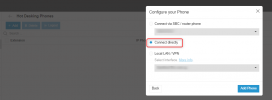
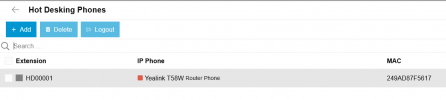
the phone model and mac address has been added and i reboot phone config was uploaded to phone but i got auth error from 3cx when phone is trying to connect to 3cx which is on premise setup
here is details from the log
SIP request (REGISTER) from 69.156.162.123 was rejected. Reason: Block WAN requests is ON. Message:REGISTER sip:finespeak.3cx.ca:5060 SIP/2.0Via: SIP/2.0/UDP 192.168.2.205:41047;branch=z9hG4bK669497772;received=69.156.162.123Max-Forwards: 70Contact: <sip:[email protected]:41047>To: "HD00001" <sip:[email protected]:5060>From: "HD00001" <sip:[email protected]:5060>;tag=669279306Call-ID: [email protected]: 2 REGISTERExpires: 120Allow: INVITE, INFO, PRACK, ACK, BYE, CANCEL, OPTIONS, NOTIFY, REGISTER, SUBSCRIBE, REFER, PUBLISH, UPDATE, MESSAGEProxy-Authorization: Digest username="F7Kr3oIOfH",realm="3CXPhoneSystem",nonce="414d535965e2143090:1c9eda38b562dcc97544fbb72080db5f",uri="sip:finespeak.3cx.ca:5060",response="b7343779d10118bc720bbbb7d73f09ee",algorithm=MD5User-Agent: Yealink SIP-T58W 150.86.0.50 249ad87f5617Allow-Events: talk, hold, conference, refer, check-syncMac: 24:9a:d8:7f:56:17Content-Length: 0
hope you can help me with that
thanks
the phone model and mac address has been added and i reboot phone config was uploaded to phone but i got auth error from 3cx when phone is trying to connect to 3cx which is on premise setup
here is details from the log
SIP request (REGISTER) from 69.156.162.123 was rejected. Reason: Block WAN requests is ON. Message:REGISTER sip:finespeak.3cx.ca:5060 SIP/2.0Via: SIP/2.0/UDP 192.168.2.205:41047;branch=z9hG4bK669497772;received=69.156.162.123Max-Forwards: 70Contact: <sip:[email protected]:41047>To: "HD00001" <sip:[email protected]:5060>From: "HD00001" <sip:[email protected]:5060>;tag=669279306Call-ID: [email protected]: 2 REGISTERExpires: 120Allow: INVITE, INFO, PRACK, ACK, BYE, CANCEL, OPTIONS, NOTIFY, REGISTER, SUBSCRIBE, REFER, PUBLISH, UPDATE, MESSAGEProxy-Authorization: Digest username="F7Kr3oIOfH",realm="3CXPhoneSystem",nonce="414d535965e2143090:1c9eda38b562dcc97544fbb72080db5f",uri="sip:finespeak.3cx.ca:5060",response="b7343779d10118bc720bbbb7d73f09ee",algorithm=MD5User-Agent: Yealink SIP-T58W 150.86.0.50 249ad87f5617Allow-Events: talk, hold, conference, refer, check-syncMac: 24:9a:d8:7f:56:17Content-Length: 0
hope you can help me with that
thanks