


- Joined
- Oct 2, 2019
- Messages
- 5
- Reaction score
- 0
Hello, I am trying to change the FQDN on a paid licence.
I uninstalled 3CX using the command line as follows.
sudo apt-get purge 3cxpbx
sudo apt-get update
sudo apt-get autoremove
I then deleted the entire instance off Amazon cloud.
I am not using backup to restore.
When I reinstall a new one, the old unwanted FQDN is still there. I have every other option (how many digits for the extension, etc), but no FQDN naming option.
I swear there is nowhere in the portal to 'release' the FQDN. I looked through every menu and submenu, but there is no such option. The unwanted FQDN is displayed throughout many places in the portal and can't be changed. The version says 16.0.676.
Please help me finally get rid of this unwanted FQDN. It's been a nightmare.
I uninstalled 3CX using the command line as follows.
sudo apt-get purge 3cxpbx
sudo apt-get update
sudo apt-get autoremove
I then deleted the entire instance off Amazon cloud.
I am not using backup to restore.
When I reinstall a new one, the old unwanted FQDN is still there. I have every other option (how many digits for the extension, etc), but no FQDN naming option.
I swear there is nowhere in the portal to 'release' the FQDN. I looked through every menu and submenu, but there is no such option. The unwanted FQDN is displayed throughout many places in the portal and can't be changed. The version says 16.0.676.
Please help me finally get rid of this unwanted FQDN. It's been a nightmare.
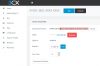
 You need to login with the email account that key is bound to. Then you will see all options.


