- Joined
- Feb 12, 2017
- Messages
- 17
- Reaction score
- 3
hello,
just updated the new release to
and the sbc is on windows 10 and cannot update it :
have you the same ?
message error is :
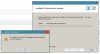
from log file :
####
thank you for any help,.
best,
just updated the new release to
| Version Number | 16.0.1581 |
and the sbc is on windows 10 and cannot update it :
have you the same ?
message error is :
from log file :
Code:
Action start 12:12:38: CostFinalize.
MSI (s) (64:24) [12:12:38:869]: PROPERTY CHANGE: Adding OutOfDiskSpace property. Its value is '0'.
MSI (s) (64:24) [12:12:38:869]: PROPERTY CHANGE: Adding OutOfNoRbDiskSpace property. Its value is '0'.
MSI (s) (64:24) [12:12:38:869]: PROPERTY CHANGE: Adding PrimaryVolumeSpaceAvailable property. Its value is '0'.
MSI (s) (64:24) [12:12:38:869]: PROPERTY CHANGE: Adding PrimaryVolumeSpaceRequired property. Its value is '0'.
MSI (s) (64:24) [12:12:38:869]: PROPERTY CHANGE: Adding PrimaryVolumeSpaceRemaining property. Its value is '0'.
MSI (s) (64:24) [12:12:38:869]: Note: 1: 2262 2: Condition 3: -2147287038
MSI (s) (64:24) [12:12:38:869]: PROPERTY CHANGE: Adding CXSBC_1_Dir property. Its value is 'C:\ProgramData\Microsoft\Windows\Start Menu\Programs\3CX SBC\'.
MSI (s) (64:24) [12:12:38:870]: PROPERTY CHANGE: Adding CXSBC_Dir property. Its value is 'C:\ProgramData\3CXSBC\'.
MSI (s) (64:24) [12:12:38:870]: PROPERTY CHANGE: Adding Logs_Dir property. Its value is 'C:\ProgramData\3CXSBC\Logs\'.
MSI (s) (64:24) [12:12:38:870]: Note: 1: 1324 2: SAUVEG~1/appdata/local/temp 3: 1
MSI (s) (64:24) [12:17:42:793]: Product: 3CX Session Border Controller -- Error 1324. The folder path 'SAUVEG~1/appdata/local/temp' contains an invalid character.

Action ended 12:17:42: CostFinalize. Return value 3.
Action ended 12:17:42: INSTALL. Return value 3.
####
thank you for any help,.
best,