


- Joined
- Feb 10, 2025
- Messages
- 13
- Reaction score
- 5
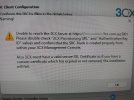
The full error message is in the attached screenshot.
"Unable to reach the 3cx server at ... Please double check "3CX Provisioning URL" and "Authentication Key ID" values and confirm that the SBC Trunk is created properly from within your 3CX Management Console. Also 3CX must have a valid secure SSL Certificate so if you have a custom certificate which has expired or not renewed, the installation will fail."
The error occurs when installing the SBC on a Windows 11 computer using the MSI file. The same error message appears on a different laptop connected to the same network.
After connecting a laptop to a phone hotspot, the SBC installs successfully without the error message and comes online. However, after disconnecting from the hotspot, the SBC shows as offline in the 3CX web portal.
I installed the SBC on a Raspberry Pi in my office, tested it, and then brought it to the customer's site, only to find that the SBC would not come online at the customer's premises.
What has been attempted:
ISP: Aussie Broadband
The problem was resolved by changing the Internet service provider. I am curious to know what caused the issue, as this is the second customer where I have encountered this error message. What else should I check?
"Unable to reach the 3cx server at ... Please double check "3CX Provisioning URL" and "Authentication Key ID" values and confirm that the SBC Trunk is created properly from within your 3CX Management Console. Also 3CX must have a valid secure SSL Certificate so if you have a custom certificate which has expired or not renewed, the installation will fail."
The error occurs when installing the SBC on a Windows 11 computer using the MSI file. The same error message appears on a different laptop connected to the same network.
After connecting a laptop to a phone hotspot, the SBC installs successfully without the error message and comes online. However, after disconnecting from the hotspot, the SBC shows as offline in the 3CX web portal.
I installed the SBC on a Raspberry Pi in my office, tested it, and then brought it to the customer's site, only to find that the SBC would not come online at the customer's premises.
What has been attempted:
- Changed DNS to 8.8.8.8 and removed ISP DNS server details.
- Changed EWAN connection settings under "Advanced" to enable "Full-cone NAT".
- Disabled the SPI-4 firewall under the "Security" tab.
- Tried placing the Raspberry Pi's local IP address into the "DMZ".
- Accessed the web address https://...3cx.com.au:5001 successfully in a browser, with no certificate errors.
- Disabled all ALG protocols on the "ALG" tab of the TP-Link VX220-G2v router
ISP: Aussie Broadband
The problem was resolved by changing the Internet service provider. I am curious to know what caused the issue, as this is the second customer where I have encountered this error message. What else should I check?
Attachments
Last edited:


