- Joined
- Feb 6, 2023
- Messages
- 3
- Reaction score
- 0
Hi,
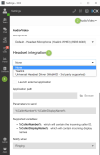
I want to test my new Yealink WH66 headset with 3CX. To do this, I followed the Yealink WH66 integration guide (Yealink Support).
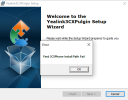
The guide tells me to install the Yealink3CXPlugin, and after that, to restart my pc. Pretty straight forward. Once I downloaded the .zip file, I tried to execute the .msi file to install the plugin. This gave me the error : “Find 3CXPhone Install Path Fail”.
I have tried executing the .msi file as administrator by using Powershell in elevated mode. And by moving it to a root folder in my C drive. This way OneDrive could not cause any trouble. Even then, I get the same error as mentioned above.
Lastly, I tried executing the .msi file on a newly installed Win11 Pro pc. Same deal.
I’d really appreciate any suggestions!
I want to test my new Yealink WH66 headset with 3CX. To do this, I followed the Yealink WH66 integration guide (Yealink Support).
The guide tells me to install the Yealink3CXPlugin, and after that, to restart my pc. Pretty straight forward. Once I downloaded the .zip file, I tried to execute the .msi file to install the plugin. This gave me the error : “Find 3CXPhone Install Path Fail”.
I have tried executing the .msi file as administrator by using Powershell in elevated mode. And by moving it to a root folder in my C drive. This way OneDrive could not cause any trouble. Even then, I get the same error as mentioned above.
Lastly, I tried executing the .msi file on a newly installed Win11 Pro pc. Same deal.
I’d really appreciate any suggestions!