• We do not provide troubleshooting help for unsupported phones. Please try with a supported phone.
  • V20 Update 10 Alpha 2 Learn more

Unable to provision phones

Status
Not open for further replies.

brianlee79

SOHO User
Joined
Jan 19, 2022
Messages
6
Reaction score
0
Good Evening,

I am having trouble provisioning my phones.

Running 3cx in the cloud
SBC is setup and running
Phones are on the same subnet at the SBC.
Firewall shows all Green in the Management Portal
3cx app works fine

Phone shows up in the management console but always shows "new" even after assigning it to the user.
Phone always says "account not configured or setup"

Still not understanding what I am doing wrong.

Is there something with my firewall that is causing the issue ? I thought the SBC addressed all the firewall issues upon install.

Any ideas ?
 
Are you allowing 3cx https port out from the sbc / phone network as this is used to provision the phones

Do you have any dhcp option configured on your dhcp server ie option 66 - remove it

What phones are you using, are there on the correct firmware
 
Last edited:
Hi Brian,

The 3CX app should work regardless of the phones/SBC so that is to be expected.

As for your phones, can you please tell us the following?

  • Model(s)
  • Firmware Version
 
Hi Brian,

The 3CX app should work regardless of the phones/SBC so that is to be expected.

As for your phones, can you please tell us the following?

  • Model(s) Grandstream 2612
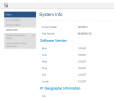
  • Firmware Version: See picture
 

Attachments

  • Phone2612.png
    Phone2612.png
    8.9 KB · Views: 10
1. Please select all the "new" devices and press reject to clear them
2. Then reset your phone, and wait until it appears as "new" again
3. When it appears, assign your phone to an extension
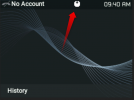
4. Then immediately check: does this little arrow appear on the top of the screen?

1642689981758.png
 
1. Please select all the "new" devices and press reject to clear them
2. Then reset your phone, and wait until it appears as "new" again
3. When it appears, assign your phone to an extension
4. Then immediately check: does this little arrow appear on the top of the screen?

View attachment 27297

The phone didn't show back up, but the the little arrow appears after restart and then goes away
 
If the phone didn't show up, then you were seeing old entries that were no longer valid.

Currently your SBC cannot see the phones, this is the first thing you need to troubleshoot.

- Where and what is your SBC running on? (VM, physical PC, Raspberry Pi?)
- What OS is the SBC running on?
- If on a Windows PC, are there other things installed or is it a dedicated PC?
- ..and how many LAN cards does Windows see in the network settings?
 
If the phone didn't show up, then you were seeing old entries that were no longer valid.

Currently your SBC cannot see the phones, this is the first thing you need to troubleshoot.

- Where and what is your SBC running on? (VM, physical PC, Raspberry Pi?) Physical P
- What OS is the SBC running on? Windows 10 Pro
- If on a Windows PC, are there other things installed or is it a dedicated PC? Yes, biggest thing running is CCTV app to view cameras off a NVR
- ..and how many LAN cards does Windows see in the network settings? Just one LAN card, using a static address
 
Hi Brian,

You might be better of running the SBC on a separate, dedicated machine then. Or if you cannot do that, consider running a VM inside the current PC, and deploying our Debian ISO in SBC mode.

This should give you a more isolate SBC machine that will be more reliable in the long run. If you need assistance on how to do this I will be glad to help.
 
Status
Not open for further replies.

Forum statistics

Threads
112,149
Messages
590,965
Members
165,170
Latest member
SupportRock