- Joined
- Mar 22, 2024
- Messages
- 24
- Reaction score
- 4
Hello everyone,
I encountered an issue with automatic provisioning on an up-to-date M300 base station (530 B1400).
It was already installed and had two extensions successfully provisioned.
After adding two DECT phones, I created the extensions in 3CX, added them to the base station via 3CX, and restarted the base from its interface so it could retrieve the two new profiles.
However, it didn’t work — the base just wouldn’t fetch anything.
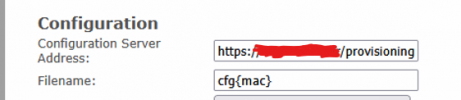
I tried everything: with and without the cfg{mac} file, checked if the URL shown in the syslog was correct, reset the base and did a full reconfiguration, rebuilt the 3CX configuration from scratch — nothing worked.
I ended up having to configure it manually like an M700.
From the syslog, the error message was:
loc3 .Info 2025-08-01T10:10:23Z 133-[ RemCfg: Attempting fetch of file: https://fqdn.on3cx.fr/provisioning/4irXXXXXfnj/cfg000413BXXXXC]
loc3 .Info 2025-08-01T10:10:23Z 133-[ RemCfg: Error loading file]
On the 3CX logs: nothing.
When I paste the provisioning URL from the Snom syslog into a browser, I can download the provisioning file successfully. The phone is on the same subnet as the base. Same network settings, same gateway, etc.
Has the M300 turned into AOL?
Thanks.
best regards
I encountered an issue with automatic provisioning on an up-to-date M300 base station (530 B1400).
It was already installed and had two extensions successfully provisioned.
After adding two DECT phones, I created the extensions in 3CX, added them to the base station via 3CX, and restarted the base from its interface so it could retrieve the two new profiles.
However, it didn’t work — the base just wouldn’t fetch anything.
I tried everything: with and without the cfg{mac} file, checked if the URL shown in the syslog was correct, reset the base and did a full reconfiguration, rebuilt the 3CX configuration from scratch — nothing worked.
I ended up having to configure it manually like an M700.
From the syslog, the error message was:
loc3 .Info 2025-08-01T10:10:23Z 133-[ RemCfg: Attempting fetch of file: https://fqdn.on3cx.fr/provisioning/4irXXXXXfnj/cfg000413BXXXXC]
loc3 .Info 2025-08-01T10:10:23Z 133-[ RemCfg: Error loading file]
On the 3CX logs: nothing.
When I paste the provisioning URL from the Snom syslog into a browser, I can download the provisioning file successfully. The phone is on the same subnet as the base. Same network settings, same gateway, etc.
Has the M300 turned into AOL?
Thanks.
best regards