Unable to see extensions & presence on Master Bridge side

Status
Not open for further replies.

providencetg

Premier Customer
Joined
Oct 4, 2010
Messages
85
Reaction score
27
Good day,

3CX v18 Update 4 (build 965) on both sides with Enterprise.

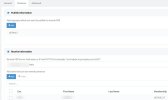
I have been trying to solve an issue with my bridge between two systems. I can see the extensions from the Master on the Slave side. However, no matter what I have tried, I am unable to see the slave extensions on the Master side.

There is no issues calling a know slave extension from the Master side. Just don't see it.

I saw a post on this but it never explained what the issue was and all of my settings seems to be the same.

Thanks
Alexander
 

Attachments

  • 2022-07-20_12-27-38.jpg
    2022-07-20_12-27-38.jpg
    60.4 KB · Views: 44
Check the slave side and make sure the groups are shared correctly both ways.
 
Check the slave side and make sure the groups are shared correctly both ways.
I have done this several times with no luck. I have even deleted Master and Slave and recreated and still only the Slave side can see the Master presences. The Master is not seeing the Slave extensions.
 
Can you try to disable the publish presence settings from the Slave and receive presence from the master, then re-enable the publish presence settings from the Slave and receive presence on the master, making sure the extension groups are set in the slave from which should show presence and within master choosing the extensions that should receive presence. Additionally, check that URL you have entered on the Master remote PBX (slave) here, you can also try the actual IP address and the port if other than 443.
 
@providencetg also check the Blacklist section.
Bridges might be registered but since Presence is on https, then you may have the ip of the Bridge at your blacklist section.
 
  • Like
Reactions: Charles_3CX
@providencetg also check the Blacklist section.
Bridges might be registered but since Presence is on https, then you may have the ip of the Bridge at your blacklist section.
Had previously checked this and also added them to the allow list.
 
Can you try to disable the publish presence settings from the Slave and receive presence from the master, then re-enable the publish presence settings from the Slave and receive presence on the master, making sure the extension groups are set in the slave from which should show presence and within master choosing the extensions that should receive presence. Additionally, check that URL you have entered on the Master remote PBX (slave) here, you can also try the actual IP address and the port if other than 443.
Tried these options and no joy! it is really strange..
 
I can suggest opening a ticket with us at Techical support through your partner portal for us to check with you.
Tried these options and no joy! it is really strange..
 
Running into the same problem on this version (18.0 (Build 965).
Did you find a solution in the end?
 
Status
Not open for further replies.

Forum statistics

Threads
111,974
Messages
590,081
Members
164,899
Latest member
mazet