


- Joined
- Apr 27, 2023
- Messages
- 20
- Reaction score
- 2
Google AI is freaking out saying I need to do this
"Hello,
I am the system owner and only user for my 3CX Hosted instance ([Your FQDN: ----.3cx.cloud]). I am trying to add my working DID (Direct Inward Dialing number) to the conferencing settings so a dial-in phone number appears in meeting invitations.
The 'System' menu option where the 'Conferencing' settings are located is not visible in my admin panel. The current version is 20.0 Update 8.
I understand that Console Restrictions are likely enabled by default for hosted systems. Could you please remove the console restrictions from my instance so I can access the full admin menu and configure my dial-in number?
Thank you."
I am on the old 3X Free Tier(10 users) but it swears I should have ADMIN CONSOLE > CONFERENCING and I don't. In the office, same IP. Any idea how I can get my DID number on the web conferencing section?
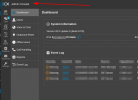 Thank you.
"Hello,
I am the system owner and only user for my 3CX Hosted instance ([Your FQDN: ----.3cx.cloud]). I am trying to add my working DID (Direct Inward Dialing number) to the conferencing settings so a dial-in phone number appears in meeting invitations.
The 'System' menu option where the 'Conferencing' settings are located is not visible in my admin panel. The current version is 20.0 Update 8.
I understand that Console Restrictions are likely enabled by default for hosted systems. Could you please remove the console restrictions from my instance so I can access the full admin menu and configure my dial-in number?
Thank you."
I am on the old 3X Free Tier(10 users) but it swears I should have ADMIN CONSOLE > CONFERENCING and I don't. In the office, same IP. Any idea how I can get my DID number on the web conferencing section?
Thank you.


