


- Joined
- Jul 24, 2021
- Messages
- 41
- Reaction score
- 16
This is annoying. I can't uninstall the v18 PWA.
I built a 3CX v20 PBX and installed its PWA which showed up in both my Windows 11 "Installed apps" and "Programs and Features" as "3CX (PWA)".
I noticed that in my list of installed apps I also had a v18 PWA installed which shows just as "3CX":
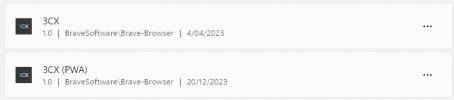
Seeing as though I didn't need need the earlier one any more, I clicked the "..." to uninstall it, but when I ran that, it removed the newer "3CX (PWA)" and left the 3CX app (4/04/2023) you can see in the screenshot in some kind of weird orphan state, and no amount of trying to uninstall it will remove the darn thing! I have rebooted, deleted everything from my Brave Browser cache, and have been down many web-search dead-ends to try and rectify this small yet aggravating little issue that's just gnawing away at me.
I would appreciate a response of type "I've had that exact same issue and this is how you fix it" over "try this / try that", but will take whatever I can get. Chances are, if it's in the first few pages of Google search results - I've probably tried it already. Just so you know I've tried from "Programs and Features" installed of "Installed apps". I've also tried installing then uninstalling the new (v20) PWA, and then trying again, and then doing the same for the old PWA. Seems like whatever I do, this thing won't budge. If only I knew how Windows builds the list of installed apps so I can rip it out manually bit by bit (file by file, reg key by reg key).
Word of warning when upgrading to 3CX v20 - UNINSTALL ALL THE LEGACY PWA BEFORE YOU GO INSTALLING THE NEW ONE!
I built a 3CX v20 PBX and installed its PWA which showed up in both my Windows 11 "Installed apps" and "Programs and Features" as "3CX (PWA)".
I noticed that in my list of installed apps I also had a v18 PWA installed which shows just as "3CX":
Seeing as though I didn't need need the earlier one any more, I clicked the "..." to uninstall it, but when I ran that, it removed the newer "3CX (PWA)" and left the 3CX app (4/04/2023) you can see in the screenshot in some kind of weird orphan state, and no amount of trying to uninstall it will remove the darn thing! I have rebooted, deleted everything from my Brave Browser cache, and have been down many web-search dead-ends to try and rectify this small yet aggravating little issue that's just gnawing away at me.
I would appreciate a response of type "I've had that exact same issue and this is how you fix it" over "try this / try that", but will take whatever I can get. Chances are, if it's in the first few pages of Google search results - I've probably tried it already. Just so you know I've tried from "Programs and Features" installed of "Installed apps". I've also tried installing then uninstalling the new (v20) PWA, and then trying again, and then doing the same for the old PWA. Seems like whatever I do, this thing won't budge. If only I knew how Windows builds the list of installed apps so I can rip it out manually bit by bit (file by file, reg key by reg key).
Word of warning when upgrading to 3CX v20 - UNINSTALL ALL THE LEGACY PWA BEFORE YOU GO INSTALLING THE NEW ONE!



