• We do not provide troubleshooting help for unsupported phones. Please try with a supported phone.
  • V20 Update 10 Alpha 2 Learn more

Unable to upgrade phone firmware, and re-provision through SBC

Status
Not open for further replies.

vlt

Bronze Partner
Joined
Oct 19, 2021
Messages
16
Reaction score
1
Hello,

On the latest 3CX SBC and latest 3CX PBX.

Local phones are easily able to upgrade the phones firmware and re provision, but we are unable to update BLF's.

The way around this now is we factory wipe the phones, and then provision it again, and update the phone firmware manually.. We are using Rasberry Pi and have a Windows SBC at different locations, both SBC's do not work.

We can reboot the phone, but firmware upgrade and re-provision doesn't do anything. We have Yealink T48G, and T48S. Also the conference phone CP960 is not working as well.

Thanks in Advance.
 
Lets clear up a few things first

1. Firmware
The device firmware upgrade instructions can be found in our guide. You need to have the minimum firmware stated here installed, otherwise you cannot upgrade to newer versions. The phone thinks that the update is "too new" and rejects it. Just follow the guide here to upgrade your phones manually.

2. BLFs
First make you have the correct firmware like I mentioned above. Do not provision the phone if you have not yet updated it. The BLFs are part of the phone's general config and should update whenever you press the reprovision button in 3CX or whenever you reboot the phone, or daily when the phone auto-provisions itself every 24hrs.

You said that neither the phones nor the SBC works and this is usually a sign of misconfiguration. Let's start by having you read this post below, and providing us with as much detail as you can so we can understand how your system is currently laid out., especially where the PBX is and where the SBCs are in relation to each other.
https://www.3cx.com/community/threads/information-to-provide-when-requesting-help.67558/
 
HI John,

1. Thanks for the quick reply, it does meat the minimum required firmware. The SIP-T48S is on 66.85.0.5.
2.
  • 3CX Version, Professional Annual
  • Server OS, Debian 9
  • Is the 3CX Server Hosted and where? On-Premise, but with several locations using SBC
  • IP Phone Make/Model/Firmware version, Yealink T48S 66.85.0.5
  • Provisioning Method: SBC
  • Trunk Provider or VoIP Gateway Make/Model, IXICA
  • Has the Firewall Checker passed: YES
  • Are custom Phone Templates being used: NO
The SBC is Raspberry Pi, or a Windows SBC, there are 3 locations, we use both. Both cannot upgrade the firmware, and both cannot update the BLFS. I can reboot, but whenever re provision or firmware is pressed, nothing happens.
 
1. I still need to know your 3CX Version number please.

2. Since you have your own 3CX server, you need to portforward at least two things: the HTTPS and Tunnel ports. These are usually TCP 5001 and TCP/UDP 5090 unless you changed them during setup.

3. At the remote sites: Your SBC and your phones need to be on the same network and IP range so they can see each other. No port forwards are necessary at the remote site however you need to make sure that the phones and SBC both have full internet access so they can reach your PBX at its aforementioned HTTPS and Tunnel ports.

Without these things, both SBC and phones will be entirely impossible to use.
 
1. Oh Sorry, its the latest 18.0 Update 1 Build 237
2. Yes they are already forwarded or we would not be able to Managed the website through 5001.
3. Unfortunately they are not on the same subnet, one is 10.10.10.x and the other 10.10.11.x and 10.10.12.x. How would they not see each other? they can call each others extensions fine. the BLFS all update when someone is on the phone, etc. I can provision phones fine through the SBC, just re provisioning and updating firmware doesn't work.
 
We are using Rasberry Pi and have a Windows SBC at different locations, both SBC's do not work.
You said initially that both SBCs do not work. I take this to mean that the phones cannot make calls unless you wish to clarify further?


Also how do you provision a phone after you reset it? Please describe to me the steps you follow so I can better understand the situation
 
Sorry for the confusion, the SBC's do not work for reprovisioning and firmware upgrades. Windows or Raspberry Pi SBC's as we have 3 locations.

I can provision the first time fine, but if i want to upgrade the firmware - i have to update it manually, or update the BLF, i have to factory wipe the phone and provision like a new phone again.
 
Ok this is very useful information. The reason will become clear as I explain the following:

The SBC does not upgrade the firmware or re-provision the phones ever.

The only thing the SBC does is inform the phone to go upgrade itself, or configure itself.

Once the SBC sends the command, the phone will then try to contact the PBX and grab the config file or the firmware file. If the configuration URL stored in the phones is wrong, or if the PBX is not reachable from the phone's location this will certainly prevent it from carrying out the task. I think this is the part that is failing for you so you need to investigate further by thinking about what can affect this chain of communication.

a) Please also answer this, I want exact step by step instructions to understand how you provision the phone.

Also how do you provision a phone after you reset it? Please describe to me the steps you follow so I can better understand the situation

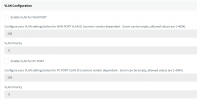
b) do you use these fields in the phone's config? This could be a reason that they only configure once and then they can never configure again
1634886678175.png

c) Change the BLFs on an extension and then simply restart the phone. Will it now configure itself upon restart or does that fail too?
 
Ok i actually think i found out the reason why it won't upgrade or reprovision.

a) We usually have to change the "only accepted trusted certificates" to disable before we can provision from the portal. When i just logged in, it was "enabled" again, so i disabled it, and was able to upgrade the firmware.

I just tested this with several phones, and logging into the phone and disabling only accept trusted certificates triggered the firmware upgrades. I guess we have to do that everytime, as when the new firmware is uploaded, it enables the trusted certificates again.

Thanks for your help.
 
The 3CX configuration enables this option for higher security.

Are you using your own custom FQDN and certificates for your PBX?
 
Hello, yes we are using a custom FQDN, we have our own certificates. It's a wildcard SSL Cert.
 
Good work! It is clear now why this was happening

You have some options now:

a) replace your certificates with something that Yealink accepts. They tell you which CAs they have built into the phone here https://support.yealink.com/en/portal/knowledge/show?id=bab64fcca62fd012b682c533

b) upload certificates manually into your phones

c) use a 3CX FQDN that automatically generates compatible certificates for you

d) use custom templates to disable security (not recommended)


The best ones I would say is either a) or c)
 
  • Like
Reactions: vlt
Thanks, we are using one that Yealink accepts, i believe its probably because its a wildcard cert.
 
Not necessarily, there is a chain of trust and the phone may not have the Root CA in its trusted list.

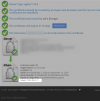
Go here, type your FQDN like pbx.mycompany.com:5001 and when you see the results, read the very last Issuer: at the very bottom.

If this is not in the Yealink list then your CA is not trusted as you may have originally thought..
https://www.sslshopper.com/ssl-checker.html

1634910255030.png
 
Status
Not open for further replies.

Forum statistics

Threads
112,149
Messages
590,965
Members
165,171
Latest member
Mahlon