Solved Unabled to create mixed Conference on latest update

Status
Not open for further replies.

Brodur

Free User
Intermediate Cert.
Joined
Apr 24, 2020
Messages
4
Reaction score
1
Hey, is anyone else experiencing this?

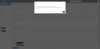
When I try to create a video conference in the webclient and invite others with the direct email option, I receive the following error, where previously it worked flawlessly. I have made no changes to my system configuration.

Code:
Error
Exception of type System.ArgumentOutOfRangeException occured in 'DoProcessWebMeetingStateCallback' line 1484. Message: Count cannot be less than zero. (Parameter 'count')

It then proceeds to send out the invite email, but it only creates the video conference, not the audio conference like it has in the past.
 
Hi,

I would recommend as a test that you open an incognito window in Chrome, log in and create a new webmeeting.

Take a screenshot in case this does not help so we can see exactly what you see.
 
  • Like
Reactions: Brodur
Hey John,

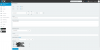
I get the same result when doing this in an incognito window. Please see below for the screenshots.

Meetin settings.PNG
error.PNG


EDIT:
Upon further testing, it appears that the way mixed conferences are displayed in the webclient and softphone was changed, and this led to the confusion on my part. They no longer display as two entries.

I still receive the error on creation, but I am able to join by call regardless.
 
Last edited:
Can you please share the exact version of your PBX, as well as your Chrome browser?

I would recommend to restart your services and retry if you are pressed for time.
 
  • Like
Reactions: Brodur
Not pressed for time, as the conference seems to function as intended aside from the error on creation.

I've already followed the troubleshooting steps in the webmeeting article, which included restarting services, that made no change.

Chrome:
Version 81.0.4044.122 (Official Build) (64-bit)


3CX:
Standard Annual 16.0.611
 
Hi @Brodur

If possible, please create brand new extension, make sure to add an email address, and log in to the Webclient.

See if you can schedule meetings with this new Extension. If not, please send me a private message with your FQDN and login credentials for this extension, I will try to replicate the issue from my end.
 
  • Like
Reactions: Brodur
Hey @JohnS_3CX

I have not been able to circumvent the error message with the new testing extension. Direct Message to follow.
 
  • Like
Reactions: JohnS_3CX
  • Like
Reactions: Brodur
Status
Not open for further replies.

Forum statistics

Threads
111,973
Messages
590,076
Members
164,895
Latest member
jasonkkrause