- Joined
- Oct 9, 2019
- Messages
- 44
- Reaction score
- 19
I've recently migrated from v16 Standard to v18 Pro, both self-hosted on Azure.
With legacy 3CXPhone v16.3.0.261 running, calls are auto-answered even though Auto Answer is not highlighted:
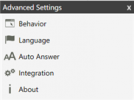
If I highlight Auto Answer, calls are still auto-answered. (It's not just that the setting is backwards.)
If I downgrade to 3CXPhone v16.3.0.220, calls are still auto-answered. (It's not just in the latest release.)
If I Exit from 3CXPhone, calls are not auto-answered. (Also confirmed that the Yealink T54W has its auto-answer disabled.)
The Yealink is connected through a v18 SBC on Windows. The 3CXPhone is apparently connected directly the Azure server--there is no reference to the SBC in its provisioning file.
3CXPhone is in CTI mode so the Yealink goes off-hook when 3CXPhone auto-answers.
I don't see anything in the SIP or 3CXPhone logs that seems relevant. The Activity Log shows that the extension joins the call:
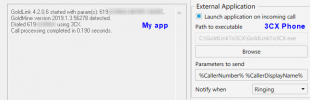
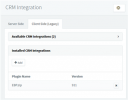
The EBP.log indicates that it's trying to open some CRM that is not installed (and that I don't recognize):
Any thoughts on why 3CXPhone is auto-answering?
Thanks,
With legacy 3CXPhone v16.3.0.261 running, calls are auto-answered even though Auto Answer is not highlighted:
If I highlight Auto Answer, calls are still auto-answered. (It's not just that the setting is backwards.)
If I downgrade to 3CXPhone v16.3.0.220, calls are still auto-answered. (It's not just in the latest release.)
If I Exit from 3CXPhone, calls are not auto-answered. (Also confirmed that the Yealink T54W has its auto-answer disabled.)
The Yealink is connected through a v18 SBC on Windows. The 3CXPhone is apparently connected directly the Azure server--there is no reference to the SBC in its provisioning file.
3CXPhone is in CTI mode so the Yealink goes off-hook when 3CXPhone auto-answers.
I don't see anything in the SIP or 3CXPhone logs that seems relevant. The Activity Log shows that the extension joins the call:
Code:
09/13/2021 4:59:24 PM - [CM503007]: Call(C:37): Extn:10 has joined, contact <sip:[email protected]:5060/UDP>The EBP.log indicates that it's trying to open some CRM that is not installed (and that I don't recognize):
Code:
9/13/2021 4:59:24 PM - CallStatusChanged - CallID='37:2' - RealTimeCallID='37' - Incoming='True' - OtherPartyNumber='61912345678' - State='Ringing'
9/13/2021 4:59:24 PM - Call arrived - contactNumber='61912345678' - callType='Inbound' - callId='37'.
9/13/2021 4:59:24 PM - EBP to be called with cmd: C:\Program Files\EBP\CRM8.0FRFR40\EBP.CRM.Application.exe /database="C:\Users\Administrator\Documents\EBP Demo CRM 8.0 FR Ligne Open Line.ebp" /voipcall="61912345678"
9/13/2021 4:59:24 PM - Error while trying to execute EBP: The system cannot find the file specified
9/13/2021 4:59:24 PM - CallStatusChanged - CallID='37:2' - RealTimeCallID='37' - Incoming='True' - OtherPartyNumber='61912345678' - State='Connected'
9/13/2021 4:59:24 PM - Call connected - callType='Inbound' - callId='37'.
9/13/2021 4:59:29 PM - CallStatusChanged - CallID='37:2' - RealTimeCallID='37' - Incoming='True' - OtherPartyNumber='61912345678' - State='Ended'
9/13/2021 4:59:29 PM - Call ended - callType='Inbound' - callId='37'.
Any thoughts on why 3CXPhone is auto-answering?
Thanks,