Unifying 3CX with Microsoft 365 - Teams Direct Routing - Part 3 of 3

Keith Winhall_3CX

Product Communicator
Free User
Joined
Aug 3, 2021
Messages
60
Reaction score
67
In this 3rd and final video series covering version 18 synchronisation with Microsoft 365, Stefan Walther, CEO at 3CX, walks through the steps to bring one of the hottest additions to 3CX, full integration with Teams phone system by way of Direct Routing. Click here if you missed part 1 and part 2. [fusion_youtube id=\"-1E02o_LN3E\" alignment=\"cen...
Continue reading the Original Blog Post.
 
Last edited by a moderator:
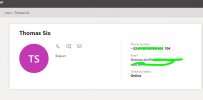
Working great so far, just one question: Do you really need a second FQDN for the Teams SBC if it points to the same IP as your usual PBX FQDN anyways?
 

Attachments

  • phonenumber.JPG
    phonenumber.JPG
    26.5 KB · Views: 24
Working great so far, just one question: Do you really need a second FQDN for the Teams SBC if it points to the same IP as your usual PBX FQDN anyways?
The answer is: It depends

There is only 1 case where you don't need a second FQDN, and all of the following criteria must be met:
  • You have installed your 3CX using a Custom FQDN
  • The FQDN domain matches the email domain in your O365 account
  • The SSL Certificate you used when installing 3CX, is one of those listed as a supported Teams Certificate Authority.
  • You have a static Public IP
In this case and only in this case, you could put the 3CX FQDN directly in as the Teams SBC FQDN.
Also, only in this case, the TCP Port on 3CX that would be used would be 5061.


In any other case other than the above, you need a second FQDN as per the 3CX-Teams configuration guide.
 

Attachments

  • office phone.JPG
    office phone.JPG
    65.6 KB · Views: 20
What is the behavior when a 3CX extension calls another 3CX extension that is also configured for Teams? For example: ext. 100 is not configured for M365 sync and has a desk handset; ext. 200 is configured for M365...ext. 200 also has a desk handset, but also has Teams on their mobile. Assuming the steps in the guide were followed and things are working correctly, if ext. 100 calls ext. 200...then what will ring? The handset? The Teams client? or both the handset AND Teams client?
 
What is the behavior when a 3CX extension calls another 3CX extension that is also configured for Teams? For example: ext. 100 is not configured for M365 sync and has a desk handset; ext. 200 is configured for M365...ext. 200 also has a desk handset, but also has Teams on their mobile. Assuming the steps in the guide were followed and things are working correctly, if ext. 100 calls ext. 200...then what will ring? The handset? The Teams client? or both the handset AND Teams client?
Both the Handset and the Teams Client, and any other handset or 3CX App that you may have configured on that extension.

One thing to keep in mind though in this scenario. If you enable Call Forwarding on Teams for calls to go the the Teams VMail, then all devices will ring once, but then the call will be 'stolen' by the Teams VMail and the caller will be connected there.
 
  • Like
Reactions: Evolute IT and h4x
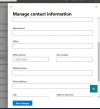
I've solved the problem. I've needed to add the office phone numJber in the manage contact information form of the user in the https://admin.microsoft.com/ portal.
THANK YOU! this partially solved also my problem. For the rest that are facing the same situation, Office Number and Mobile Number should MATCH. At least, that worked for me. Once done, close Teams, reopen it and voila.
 
  • Like
Reactions: NickD_3CX
Office Number and Mobile Number should MATCH
No need to match, but the Office Number can be synced as Outbound Caller ID and is also used for the Teams OnPremLineUri.
 
Hello, everyone A short question. Is it important that the domain name has to be "teams.muster.com"? And does the SSL certificate have to be issued on "teams.muster.com" or can it also be issued on "muster.com"?
 
Hello, everyone A short question. Is it important that the domain name has to be "teams.muster.com"? And does the SSL certificate have to be issued on "teams.muster.com" or can it also be issued on "muster.com"?

it must cover exactly what you entered, muster.com does not cover teams.muster.com, so no this SSL cert does not work unless it is listed in the SAN in the cert...​

​

DNS Records​

To clear up what you must enter in the Microsoft Teams Direct Routing FQDN section in 3CX.
O1l0L2J9E1IIySG9jVaBENdi-esIT1qvibl-LfPAP_zkaLNIF6ZEsnGZa8Pw__Ry2rxRpuQxceP3j-Rp57MwwnzRNp7k1rDHwLPH-JU_pJeke3dTjWAia-eG_RD1jstG_doiMZ0-=s0

This FQDN will be used by Microsoft to connect to 3CX to place outbound calls. Therefore it must point to the public IPv4 address of your 3CX installation. It goes without saying that for this your public IP address must be static!

Assume your email address domain is [email protected]. Then create an A record DNS entry in your DNS server for teams.marketing-3cx.com. Point this A record to your 3CX public IP address! You cannot do this for domains you don’t own, such as onmicrosoft.com or any 3CX provided domain as you don’t control the DNS server of this domain. AAAA records are not needed as Teams does not support IPv6.

Note: In this example, teams.marketing-3cx.com was used but it can be anything you like it to be as long it is within marketing-3cx.com.
 
  • Like
Reactions: Evolute IT
Hi!

We have made the integration between teams and 3CX without problems. But we have a mini incidence. When we call from the Teams APP to an internal extension of the 3CX, until the call is established there is no audio. But if the call is external, there is a tone during the call establishment.

Any sugestion?

Thanks!
 
Hi!

We have made the integration between teams and 3CX without problems. But we have a mini incidence. When we call from the Teams APP to an internal extension of the 3CX, until the call is established there is no audio. But if the call is external, there is a tone during the call establishment.

Any sugestion?

Thanks!
I think not hearing the ringing sounds is normal. The reason why you probably hear if on external calls is because your provider might be sending "Early Media", meaning they are actually sending the ringing sound over the connection.
 
  • Like
Reactions: Evolute IT
I think not hearing the ringing sounds is normal. The reason why you probably hear if on external calls is because your provider might be sending "Early Media", meaning they are actually sending the ringing sound over the connection.
Hi @NickD_3CX, thanks for the answer!

Solved! Yes, the ringing sound that i hear on external calls it's sending by the provider. But now i can hear the traditional ringing sound of Teams. It was a problem of the user account configuration.

Best regards!
 
  • Like
Reactions: NickD_3CX
Anyone trying to do this on an OVH VPS? i think the port is blocked for 5062. Does anyone know how to unblock the port? OVH support are not very helpful.
 

it must cover exactly what you entered, muster.com does not cover teams.muster.com, so no this SSL cert does not work unless it is listed in the SAN in the cert...​

​

DNS Records​

To clear up what you must enter in the Microsoft Teams Direct Routing FQDN section in 3CX.
O1l0L2J9E1IIySG9jVaBENdi-esIT1qvibl-LfPAP_zkaLNIF6ZEsnGZa8Pw__Ry2rxRpuQxceP3j-Rp57MwwnzRNp7k1rDHwLPH-JU_pJeke3dTjWAia-eG_RD1jstG_doiMZ0-=s0

This FQDN will be used by Microsoft to connect to 3CX to place outbound calls. Therefore it must point to the public IPv4 address of your 3CX installation. It goes without saying that for this your public IP address must be static!

Assume your email address domain is [email protected]. Then create an A record DNS entry in your DNS server for teams.marketing-3cx.com. Point this A record to your 3CX public IP address! You cannot do this for domains you don’t own, such as onmicrosoft.com or any 3CX provided domain as you don’t control the DNS server of this domain. AAAA records are not needed as Teams does not support IPv6.

Note: In this example, teams.marketing-3cx.com was used but it can be anything you like it to be as long it is within marketing-3cx.com.

Many thanks Stefan. Solved! With your support it worked fine. Greetings Urs
 
  • Like
Reactions: StefanW
I have two questions:
- Does the CRM Integration also work when using Teams as a client? Does it show the correct name, when you receive an external call over teams?
- Is it possible to transfer the calls using the Teams Client?
 
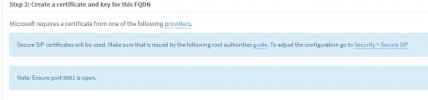
Interesting thing happening when I go to configure the direct routing...we already have our own FQDN for 3CX, and when I use that in my FQDN line then it will not let me upload the cert files. If I change it to ANYTHING else, then I get prompted to upload the cert files.

Does the FQDN used for Teams Direct Routing have to be different than the public FQDN that we are already using? Or do I proceed through Step 2 and move onto Step 3?
 

Attachments

  • 3cx step 2.JPG
    3cx step 2.JPG
    28.8 KB · Views: 11

Forum statistics

Threads
112,148
Messages
590,962
Members
165,168
Latest member
Stephan Eusebe