Unifying 3CX with Microsoft 365 - Teams Direct Routing - Part 3 of 3

Keith Winhall_3CX

Product Communicator
Free User
Joined
Aug 3, 2021
Messages
60
Reaction score
67
In this 3rd and final video series covering version 18 synchronisation with Microsoft 365, Stefan Walther, CEO at 3CX, walks through the steps to bring one of the hottest additions to 3CX, full integration with Teams phone system by way of Direct Routing. Click here if you missed part 1 and part 2. [fusion_youtube id=\"-1E02o_LN3E\" alignment=\"cen...
Continue reading the Original Blog Post.
 
Last edited by a moderator:
Dear 3CX,

Can you please add a line in Prerequisites: 3CX Enterprise license ?

Thank you
 
  • Like
Reactions: Evolute IT
Nice! I knew it was somewhere!
ok. I finally managed to generate a free 90 day trial certificate from ssl.com and problem persists. When I try to call using Teams dialpad to external numbers, doesn't work "rejected". 3cx logs? nothing.
 
@Lantera

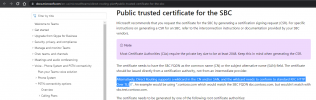
The certificate I used successfully is the Comodo Essential SSL (from here: https://cheapsslsecurity.co.uk/comodo/essentialssl.html) It's fairly cheap. Make sure you don't use the Comodo PositiveSSL which is slightly cheaper as I believe it uses a different non supported root.

When you get the certificate, you will need to combine it with the intermediates, usually easiest in notepad or similar rather than doing the command line combines. There's plenty of guides online on how to create a 'bundled certificate'.

Hope that helps

EDIT: I haven't tried it personally, but Rapid SSL certificates seem to have "DigiCert Global Root CA" as their root, so in theory are supported and they are super cheap - again from here seems to be cheapest: https://cheapsslsecurity.com/rapidssl/rapidsslcertificate.html ($12 / year).
 
Last edited:
  • Like
Reactions: Evolute IT
ok. I finally managed to generate a free 90 day trial certificate from ssl.com and problem persists. When I try to call using Teams dialpad to external numbers, doesn't work "rejected". 3cx logs? nothing.
As @TomR said, did you combine the SSL .pem files with the Intermediate .pem? Also, make sure the files are not encrypted.

DM me, I can take a look and help you convert the files if needed.
 
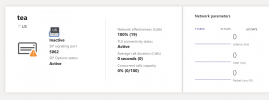
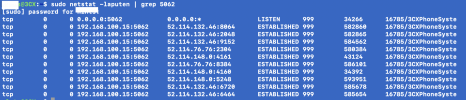
I am having a similar issue, I have followed the steps, Teams shows that the TLS connectivity and SIP options are active, but when I try to make a call via the dial pad it "rings" and says connecting, then changes to "Declined" after about ten seconds. I can see the connections via port 5062 on the 3CX server, however Teams also shows an inactive if I click on the domain in the direct routing and bring it up. The dial pad in Teams does have my number and extension listed.

I believe that I am using the combined SSL certificate though I am not super good with those.
 

Attachments

  • Screen Shot 2021-08-26 at 9.14.07 AM.png
    Screen Shot 2021-08-26 at 9.14.07 AM.png
    72.6 KB · Views: 16
  • Screen Shot 2021-08-26 at 9.14.13 AM.png
    Screen Shot 2021-08-26 at 9.14.13 AM.png
    115.3 KB · Views: 16
  • Screen Shot 2021-08-26 at 9.16.05 AM.png
    Screen Shot 2021-08-26 at 9.16.05 AM.png
    600.1 KB · Views: 15
@Lantera @keaton
I will send you a PM shortly to try and help you get things sorted out.
 
Hello, I have the same Issue. In direct routing from teams, The tls connectivity status and sip options status are active, but the global status is inactive. When I call from teams to a 3cx phone. It's ringing and then declined. On the 3cx server I see the call into the log. But I says caller forbidden. 3 cx user 104 and I call to a fixed 3cx phone 210:

08/27/2021 4:38:48 PM - L:11.1[Unknown:] Sending: OnSendResp Send 603/INVITE from 0.0.0.0:0 tid=92b773ed Call-ID=84cd7167a4205f049d15478c698c8937:
SIP/2.0 603 Decline Via: SIP/2.0/TLS 52.114.76.76:5061;branch=z9hG4bK92b773ed
To: <sip:[email protected]:5062;user=phone>;tag=ed092402
From: "Thomas Six"<sip:+3251259059;ext=[email protected]:5061;user=phone>;tag=2291222341fd476c89eacbee26b1df47
Call-ID: 84cd7167a4205f049d15478c698c8937
CSeq: 1 INVITE
Warning: 499 vm5ac8225518.31o1afkqpjve3ajje553o0ywyg.ax.internal.cloudapp.net "Caller is forbidden"
Content-Length: 0
 
Hello, I have the same Issue. In direct routing from teams, The tls connectivity status and sip options status are active, but the global status is inactive. When I call from teams to a 3cx phone. It's ringing and then declined. On the 3cx server I see the call into the log. But I says caller forbidden. 3 cx user 104 and I call to a fixed 3cx phone 210:

08/27/2021 4:38:48 PM - L:11.1[Unknown:] Sending: OnSendResp Send 603/INVITE from 0.0.0.0:0 tid=92b773ed Call-ID=84cd7167a4205f049d15478c698c8937:
SIP/2.0 603 Decline Via: SIP/2.0/TLS 52.114.76.76:5061;branch=z9hG4bK92b773ed
To: <sip:[email protected]:5062;user=phone>;tag=ed092402
From: "Thomas Six"<sip:+3251259059;ext=[email protected]:5061;user=phone>;tag=2291222341fd476c89eacbee26b1df47
Call-ID: 84cd7167a4205f049d15478c698c8937
CSeq: 1 INVITE
Warning: 499 vm5ac8225518.31o1afkqpjve3ajje553o0ywyg.ax.internal.cloudapp.net "Caller is forbidden"
Content-Length: 0
First of all, if you have just set this up, please wait up to 24 hours as MS sometimes requires a long time to provision changes.

Also please check the requirements and that they have been followed:
https://www.3cx.com/docs/microsoft-teams-business-voice/#h.fi8uhu6816s3

If that still does not fix things, please try this:
  1. Disable MS365 User Sync
  2. Delete the Extension
  3. Recreate the extension manually using the same extension number and a random name and put the email address that the user has in MS365
  4. Re-enable User Sync and check that the information of the user populate the newly created extension
  5. Restart all 3CX Services and try again.
 
  • Like
Reactions: Evolute IT
I am a little confused by one thing...if there is more detailed documentation that I'm missing, then maybe it is discussed there...it is very possible I have missed it.

In the YouTube video, Stefan mentions around 2:45 that the FQDN is for the 3CX server...then around 5:33 in the video he shows that there is no SBC configured under the Teams Direct Routing.

It seems like this integration configures the 3CX server (with the appropriate cert) as the SBC in Teams...no other SBC is needed for the direct routing configuration, correct? Am I missing anything there?
 
First of all, if you have just set this up, please wait up to 24 hours as MS sometimes requires a long time to provision changes.

Also please check the requirements and that they have been followed:
https://www.3cx.com/docs/microsoft-teams-business-voice/#h.fi8uhu6816s3

If that still does not fix things, please try this:
  1. Disable MS365 User Sync
  2. Delete the Extension
  3. Recreate the extension manually using the same extension number and a random name and put the email address that the user has in MS365
  4. Re-enable User Sync and check that the information of the user populate the newly created extension
  5. Restart all 3CX Services and try again.
Hi Nick

The information is populated from 3cx to teams after re-enabling the sync. The name is now the one in teams again.
After restarting all services, I still see rejected in the 3cx log when I call from teams to 3cx

Terminated from "Thomas Six"<sip:+3251259059;ext=[email protected]:5061;user=phone>;tag=0a34c6104ad8462cb8fe84ffffa6a336 to <sip:[email protected]:5062;user=phone>;tag=666c952d; reason: Rejected
 
Last edited:
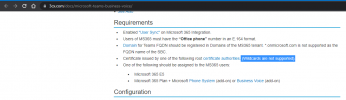
In the requirements, Is see
  • Users of MS365 must have the “Office phone” number in an E.164 format.
Where should we enter this number in 3cx? Are we doing this by adding a did number at the user?
 
In the requirements, Is see
  • Users of MS365 must have the “Office phone” number in an E.164 format.
Where should we enter this number in 3cx? Are we doing this by adding a did number at the user?
I think that's the problem. Because when I try to call to the teams user, I receive the log message '[CM503025]: Call(C:8): Calling T:Extn:104@[Dev:sip:NOT_E_164;ext=[email protected]] for L:8.1[Extn:103]' NOT_E 164, but where to enter this number in 3cx?

Thanks in advance for your reply
 
Run this:

Code:
Set-CsUser -Identity [email protected] -OnPremLineURI tel:+11234567890

Where [email protected] is the affected user and 1234567890 (not the leading +1) is their phone number.

Verify with this:
Code:
Get-CSOnlineUser -Identity [email protected] | fl OnPremLineUriManuallySet,OnPremLineUri,LineUri
 
Run this:

Code:
Set-CsUser -Identity [email protected] -OnPremLineURI tel:+11234567890

Where [email protected] is the affected user and 1234567890 (not the leading +1) is their phone number.

Verify with this:
Code:
Get-CSOnlineUser -Identity [email protected] | fl OnPremLineUriManuallySet,OnPremLineUri,LineUri
PS C:\Users\thomas.six> Get-CsOnlineUser -Identity [email protected] | fl OnPremLineUriManuallySet,OnPremLineUri,LineUri

LineUri : 3251259059;ext=104

But still the same issue.
 
I am a little confused by one thing...if there is more detailed documentation that I'm missing, then maybe it is discussed there...it is very possible I have missed it.

In the YouTube video, Stefan mentions around 2:45 that the FQDN is for the 3CX server...then around 5:33 in the video he shows that there is no SBC configured under the Teams Direct Routing.

It seems like this integration configures the 3CX server (with the appropriate cert) as the SBC in Teams...no other SBC is needed for the direct routing configuration, correct? Am I missing anything there?
That is correct, no additional equipment is required to configure 3CX with Teams, and speaking in "Microsoft terms", 3CX IS the SBC.
 
  • Like
Reactions: h4x
In the requirements, Is see
  • Users of MS365 must have the “Office phone” number in an E.164 format.
Where should we enter this number in 3cx? Are we doing this by adding a did number at the user?
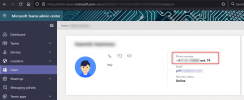
The commands from @SweetAction seem to do the same, from the Teams Portal you can check it here:
1630306089105.png

If the number is not in a e164 format, you can set it from admin.microsoft.com (or again, with the command it seems).
 

Forum statistics

Threads
112,148
Messages
590,962
Members
165,168
Latest member
Stephan Eusebe