Unknown Expression: CallType

Status
Not open for further replies.

DrRob

Customer
Basic Certified
Joined
Sep 23, 2020
Messages
23
Reaction score
2
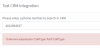
Trying to build out our CRM integration and I need a sanity check. I'm at a stage where we're trying to get the call journaling to work and need to use the CallType expression, but no matter how or where I use it, I get slapped with the unknown expression: CallType error every time I run the test. I am only using it in the ReportCall scenario.
120400930_742923656554408_1134350208543903826_n.png

Can someone review the below XML, specifically the ReportCall scenario?

Code:
<?xml version="1.0"?>
<Crm xmlns:xsi="http://www.w3.org/2001/XMLSchema-instance" xmlns:xsd="http://www.w3.org/2001/XMLSchema" Country="US" Name="Repairshopr" Version="1">
  <Number Prefix="Off" MaxLength="10" />
  <Connection MaxConcurrentRequests="2" />
  <Parameters>
    <Parameter Name="APIkey" Type="String" Parent="General Configuration" Editor="String" Title="API Key:" />
    <Parameter Name="Token" Type="String" Editor="String" Title="Caller ID Token" />
    <Parameter Name="ReportCallEnabled" Type="Boolean" Editor="String" Title="Enable Call Journaling" Default="True" />
    <Parameter Name="Domain" Type="String" Editor="String" Title="Domain" />
  </Parameters>
  <Authentication Type="Basic">
    <Value>[APIkey]:X</Value>
  </Authentication>
  <Scenarios>
    <Scenario Id="" Type="REST">
      <Request Url="https://[Domain].repairshopr.com/api/v1/customers?query=[Number]&amp;api_key=[APIkey]" MessagePasses="0" RequestEncoding="UrlEncoded" RequestType="Get" ResponseType="Json" />
      <Rules>
        <Rule Type="Any">customers.phone</Rule>
      </Rules>
      <Variables>   
        <Variable Name="FirstName" Path="customers.firstname">
          <Filter />
        </Variable>
        <Variable Name="LastName" Path="customers.lastname">
          <Filter />
        </Variable>
        <Variable Name="CompanyName" Path="customers.business_name">
          <Filter />
        </Variable>       
      </Variables>
      <Outputs Next="ReportCall" AllowEmpty="false">
        <Output Type="FirstName" Passes="1" Value="[FirstName]" />
        <Output Type="LastName" Passes="1" Value="[LastName]" />
        <Output Type="CompanyName" Passes="1" Value="[CompanyName]" />               
      </Outputs>
    </Scenario>
    <Scenario Id="ReportCall" Type="REST">
      <Request SkipIf="[ReportCallEnabled]!=True" Url="http://[Domain].repairshopr.com/api/callerid/?did=[Number]&amp;token=[Token][IIf([CallType]==Inbound||[CallType]==Missed,&quot;&quot;,&amp;outbound=TRUE)]" MessagePasses="1" RequestContentType="application/x-www-form-urlencoded" RequestEncoding="UrlEncoded" RequestType="Get" ResponseType="Json" />
      <Variables />
      <Outputs AllowEmpty="false" />
    </Scenario>
  </Scenarios>
</Crm>

I have also tried using it in the SkipIf= like so, but still get the same unknown expression error:

XML:
<Scenario Id="ReportCall" Type="REST">

      <Request SkipIf="[ReportCallEnabled]!=True|[CallType]!=Inbound" Url="http://[Domain].repairshopr.com/api/callerid/?did=[Number]&amp;token=[Token]" MessagePasses="1" RequestContentType="application/x-www-form-urlencoded" RequestEncoding="UrlEncoded" RequestType="Get" ResponseType="Json" />

      <Variables />

      <Outputs AllowEmpty="false" />

    </Scenario>
 
The problem is that you're invoking the Report all scenario from the lookup scenario, and there the CallType variable doesn't exist.

Please note that Call Journaling can't be tested from the console, you need to make real calls, or use the CRM Template Generator tool.
 
Do you mean ReportCall from the lookup? Maybe I'm missing something, but I believe I have two independent scenarios, no? scenario id="" and scenario id="ReportCall"

Is this because I have it invoked in the Outputs next= ?

Understood on the call journaling end.
 
Is this because I have it invoked in the Outputs next= ?
Exactly, you must not chain the Report Call scenario from the lookup scenario.
 
Got it. That seems to fix it for me.

I'll probably start a new thread, but that leads to the second issue. You might notice the lookup request URL is different than the Report Call request URL.

When that Report Call request URL is hit, it triggers a popup in our application that lets us easily open the customer's records. Considering the ReportCall isn't executed until the call is completed (as in inbound call is answered and then ended), it shows a popup that the customer is calling AFTER we've already hung up with the customer.

Any creative ways of reaching out to that URL during the lookup in order to trigger the popup? OR... are we able to only do lookups on inbound calls? I'd forego outbound call logging if it meant we could log inbound calls and get the popup by just using the lookup.
 
Got it. That seems to fix it for me.

I'll probably start a new thread, but that leads to the second issue. You might notice the lookup request URL is different than the Report Call request URL.

When that Report Call request URL is hit, it triggers a popup in our application that lets us easily open the customer's records. Considering the ReportCall isn't executed until the call is completed (as in inbound call is answered and then ended), it shows a popup that the customer is calling AFTER we've already hung up with the customer.

Any creative ways of reaching out to that URL during the lookup in order to trigger the popup? OR... are we able to only do lookups on inbound calls? I'd forego outbound call logging if it meant we could log inbound calls and get the popup by just using the lookup.
If your CRM has a unique URL per customer, just return that as ContactURL in the lookup scenario. That URL will be opened automatically by the Webclient/Browser Extension when the agent is ringing.
 
If your CRM has a unique URL per customer, just return that as ContactURL in the lookup scenario. That URL will be opened automatically by the Webclient/Browser Extension when the agent is ringing.

That's interesting and MIGHT be an option. We use the Windows app currently but can test with the webclient. The negative is that it will open for everyone which will likely get annoying for people who do not want to have every client opened for them automatically even if they're not going to be dealing with that call. The nice thing about the ReportCall URL is that it presents a small popup in our application which people can ignore or click to open the client.
 
That's interesting and MIGHT be an option. We use the Windows app currently but can test with the webclient. The negative is that it will open for everyone which will likely get annoying for people who do not want to have every client opened for them automatically even if they're not going to be dealing with that call. The nice thing about the ReportCall URL is that it presents a small popup in our application which people can ignore or click to open the client.
Yeah, we have a workaround that we do for this but it's a bit tricky and requires call recording.
 
  • Like
Reactions: Evolute IT
The contact lookup is not a good option either, because it might not be triggered if you received another call in the previous 10 minutes.

I can see that the URL has the caller number as a parameter, then it might be an option to configure the Web Client to launch that URL when you receive an inbound call. You can also do this with the Windows client, but in that case you need to configure the browser as the executable to launch, and the URL as parameter.
 
  • Like
Reactions: Evolute IT
The contact lookup is not a good option either, because it might not be triggered if you received another call in the previous 10 minutes.

I can see that the URL has the caller number as a parameter, then it might be an option to configure the Web Client to launch that URL when you receive an inbound call. You can also do this with the Windows client, but in that case you need to configure the browser as the executable to launch, and the URL as parameter.

That technically will work, but it's a stretch. We'd need to set up a dedicated service extension as well as have a dedicated instance or computer set to receive all calls. Otherwise, having this running on every extension will create havoc by spamming the system with an inbound call for every agent in that ring group or queue. If that functionality were available on the mobile app, then it would be more doable as we have some "service" mobile devices for silly things like dings and other notification sounds in the office.
 
Status
Not open for further replies.

Latest Posts

Forum statistics

Threads
112,324
Messages
591,897
Members
165,476
Latest member
awan05