Update 6 Beta Available Now

Status
Not open for further replies.

N_G

Founder
Joined
Jun 6, 2006
Messages
4,857
Reaction score
9,290
Update 6 has come out of our test cycles with flying colors and has already been deployed thousands of times. Therefore we are releasing Update 6 as Beta and making it available as the default install option as follows:
  • New on-premise Linux installs deployed from our portal will be installed using Update 6
  • All StartUP instances will be...

Continue reading the Original Blog Post.
 
Great job team with the Alpha version i would have issues with the app reconnecting when i used a VPN or disconnected a VPN. Fixed in this version. :)
 
  • Like
Reactions: N_G
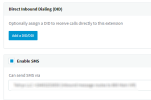
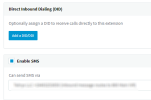
After upgrading from U6 Alpha to U6 Beta, I see the Enable SMS option is missing from the User | General tab:
1671538917711.png

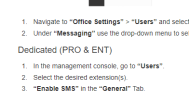
Per the documentation, that's where we enable SMS for a user for dedicated instances:

1671539046728.png
I've looked in the Admin settings for a user in the thick client/web client, and I don't see a corresponding option like there is for StartUP. Where do we set this now? This change isn't listed in the change log for U6 Beta. What am I missing?
 

Attachments

  • 1671538310786.png
    1671538310786.png
    19.7 KB · Views: 14
Hi.
What i missing, is the possibility to upload a Backup over the M.C. to activated it later.
What happend a few days before:
I customer installed the 3CX new, and the Backup what i has in the PC was newer then the Version of the .iso, so he can't install the Backup. so he used an old one to go further, but now, he can't install the Backup which was made from the latest Version.
So i helped him to get the newest Backup over scp the the Linux path where the local Backups are stored. But if we had on upload Button on the Gui, it's much more easier to do this.

Bye
Timm
 
  • Like
Reactions: CallingFromMars
After upgrading from U6 Alpha to U6 Beta, I see the Enable SMS option is missing from the User | General tab:
View attachment 33258

Per the documentation, that's where we enable SMS for a user for dedicated instances:

View attachment 33259
I've looked in the Admin settings for a user in the thick client/web client, and I don't see a corresponding option like there is for StartUP. Where do we set this now? This change isn't listed in the change log for U6 Beta. What am I missing?

This is now automatic, it is no longer needed to specify it as before.

Once you assign a couple of DIDs to your extension for example, you can then go to chat, start a new SMS, and you will get a drop down menu allowing you to choose which DID to send the SMS with.

Give it a try and let us know, but make sure your account has the rights to modify those settings.
 
  • Like
Reactions: technigogo
This is now automatic, it is no longer needed to specify it as before.

Once you assign a couple of DIDs to your extension for example, you can then go to chat, start a new SMS, and you will get a drop down menu allowing you to choose which DID to send the SMS with.

Give it a try and let us know, but make sure your account has the rights to modify those settings.
I like the idea of the user being able to choose the SMS they're initiating a conversation from.
How does this work in the case where the DIDs are not assigned directly to a user but instead to a Queue the user is a member of. For example, if there is there is a sales queues and a support queue and they both have SMS enabled DIDs assigned to them and the agent it a member of both queues, will the agent still be able to choose which number they're starting a new SMS conversation from?
 
I like the idea of the user being able to choose the SMS they're initiating a conversation from.
How does this work in the case where the DIDs are not assigned directly to a user but instead to a Queue the user is a member of. For example, if there is there is a sales queues and a support queue and they both have SMS enabled DIDs assigned to them and the agent it a member of both queues, will the agent still be able to choose which number they're starting a new SMS conversation from?
If I am correct, a user without an assigned DID will be able to select from any DID to use.
 
Yes, if any routes are targeting your extension you will get those DIDs in the drop down.

For example if I'm in a queue with 2 DIDs, I am allowed to use those DIDs.

Set one up and give it a go to see how to works in action.
 
  • Like
Reactions: pmterp
This is now automatic, it is no longer needed to specify it as before.

Once you assign a couple of DIDs to your extension for example, you can then go to chat, start a new SMS, and you will get a drop down menu allowing you to choose which DID to send the SMS with.

Give it a try and let us know, but make sure your account has the rights to modify those settings.
Yes, it is operating as you described. Sure would've been nice if this information was included in the change log and/or the documentation were updated to match what's in the wild.

At first glance this works for a 1:1 DID to User relationship. Not quite sure this will work well for my customers where a user has a DID but they also need to message as a queue or a main number. This could lead to a lot of confusion if since the user needs to choose. In U5, we could set it for them so they can't make a mistake.

Suggestion: Let the admin set a preferred or default path that could be changed as needed (on the fly). That would help eliminate the PEBCAK errors.
 
I'm just having a look around the new admin options in the web client and if I add a new extension through the web client there does not seem to be a spot to enter the extension number and it assigns it to 100 range but all the other extension in the system are in the 600 range.

Thanks.

Edit. also no option to pick your own extension number for groups, queue's and Digital receptionist if done from the web client.
 
Last edited:
the extended group function is really good. Finally it is possible to save multiple vacation policies.

is it possible to import the holidays also via csv?
For large phone systems with many different groups and different holidays, the administrators will have a lot of work every year.

Thank you
 
I don't think I ever saw this error message:
WARNING! You need to assign an extension user System / Root privileges. If the current 3CX administrator does not have an extension you need to create one for him. Then go to the user account, click on the Rights tab and select System Owner role in the Group Membership section.
1671609708358.png

Why would I need an admin extension for a user who won't be calling? Is there a reason behind the change?
 
I don't think I ever saw this error message:
WARNING! You need to assign an extension user System / Root privileges. If the current 3CX administrator does not have an extension you need to create one for him. Then go to the user account, click on the Rights tab and select System Owner role in the Group Membership section.
View attachment 33280

Why would I need an admin extension for a user who won't be calling? Is there a reason behind the change?
Take a look here where we go into some detail about this requirement: https://www.3cx.com/blog/releases/v18-update-6-alpha/
 
Where is the messaging tab now it's disappear and Facebook messenger don't work (not on start up)
 
  • Like
Reactions: Evolute IT
I already has Facebook integration that worked but now is not available I'm not using the startup its on promise PBX
in the WEBCLIENT there is nothing about the Facebook

sorry i can see the facebook under Admin in the webclient but the old integration is gone
 
That is correct. The old integration is gone and needs to be added again using the new way.

Your messages were archived in the webclient of each user that had active chats so they do not lose them.

Add your integration again now using the new way and give it a test run and let us know how it went.
 
Last edited:
  • Like
Reactions: Evolute IT and Soli
is there a limit to create trunks ?
i want to add the sms and the trunk is gray out
 

Attachments

  • Capture.PNG
    Capture.PNG
    11.8 KB · Views: 19
  • Like
Reactions: Evolute IT and N_G
I'm just having a look around the new admin options in the web client and if I add a new extension through the web client there does not seem to be a spot to enter the extension number and it assigns it to 100 range but all the other extension in the system are in the 600 range.

Thanks.

Edit. also no option to pick your own extension number for groups, queue's and Digital receptionist if done from the web client.
Is there a way to change the extension number starting range off 100? In New Zealand there are a lot of 3 digit telco services in the 100 range and our emergency number is 111.

Thanks.
 
Status
Not open for further replies.

Forum statistics

Threads
111,973
Messages
590,079
Members
164,898
Latest member
grahamaskew