Update 6 Release Candidate 2: Last Tweaks Before Final Launch

Calls have to be routed to the IVR of the group, please review our documentation i i believe i have highlighted it several times already. We have done several webinars, very well attended. yes there will be more but some self help is required.
 
Last edited:
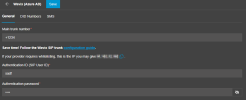
u6 doesn't have that box anymore, it's automatic based on inbound DIDs.

So if you have an inbound DID that points to that user somehow (either direct, a q that the user is a member of, etc) then they can send a SMS.
since this was our in-house production system i just deleted the sip trunk and re-configured it. I noticed on new setup I had to add +1 to our numbers on config. everything works as expected now including inbound/outbound SMS. not exactly sure where the problem was, but either way it's working now.
 
  • Like
Reactions: N_G
since this was our in-house production system i just deleted the sip trunk and re-configured it. I noticed on new setup I had to add +1 to our numbers on config. everything works as expected now including inbound/outbound SMS. not exactly sure where the problem was, but either way it's working now.
I suggest you read this about e.164 and also this about NANP. Frequently, carriers let you configure your trunk to your tastes with strip +1 options and custom prefixes. If you have no reason to do otherwise, sticking to NANP formatting will keep life simple.

 
  • Like
Reactions: N_G and Evolute IT
Question:
We are using a Yealink T57W as a router phone.
In the MC I see now almost every day these messages:
Provisioning file /provisioning/esgf1k4ypu9qulb/firmware/yealink//YL0000000000.rom requested by <ip address of phone> could not be generated
Provisioning file /provisioning/esgf1k4ypu9qulb/firmware/yealink//T57W.rom requested by <ip address of phone> could not be generated

Any idea what is going on here? Phone is on FMW 96.86.0.74 which is the required version of a router phone.
 
I might not understand this feature correctly - so another question:
Under console restriction I enabled "Allow access from specific IP addresses" However in the MC I still see tons of log in attempts from outside those IP addresses.
example:
User or password is invalid from 103.152.254.160. (User: 1400, password: 12345678)
3CX Phone System Management Console ID: 30037 01/30/2023 10:54:20 AM

so this is not a SIP hacker this is a console hacker according to that message. Should those attempts not be prevented from even launching the MC login page?
 
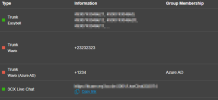
@Bolz IT A group admin can not see system wide trunks. However you can move those items to a group in update 6 from the options tab
We are on the latest build (18.0 Update 6 (Build 905))

Creating a new trunk, I can choose the "Link to", but after editing again, that option is missing.
1675100650884.png

I can see all trunks and all ivrs, queues etc. with all the roles, who has access to the admin part (group admin, group owner, system admin, system owner).
1675100659638.png

The 3rd trunk in my example cannot see a group admin in a different group as "Azure AD", which is expected.
 
I suggest you read this about e.164 and also this about NANP. Frequently, carriers let you configure your trunk to your tastes with strip +1 options and custom prefixes. If you have no reason to do otherwise, sticking to NANP formatting will keep life simple.
the new console in the v18 desktop app required the +1 on flowroute so there was no other way to do it.
 
Question:
We are using a Yealink T57W as a router phone.
In the MC I see now almost every day these messages:
Provisioning file /provisioning/esgf1k4ypu9qulb/firmware/yealink//YL0000000000.rom requested by <ip address of phone> could not be generated
Provisioning file /provisioning/esgf1k4ypu9qulb/firmware/yealink//T57W.rom requested by <ip address of phone> could not be generated

Any idea what is going on here? Phone is on FMW 96.86.0.74 which is the required version of a router phone.

You can ignore those. Please read here: https://www.3cx.com/community/threads/provisioning-errors-in-v18-update-6-rc.118759/
 
  • Like
Reactions: lbfealex
I might not understand this feature correctly - so another question:
Under console restriction I enabled "Allow access from specific IP addresses" However in the MC I still see tons of log in attempts from outside those IP addresses.
example:
User or password is invalid from 103.152.254.160. (User: 1400, password: 12345678)
3CX Phone System Management Console ID: 30037 01/30/2023 10:54:20 AM

so this is not a SIP hacker this is a console hacker according to that message. Should those attempts not be prevented from even launching the MC login page?
Console restrictions have always, in the past, not prevented getting to the login page but prevent logins with any username/password combo.
 
  • Like
Reactions: lbfealex
SweetAction & lbfealex

I think the confusion is that these are events related to login attempts in webclient as users, not in management console.
The Console restrictions feature protects management console access only.
 
  • Like
Reactions: N_G
Dear all,
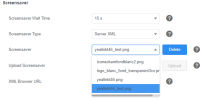
Since U6 (i am not sure before, because it's my first enterprise lic !) i have a weird issue on yealink phones using customized Logo.
Background work normally, but Screensaver does not replace the old ones, it adds them.
As a result, screensaver show all the customized logo uploaded :

1675183160941.png
Any idea ?
 
I found some issues between MC and WC configuration of Call handling, as you can see red errors with MOH, this is this same in IVR's as well. so if I fix the errors, I lose the settings?
 

Attachments

  • FireShot Capture 001 - 3CX Phone System Management Console.png
    FireShot Capture 001 - 3CX Phone System Management Console.png
    120.6 KB · Views: 15
  • FireShot Capture 002 - Admin - 3CX.png
    FireShot Capture 002 - Admin - 3CX.png
    26.9 KB · Views: 15
Please add the following options in the settings for added security.

1. The 'max-age' directive set within the HTTP Strict Transport Security Policy header is 15768000 and thus less than the required 31536000 seconds (1 year)

2. HTTP to HTTPS Redirect - option for forcing all HTTP to redirect to HTTPS

3. Missing HTTP Strict Transport Security Policy on following example url /api/CurrentUser
 
  • Like
Reactions: BigT55439
Dear all,
Since U6 (i am not sure before, because it's my first enterprise lic !) i have a weird issue on yealink phones using customized Logo.
Background work normally, but Screensaver does not replace the old ones, it adds them.
As a result, screensaver show all the customized logo uploaded :

View attachment 33820
Any idea ?
It was the same before, the Yealink uses the background as a screensaver too.

While we do set it to use the logo, the phone does not delete your previous uploads, so they appear.
 
I found some issues between MC and WC configuration of Call handling, as you can see red errors with MOH, this is this same in IVR's as well. so if I fix the errors, I lose the settings?
This has been raised previously, playlists are not supported by the webclient admin at the moment.

For now, any queues that use a playlist must be edited from the management console.

We will be addressing this in the next update.
 
AntiHacking is not working en 18.0 (Build 905)

3 times the same IP
User or password is invalid from 103.105.196.10. (User: 2555, password: password)
3CX Phone System Management Console ID: 30037 01/02/2023 14:46:45

No ip is put in blacklist, no matter how many times you try and the number of attempts you have configured to put it in blacklist.
 
AntiHacking is not working en 18.0 (Build 905)

3 times the same IP
User or password is invalid from 103.105.196.10. (User: 2555, password: password)
3CX Phone System Management Console ID: 30037 01/02/2023 14:46:45

No ip is put in blacklist, no matter how many times you try and the number of attempts you have configured to put it in blacklist.

These events relate to webclient login attempts, each time there is one it gets logged, however blacklist will occur after 10 attempts were made from the same IP and is not something adjustable.

The setting you are referring to I suppose is the one found in "Failed Authentication Protection" section which defaults to 5 and actually protects authentications attempts over SIP, which doesn't apply in this case.
 
It was the same before, the Yealink uses the background as a screensaver too.

While we do set it to use the logo, the phone does not delete your previous uploads, so they appear.
Hello,
Won't pollute the thread but no solution to manually remove the old screensaver manually in the UI of each deskphone?!
 
I just have a little feedback regarding logging of failed login attempts. My concern is that the attempted credentials are logged in plaintext, but who among us hasn't failed a login at times after copying a password with an added space, and the like. I'd ask that this be considered and logging changed.
 

Forum statistics

Threads
111,974
Messages
590,081
Members
164,899
Latest member
mazet