

- Joined
- May 11, 2021
- Messages
- 89
- Reaction score
- 39


Then how are you not able to set the SBC IP?Nope, local Enterprise
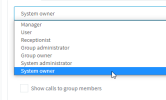
Just put system owners in their own group. Theres no need for them to have system owner role in all groups.Hello. Some brief feedback about U6 (905) from my testing:
1) All extensions now must require an email address, is that correct, even if voicemail-to-email and webclient is disabled. This looks to be a hassle. Maybe there's a workaround?
2) Why does the System Owner extension have to have his/her information displayed to all other extensions? In the Rights tab, we can't un-check Show Presence or Show Calls, and I have several cases where the System Owner role holder would want these disabled (un-checked).
Good call.Just put system owners in their own group. Theres no need for them to have system owner role in all groups.


Also disable "Send email notification on missed call" and it will allow you to save without adding an email.All extensions now must require an email address, is that correct, even if voicemail-to-email and webclient is disabled. This looks to be a hassle. Maybe there's a workaround?


Hello,
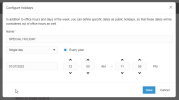
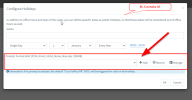
Do you plan on adding a recording for the "Configure holidays" of the Desktop App, Admin section? Similar to the Admin Web Interface?
View attachment 33762
Above, Desktop App UI
Above, Admin Console WEB UI
Thank you
Good point.Hi,
but what i see, here you can onlt set for Groups, not for the hole System.
I have set a lot of holidays for 2023, but on the Webclient-Admin i don't see them.
Bye
Timm



u6 doesn't have that box anymore, it's automatic based on inbound DIDs.I noticed this morning on our NFR key that SMS outbound has stopped flowing. when i go to the console and general tab of users, the enable SMS box is missing from the bottom of the general tab.
View attachment 33769
any idea how we can get that back? inbound SMS works just fine. Just can't respond to anyone.
Hi @Nick Galea , as @timmbo said good to know we will have to be explicit for each group.@timmbo - Group holidays are only valid for calls routed to the group. From there you can then forward to IVR or whatever. Group holidays also apply to the group members for available away etc.
If you setup a new system we set the default group holidays and the old global holidays are simply not used at all.
Current systems will continue to use global holidays until you forward calls to a group. new systems dont have global holidays and use the holidays of the default group.
Hi Nick.@MarkNAS Its about where you route calls. If you do not route calls to a group then global holidays continue in effect and if you route calls to a group then those holidays configured will take effect.
new installs will route calls to the Default Group. So Default Group hours take effect
Old installs stay as they are after the update they keep routing as they do now until you route calls to a group and configure holidays and times there.


Founded in 2005, when VoIP was an emerging technology, 3CX has gone on to establish itself as a global leader in business communications.


