Update 7 Hotfix

Pierre_3CX

Staff member
3CX Support
Joined
Aug 1, 2013
Messages
782
Reaction score
414

Syslog Logging & ASP.NET /Kestrel CVE-2025-55315.​

We’ve released a Hotfix Build 20.0.7.1060 for Update 7 that addresses a syslog logging issue and includes the latest Microsoft ASP.NET Core runtime patches.
  • Syslog Logging Bug Fix - Resolves an issue where sip-related messages about SIP Registrations were being repor...
 
Last edited by a moderator:
I am receiving Error - Requested update not found when I try to apply update
 
I am receiving Error - Requested update not found when I try to apply update
Is there anything in your network that maybe is preventing the update from being fetched? Did you try more than once with some time in-between?
 
Hello, as a result of this update, call capture using the BLF key is working slower.
 
Hello, as a result of this update, call capture using the BLF key is working slower.
Hi, can you elaborate a bit? What type of system is it, what action sequence you are performing - including devices involved, and what difference you are noticing.
 
Is there anything in your network that maybe is preventing the update from being fetched? Did you try more than once with some time in-between?
Nothing changed, today it worked. Thank you.
 
  • Like
Reactions: KyriacosS_3CX
Hello, it seems to be a problem with the Backlight Timeout and Screensaver Timeout on the Yealink. Sorry for the inconvenience.
 
Am I correct in assuming that all versions prior to u7 Hotfix 1060 are affected?

Edit:
The answer to this question determines whether we need to work a night shift or we can stick to the planned update schedule.
 
Last edited:
Am I correct in assuming that all versions prior to u7 Hotfix 1060 are affected?

Edit:
The answer to this question determines whether we need to work a night shift or we can stick to the planned update schedule.
I haven't seen this issue on machines running update 6, only update 7 before the hotfix.
 
  • Like
Reactions: KyriacosS_3CX
All of our instances seem to have lost their outbound rule called ID setting after this update. The "Outbound caller ID" is blank on all rules. The emergency settings were not affected. The trunk options default outbound caller id is fine as well.

We noticed this because when a call handling rule forwarded calls to an external number the call was failing because the provider was rejecting the call.... 3CX was sending the caller's caller id as the outbound caller id since there was none defined at the "Outbound Rules" level .... (not sure why it ignored the trunk's setting). Once we set the outbound caller id field within the "outbound rules", everything started to work again.

We decided to check all of our other instances and they are all missing.

All of our instances are using AWS hosting, Twilio as a VoIP trunk and are fully updated and this issue occurred after this latest update.
 
All of our instances seem to have lost their outbound rule called ID setting after this update. The "Outbound caller ID" is blank on all rules. The emergency settings were not affected. The trunk options default outbound caller id is fine as well.

We noticed this because when a call handling rule forwarded calls to an external number the call was failing because the provider was rejecting the call.... 3CX was sending the caller's caller id as the outbound caller id since there was none defined at the "Outbound Rules" level .... (not sure why it ignored the trunk's setting). Once we set the outbound caller id field within the "outbound rules", everything started to work again.

We decided to check all of our other instances and they are all missing.

All of our instances are using AWS hosting, Twilio as a VoIP trunk and are fully updated and this issue occurred after this latest update.
Update 7 Final or Update 7 Hotfix?
 
Update 7 Final or Update 7 Hotfix?
I believe it was the hotfix but I can't know for sure. The hotfix was applied over the weekend and we started to get errors the next day.
 
I believe it was the hotfix but I can't know for sure. The hotfix was applied over the weekend and we started to get errors the next day.
I've just checked a couple of instances and our outbound caller ID field in the Outbound rules were not changed/deleted and appear as they did pre-update.
There may be some other factor that caused this for you. Just wanted to chime in, in case anyone else saw this post and panicked like I did.
 
  • Like
Reactions: KyriacosS_3CX
I believe it was the hotfix but I can't know for sure. The hotfix was applied over the weekend and we started to get errors the next day.
Could you check Audit logs, if there is anything relevant reported?
A lot of systems have this update and we are not getting similar reports. Also to confirm, this was across all your systems?
 
I've just checked a couple of instances and our outbound caller ID field in the Outbound rules were not changed/deleted and appear as they did pre-update.
There may be some other factor that caused this for you. Just wanted to chime in, in case anyone else saw this post and panicked like I did.

You are correct... the caller id settings were not remove... I found a few and it seems like other system were left blank on purpose

Could you check Audit logs, if there is anything relevant reported?
A lot of systems have this update and we are not getting similar reports. Also to confirm, this was across all your systems?

BUT... the way outbound caller id is handled for call being sent to external numbers changed.

We have a few systems that send callers to "after hours" external numbers. All of these stopped working. The caller id that is sent to the SIP trunk is that of the original caller and it did not use the trunk's default caller id setting. Once we put the outbound caller id in the outbound rules, the forward to external numbers started working again.
 
Could you check Audit logs, if there is anything relevant reported?
A lot of systems have this update and we are not getting similar reports. Also to confirm, this was across all your systems?

I am going to get some screenshots and upload them to be more clear on what happened. Give me 5 minutes.
 
  • Like
Reactions: KyriacosS_3CX
And let us know what SIP Trunk is being used + if it's a modified template.
 
Ok, first, sorry for the confusion.... early Monday morning with a full inbox.

The issue is that call were failing when it was forward to an outside number via a ring group. The SIP trunk provider (Twilio) returned an error saying it was not allowed. It was not allowed because 3CX sent the caller id of the caller (in my example has an area code of 917) instead of using the default outbound caller id specified in the Trunk settings. The fix was to define the outbound caller id on the "Outbound Rule". Then the calls started working again. This error first started happening after applying the new hotfix. Previously, there was no outbound caller id defined in the "outbound rules". I was wrong about that previously because I thought my team always sets that but they told me otherwise.

Below is the error we would see in the 3cx call logs. Notice the "Not allowed" error.

01-3cx-log.jpg


Below is the log of the call in Twilio. Notice "Failed" and the (917) area code as the source and (516) was the destination. The source number was that of the caller when it should have been the default caller id in the trunk settings.

02-Twilio-log1.jpg

When I view the details on the error, it said: "Invalid Caller ID".
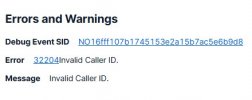
03-twilio-log2.jpg


Here is the ring group setting and forward to external number:
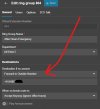
04-3cx-group-forward.jpg


Again, the fix was to copy the default caller id number defined in the trunk settings and enter it on the outbound rules:
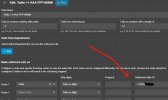
05-outboundrule.jpg

Once we did this, everything starting working again.


Our trunk sip provider is Twilio. I do believe we modify the trunk template to set the inbound caller id because those fields were removed in v20 when they used to be available in v18. I will find this and send an update with those details.

Thank you
 
We change one line in the default Twilio trunk template:

From (original):
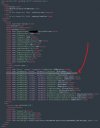
<field name="ParameterIn" custom="" parameter="FromUserPart">$CallerName</field>

To (our change):
<field name="ParameterIn" custom="" parameter="FromDisplayName">$CallerName</field>


We change "FromUserPart" to "FromDisplayName". This is required to get inbound caller id name to show up correct from Twilio. This used to be a parameter that we could edit in v18 from the admin console but it was removed in v20.

06-twilio-template.jpg
 

Forum statistics

Threads
111,990
Messages
590,165
Members
164,929
Latest member
Cloudstar