Update 7A Alpha - Focus on Password Security and More

N_G

Founder
Joined
Jun 6, 2006
Messages
4,857
Reaction score
9,291

First steps towards 7-step action plan \'EFTA\' underway.​

As promised in our sneak peek Update 7A - Focus on Security, we’ve released Update 7A - Alpha today. It remains all about Security. Read on to learn more about the features added, the 5 key points to consider - as well as the action you need to take! And finally, if yo...
Continue reading the Original Blog Post.
 
Last edited by a moderator:
One thing I didn't understand how can I know my password now as an end user?
 
One thing I didn't understand how can I know my password now as an end user?


1682433862933.png

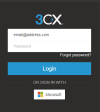
If you dont know your password you can use the reset password option, from the webclient login page.


1682433886225.png
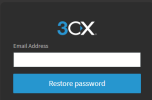
Then enter you email and have a reset passowrd link sent to the email address.
 
Where does the user get the provisionning file for the legacy windows app and to provision the Android app when the QRcode scanning doesn't work (which happens on and off with Android phones) ?
 
One thing I didn't understand how can I know my password now as an end user?
@soli thanks for the question. Do you refer to an existing end user or a new end user? To recap from the blog:
For existing end users login with your current password unless you've forgotten it. In this case, follow the reset password option as shown by @Charles_3CX . For new users, we’ve updated the Welcome Email to support "Set/Reset Password".
I hope it helps!
One thing I didn't understand how can I know my password now as an end user?
 
@Gilles (Transacom) if you open PWA WebClient and go to Apps page now and select Windows App you may download now the configuration file. Re-Android we need more information it should not behave like that especially we recently updated the QR Scanner so this should not be the case. If so open in the android thread.
 
If in this Alpha the Desktop App is likely "turn off", on the final version it will be renable ?

Thank you.
 
Hi 2all!
Well, but we have another strategy.
Only administrator generates password, because end users uses simple (like Aaqwerty1) passwords.
So.. before update we could send QR by internal mail, and preconfigure end user phone.. and now we have option that users changed stronger passwords to low...
Any suggestions to over 600 phones??
Thank you!
 
  • Like
Reactions: AlecM and timmbo
Hi 2all!
Well, but we have another strategy.
Only administrator generates password, because end users uses simple (like Aaqwerty1) passwords.
So.. before update we could send QR by internal mail, and preconfigure end user phone.. and now we have option that users changed stronger passwords to low...
Any suggestions to over 600 phones??
Thank you!
Have to agree, this makes me nervous to continue business with 3CX as we’d be relying on users setting strong passwords. Which we know they wouldn’t.
Also a site of over 400 extensions, so not an easy solution. Hopefully a better idea is thought of in the near future.
 
  • Like
Reactions: AlecM
Well the new version hashes passwords and does not send any admin set passwords by email because this is not considered secure. Every system allows a user to set the password - of course we enforce a certain complexity.

This is independent of the sip user id and password for the IP phones. Those remain admin controlled.

But we always recommend using SSO with Google or Microsoft and enforcing two factor authentication. Soon you will be able to disable the internal authentication if you wish and rely solely on SSO from Google or Microsoft.
 
Last edited:
Well the new version hashes passwords and does not send any admin set passwords by email because this is not considered secure. Every system allows a user to set the password - of course we enforce a certain complexity.

This is independent of the sip user id and password for the IP phones. Those remain admin controlled.

But we always recommend using SSO with Google or Microsoft and enforcing two factor authentication. Soon you will be able to disable the internal authentication if you wish and rely solely on SSO from Google or Microsoft.
So.. Ok, SSO is a alternative for what??, too many companies (like us) that have Active Directory, Vaults, OpenID systems (like Atlassian Crowd and etc) - not in Azure... SSO from Microsoft that you mean it's not like AD integration or auth...
3CX - is a corporate system for business... administrator should give to end user a "ready-to-go-solution" with one button...
Now you fix one security issue and give to end-user a chance to get a new problems to admin...

You could make a switch to send QR and give the right to decide to secutity admin of company, or URL to get phone app provision quickly... It's only my opinion, thank you.
 
So.. Ok, SSO is a alternative for what??, too many companies (like us) that have Active Directory, Vaults, OpenID systems (like Atlassian Crowd and etc) - not in Azure... SSO from Microsoft that you mean it's not like AD integration or auth...
3CX - is a corporate system for business... administrator should give to end user a "ready-to-go-solution" with one button...
Now you fix one security issue and give to end-user a chance to get a new problems to admin...

You could make a switch to send QR and give the right to decide to secutity admin of company, or URL to get phone app provision quickly... It's only my opinion, thank you.
I’d also like to keep it simple, MSI install of the client is perfect, the drag and drop Config file was simple, asking users to do multiple steps is difficult.

SSO is maybe an option in future for us.
I’d love to see the classic desktop app updated & the current Config file method adapted as best as can be to be secure.
 
  • Like
Reactions: AlecM
I’d also like to keep it simple, MSI install of the client is perfect, the drag and drop Config file was simple, asking users to do multiple steps is difficult.

SSO is maybe an option in future for us.
I’d love to see the classic desktop app updated & the current Config file method adapted as best as can be to be secure.
New way is "MSI free".. because Electron is eol... i'm also need msi, because i have GPO...
QR was a simple way to provision Android and iOS phone whithout telling any passwords to end-user, and now we have a lot of tickets like "let me make phone calls from my phone" in a stop list.. as workaround, we are need copy-paste this QR from Management Console... - this is reality.
end-point buisnes user must to read welcome message, go to reset pwd, generate strong password and remember that for future :)), find a qr... and that's it all without tech support - mission impossible
 
New way is "MSI free".. because Electron is eol... i'm also need msi, because i have GPO...
QR was a simple way to provision Android and iOS phone whithout telling any passwords to end-user, and now we have a lot of tickets like "let me make phone calls from my phone" in a stop list.. as workaround, we are need copy-paste this QR from Management Console... - this is reality.
end-point buisnes user must to read welcome message, go to reset pwd, generate strong password and remember that for future :)), find a qr... and that's it all without tech support - mission impossible
Pleased I’m not alone in seeing the flaws in that plan. I believe nick did say a new version of the old app would be in the works which would be my preferred option.
Users seem to prefer that version, notifications work better, headset integration with Jabra headsets works spot on but with the newer versions never seemed very good etc.
just need to keep a simple way for users to provision it
 
  • Like
Reactions: AlecM
You can use the MSI with a config file, but the file must be downloaded from the apps page in the webclient rather than via email.
 
We are working on a new window softphone which will take a URL.... For now you must download config file from client
 
Is there any known issue with this release where there is a blank password in either the welcome email, or the user resetting their password via the console? I am coming up blank

I note from the blogpost:
"We’ve updated the Welcome Emails to support "Set/Reset Password". If you’re using a custom email template, then you need to adjust it to include the new e-mail variable."

I dont have custom on a site we just took over, but happy to figure out how to reset to the expected new standard template...

In the template I still see this:
<p style="margin-left: 50px; line-height: 2; margin-bottom: 4px;"> - Your password is <strong>%%SERVICES_ACCESS_PASSWORD%%</strong></p>
 
Last edited:
We are working on a new window softphone which will take a URL.... For now you must download config file from client
I think for now we will hold off the update & stick with the current welcome emails with the attachment.

Hopefully the new app isn’t too far in the future, MSI type install is a must for large companies though - If this is something that can be kept in mind. Users having to “install” the PWA is difficult to explain to many users.

Hopefully we get to a point that’s as easy to setup as the v16 App as the majority of our users cope with the setup of this with no issues.
 
  • Like
Reactions: AlecM
Is there any known issue with this release where there is a blank password in either the welcome email, or the user resetting their password via the console? I am coming up blank

I note from the blogpost:
"We’ve updated the Welcome Emails to support "Set/Reset Password". If you’re using a custom email template, then you need to adjust it to include the new e-mail variable."

I dont have custom on a site we just took over, but happy to figure out how to reset to the expected new standard template...

In the template I still see this:
<p style="margin-left: 50px; line-height: 2; margin-bottom: 4px;"> - Your password is <strong>%%SERVICES_ACCESS_PASSWORD%%</strong></p>
Hi, if you have this in the template "%%SERVICES_ACCESS_PASSWORD%%" it means you are using custom email templates. You have 2 options;

Option1 : Update current one.
Option2: Go to Settings > Custom Parameters > Search for %%SERVICES_ACCESS_PASSWORD%% and delete the whole parameter (MAILTEMPLATE_EXTWELCOME_CUSTOM). It will take default 3CX Email template.
 
Last edited:
  • Like
Reactions: David Liddle

Forum statistics

Threads
111,993
Messages
590,178
Members
164,933
Latest member
bunthoeun.may