





First steps towards 7-step action plan 'EFTA' underway.
As promised in our sneak peek Update 7A - Focus on Security, we’ve released Update 7A - Alpha today. It remains all about Security. Read on to learn more about the features added, the 5 key points to consider - as well as the action you need to take! And finally, if you’re using the currently released Desktop App for Update 7 there are some known limitations. Check them out!
Hashing Passwords
Recognising the need to address this good practice in Update 7A, and as part of our ongoing commitment to improve and enhance our product security features, in this update all web passwords are hashed in the system. This means a conversion has been done by the System Service that gets all current passwords and hashes them. From a practical point of view Users can still login with their current password. However, we do recommend changing the password regularly.
As we outlined in our previous blog, at the moment the hashing of passwords applies to the Web Client login only. For backward compatibility reasons, we won’t hash SIP auth ID and password, SIP trunk and gateway passwords or the tunnel passwords. If hacked these credentials can only be used to get calling access to the PBX. They can’t be elevated to login to the PBX. However, in future builds we will hash these passwords also.
Removal of Password and Config File from Welcome Email
Previously, the Welcome Email had the Web Client password - and as mentioned, the config file for the old style configuration of the app. Along with the config file, the Web Client password has also been removed from the Welcome email. This means you need to take some important steps:
- Set your User password before login
- Use the QR code to provision your Android and/or iOS app
Restricting Web Client Web Admin Access by IP
Access by IP for the Management Console could already be limited. Now, however, you can also do this for System Admins that have access to the Admin section in the Web Client.
BLF View Added in the Dialer of the Web Client & PWA
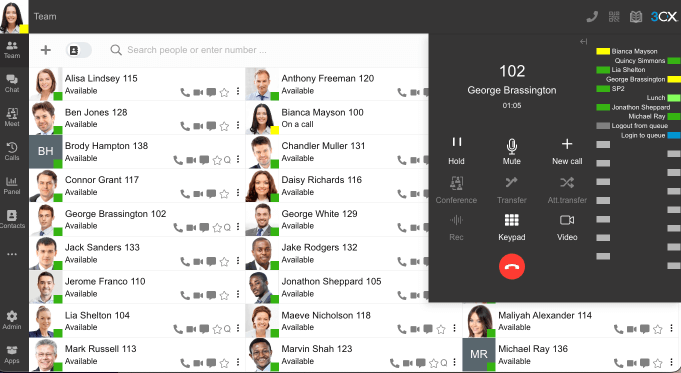
Though not a security feature per se, the lack of the BLF feature in the PWA was cited as a key reason not to start using it. To address this, we’ve added the BLF view in the dialer of the Web Client and PWA. As we’ve discussed, the PWA is easier to maintain and secure, so it still comes highly recommended.
From a practical point of view, this feature mimics a deskphone showing BLFs similar to a deskphone. Not only is the status of a user shown, it allows for easy, one-click transfers. If you’re an Admin you can configure BLFs for all users by going to “Admin > Users > Add / Edit User” and then the BLF tab. If you’re a User, configure your own BLFs by going to “Settings > BLF”.
Take Note! 5 Important Points
We’ve got 5 important things for you to note and take action upon. Read carefully for details.
- Before updating your PBX make sure you take a backup. Once the update is complete, all passwords will be hashed and will no longer be accessible. Users will be able to login with their current password, but as stated, we recommend changing it - regularly!
- We’ve updated the Welcome Emails to support "Set/Reset Password". If you’re using a custom email template, then you need to adjust it to include the new e-mail variable.
- We’ve removed the option to "Resend Credentials" from the Web Client Settings. You can now select "Forgot Password" from the login screen.
- Due to password hashing we can no longer know whether a password is secure or not. This means the old ‘weak password’ warning has been removed from the product.
- All our builds were reviewed against VirusTotal. As of yesterday 24th of April 2023 there are zero (0) detections.
Desktop Electron App Not Updated in Build Number 18.12.425
You will recall that the Update 7 Windows Electron App was checked by our advisors Mandiant who found no evidence of compromise. In this release, however, the Desktop Electron App will not be pushed. This means that if you’re using the currently released Desktop App for Update 7 - it will continue to work but with limitations. Here’s a recap on what you can expect:
- Even if enabled, the Console Restriction /Admin will not be accessible
- You will be unable to download provisioning files for the Windows App in Apps page
- The ‘Change Password’ function will not work even if enabled globally
Planned Fixes Update 7A BETA
- Due to some updates related to our internal packages, Web Client in Safari will not work.
- A Bug was found while reviewing the 3CX PWA, where according to the browser you use, the Chrome or Edge logo under the Avatar will not be shown for the first time if a new User logs in. This means the User cannot install the PWA.
How to Get Update 7A Alpha
Users can access the update as follows:
- Windows and Linux Debian 10 users
- Log into your Management Console
- Update to "New 18.0 Update 7A Alpha Security"
StartUP users, current NFRs, Trials and Commercial instances running on 3CX Hosted will be updated (outside of configured office hours) when U7A Final is released.
View the complete changelog here.
Stay Informed
Hit the follow button on Twitter and LinkedIn for blog updates on the Update 7A Beta/Final release up next.









 Copyright © 2026