Update 7A Alpha - Focus on Password Security and More

Hi, if you have this in the template "%%SERVICES_ACCESS_PASSWORD%%" it means you are using custom email templates. You have 2 options;

Option1 : Update current one.
Option2: Go to Settings > Custom Parameters > Search for %%SERVICES_ACCESS_PASSWORD%% and delete the whole parameter (MAILTEMPLATE_EXTWELCOME_CUSTOM). It will take default 3CX Email template.
This worked, thank you.
I am going to review some other sites, because this was an inherited one, and we generally never edit the system.

Sidenote: Please get rid of that "in office" "out of office" separation :) (As the default)
 
This worked, thank you.
I am going to review some other sites, because this was an inherited one, and we generally never edit the system.

Sidenote: Please get rid of that "in office" "out of office" separation :) (As the default)
You see "in office" "out of office" because your host is not SPLIT DNS.
 
Hi,

I see a small flaw with that new password reset system. If a user has his single e-mail present in multiple extensions (for whatever reasons!), the user won't be able to reset his password via "forgot password" on webclient login page - he won't receive an e-mail at all.

Of course I may circumvent this by resending the welcome e-mail from admin interface, so the user can follow the reset password link from there.

Would it be possible and meaningful to ask the e-mail AND extension number in the password forgotten screen?
 
You see "in office" "out of office" because your host is not SPLIT DNS.
I think its because we took over a site and restored it to the cloud. First time i have ever seen it. Any way to change it?

Nick
 
I think its because we took over a site and restored it to the cloud. First time i have ever seen it. Any way to change it?

Nick
You can use custom template as workaround. Copy original template code and edit block with variable
edit to needed var
Code:
%%RECOVERY_EXTERNAL_LINK%%
%%RECOVERY_LOCAL_LINK%%
 
  • Like
Reactions: Nick W
  • Like
Reactions: accentlogic and jed
the option to give the customer to enter his own password is ok but the problem is that it's not configured to be complex
for example, customers can insert the password like Aa12345678
This issue must be addressed
 
This 100%

While it would take development time to test the code and implement it securely, it certainly wouldn’t be insurmountable.

@Nick Galea @pj3cx please add password complexity checking and enforcement to your product roadmap for the next release.

I understand what you are saying but I suggest being reasonable in our demands.
In the end, he has a minimum of awareness-raising to do with customers.
If the user, after all awareness, persists in using simple passwords... it is up to the company managers to intervene...

• Already 3CX block iP address if 3 wrong attempts are made..
• Mix with the Hash of passwords,
• and the ability to restrict WebClient access to chosen IP addresses…

Do you not believe that the user has a share of responsibility?

Not to mention that popular passwords managers softwares (LastPass, Keeper, etc.) helps identify weak passwords.

Personally, at this stage, if the functionality is added by 3CX, it would be an added value… not an obligation.

Cordially,
 
  • Like
Reactions: Evolute IT
Sorry if I am getting confused but as expected the new welcome email doesn't contain a password.
As far as I can tell the only way to set a password is click on "Forgot Password?".
However when I do that and enter my email address etc. I get an email that says "login using xyz@abc and password"
But I don't know the password and I can't create a new one so go into an endless loop until I explode.
Please tell me what I am doing wrong,
Thanks
 
Sorry if I am getting confused but as expected the new welcome email doesn't contain a password.
As far as I can tell the only way to set a password is click on "Forgot Password?".
However when I do that and enter my email address etc. I get an email that says "login using xyz@abc and password"
But I don't know the password and I can't create a new one so go into an endless loop until I explode.
Please tell me what I am doing wrong,
Thanks

Hi,

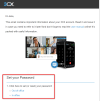
The welcome email does not contain a password, but it now contains this.
Have you seen this part?

1683096256607.png

Once you click on it, it will ask you to create a new password, and as soon as you successfully complete the above, it will bring you back to the login screen where you can login.


If you had custom templates and are not seeing the above, delete your custom template so you can get the default back:
https://www.3cx.com/community/threa...password-security-and-more.120373/post-562034
 
Hi JohnS,

Thanks for the fast reply. Yes, we were using a custom welcome email. I deleted it as you suggested and can now see where to set the new password.

Thanks very much for your help.
 
Hi, if you have this in the template "%%SERVICES_ACCESS_PASSWORD%%" it means you are using custom email templates. You have 2 options;

Option1 : Update current one.
Option2: Go to Settings > Custom Parameters > Search for %%SERVICES_ACCESS_PASSWORD%% and delete the whole parameter (MAILTEMPLATE_EXTWELCOME_CUSTOM). It will take default 3CX Email template.
I'm glad that I took notice of this entry. Though I don't think that I have ever edited the template in use on our system (still Update 7), it was nevertheless sending out a custom message with a few significant differences. Deleting it did exactly what you said it would, and now my system is sending the messages I expect to see—the ones described in the handbook. Thank you!
 
I am very glad that you are moving towards reliability and security.
When will it be possible to synchronize not all users, but only groups of users between M365 and 3CX?
This feature will reduce user creation time, and provide better security.
It will also be very cool if you can apply templates to groups, for example, synchronize the Sales group with 3CX and apply a template in which a certain 3CX group is configured, where the employee immediately gets.
Call recording is enabled for them and they get into the Sales call queue.
And the employee receives a welcome email with one button, log in via Microsoft, instead of a password.
 
  • Like
Reactions: accentlogic
I am very glad that you are moving towards reliability and security.
When will it be possible to synchronize not all users, but only groups of users between M365 and 3CX?
This feature will reduce user creation time, and provide better security.
It will also be very cool if you can apply templates to groups, for example, synchronize the Sales group with 3CX and apply a template in which a certain 3CX group is configured, where the employee immediately gets.
Call recording is enabled for them and they get into the Sales call queue.
And the employee receives a welcome email with one button, log in via Microsoft, instead of a password.
Vote here: https://www.3cx.com/community/threads/office-365-sync-sync-members-of-group.79775/
 
Hi,
"Take Note! 5 Important Points"
"Due to password hashing we can no longer know whether a password is secure or not. This means the old ‘weak password’ warning has been removed from the product."
I do not understand how the storage of passwords and the functionality to show "weak password" are connected
When updating and transferring passwords to hash, you could additionally save this information.

You can add a separate column to the database to store the password status. We don't need to know the password itself; it's enough to store the password weak status and its hash.
For example, Google tells the user that his password is weak. The domain administrator can then also see in the admin panel that the user's password is weak.
 

Attachments

  • Screenshot at 2023-05-18 11-28-10.png
    Screenshot at 2023-05-18 11-28-10.png
    62.6 KB · Views: 8
Last edited:
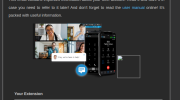
As per the blogpost, QR was removed from emails.

You can only access it in the webclient after logging in.

It is also available in the Management Console.
 
Thanks JohnS
Allthough it seems i can't find that info, only password and provisioning config are removed as i see
 

Access by IP for the Management Console could already be limited. Now, however, you can also do this for System Admins that have access to the Admin section in the Web Client.

Can someone shed some light on this ?
is it same as is Security->Console Restrictions

Where one can restrict Web Client admin
 

Forum statistics

Threads
111,994
Messages
590,183
Members
164,934
Latest member
bunthoeun.may