Update failing from 16.0.6.655 to 16.0.7.1078

Status
Not open for further replies.

ASC Admin

Free User
Joined
Mar 21, 2019
Messages
30
Reaction score
4
We're trying to run the updates from a 3CX installation that has been installed to the Azure cloud through the PBX Express.

Here is our output log. Is there anything we can try to do to fix this issue short of trying to restore from a backup?

Ign:1 http://debian-archive.trafficmanager.net/debian stretch InRelease
Hit:2 http://debian-archive.trafficmanager.net/debian-security stretch/updates InRelease
Hit:3 http://debian-archive.trafficmanager.net/debian stretch-updates InRelease
Hit:4 http://debian-archive.trafficmanager.net/debian stretch-backports InRelease
Hit:5 http://downloads-global.3cx.com/downloads/debian stretch-testing InRelease
Hit:6 http://downloads-global.3cx.com/downloads/debian stretch InRelease
Hit:7 http://debian-archive.trafficmanager.net/debian stretch Release
Reading package lists...
Building dependency tree...
Reading state information...
Some packages could not be installed. This may mean that you have
requested an impossible situation or if you are using the unstable
distribution that some required packages have not yet been created
or been moved out of Incoming.
The following information may help to resolve the situation:

The following packages have unmet dependencies:
3cxpbx : Depends: libfreeimage3 but it is not going to be installed
E: Unable to correct problems, you have held broken packages.
Rollback to 16.0.6.655...
Reading package lists...
Building dependency tree...
Reading state information...
3cxpbx is already the newest version (16.0.6.655).
The following package was automatically installed and is no longer required:
libcurl3
Use 'sudo apt autoremove' to remove it.
0 upgraded, 0 newly installed, 0 to remove and 133 not upgraded.
 
Do you have any other software running on the system beside 3CX? Meaning: have you manually installed anything?
 
Nope. We went with the PBX Express a few years ago and have done nothing else with the Virtual Machine it created besides run 3cx.
 
Easiest thing to do is to take a backup, copy it off the machine and redeploy. That will give you a fresh start.
 
That might be what we have to end up doing. I'm a bit nervous about it.
Will there be a problem using the PBX Express to restore our backup if our backup is from this older 16.0.6.version?
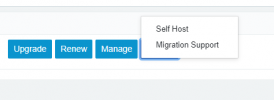
Also, it looks like the PBX Express has changed a bit. It looks like that functionality can be found by logging into customer.3cx.com, and clicking 'More'-->'Self Host' from the subscriptions panel. Am I on the right track?
 

Attachments

  • Screenshot 2021-07-03 203522.png
    Screenshot 2021-07-03 203522.png
    5.8 KB · Views: 1
That is correct. Self Host is for deploying to your own cloud service (GCP, Azure, AWS, DO, etc) vs the 3CX hosting. Just make sure the current instance is shutdown (don't need to delete it just yet) so you don't have two instances running at the same time.
 
@ASC Admin

Taking a backup, redeploying and restoring would indeed be the way to go but do note that you should not use the PBX Express to redeploy. This is because you will not be able to restore an older version backup while the installation of a newer version is already running as you would do when deploying via the PBX Express.

Instead:

• Take a backup, move it off the machine.
• Shutdown the machine (do not delete it just yet)
• Deploy a new instance via the Azure marketplace: https://www.3cx.com/docs/pbx-azure-marketplace/
• Restore the backup during installation.

If all goes well you can then delete the old instance.
 
Oh really?! I'm glad you said so, as re-deploying from the PBX Express was exactly what I was about to do.

So just to clarify, there would be no way to restore my 3cx backups by using the PBX Express if there had been 3CX Updates in the interim?

I know I've used the PBX Express to restore a backup in the past, but that was using a very recent backup on the same version.

That's a bit destessing, as deploying form the Azure marketplace looks to be a bit more involved.

Thank you for your advice though. I'll have to do my research.
 
Alright. We just used the Azure Marketplace to deploy a new Default server.

We're just about to shut down the old one and restore a backup w/ License and FQDN.

Correctly me if I'm wrong, but if this doesn't go according to plan and something is irreparably broken on the new server, we can always shut it down and use the older functioning one, correct? The FQDN Should swing back to the License key on the old one?
 
That's right, worse case scenario if you need to bring the old instance back online you may have to:
  1. After shutting down the new one and powering on the old one
  2. Go to Settings --> Network
  3. Set the Public IP setting to 'Dynamic'
  4. Press OK
  5. Restart all 3CX Services
This is just to make sure that the FQDN switches back to resolving to the IP of the instance you just powered on.

Also, tip for the new Deployment, try to use the same ports as you were using for the current Deployment.
 
Thank you so much. The advice in this thread really helped us out. We ended up deploying a fresh VM using the Azure Marketplace, shutting the original pbx down, and restoring from our backup file.
We were only down for a couple of moments and the restore went off without a hitch for the most part. I'm very pleased.
The only anomaly was that now we need to amend the web management portal with the 5001 port instead of just being able to navigate to https://ourpbx.my3cx.us. Now we must go to https://ourpbx.my3cx.us:5001. Small price to pay.
Also, it looks like those of us who used phone apps needed to delete our old instance and re-add our user accounts from the provisioning QR code. No biggie.
There may have been a step when restoring the backup that I didn't pay too much attention to that gave us the option to use 5001 for the management port instead of using 443, so we'll take note for next time.

Overall, I'm very very pleased with how easy it was to get back up and running. I especially like the fact that we could have potentially restored the older VM if things had gone wrong.

Thank you everyone!
 
  • Like
Reactions: ChrisC_3CX
Glad to hear that everything went smoothly!

I did try and tell you about the ports in my previous reply at the end, but I may have been a bit too late it seems.
Yes, if the ports change, you will need to re-provision the mobile apps and any IP Phones you have as they will have the correct FQDN in their settings, but the wrong port (you could just access the IP Phones web UI, find the provisioning link and just add the 5001 port).

Other than that though, that's it! :)
 
Status
Not open for further replies.

Forum statistics

Threads
111,982
Messages
590,122
Members
164,909
Latest member
Jacob.Ive